
How to Make a Goodbye GTA 5 AI Video (The Sunset Pier Farewell)
Thirteen years are ending this week. GTA 6 launches November 19, 2026, and the internet's farewell to GTA 5 has become its own viral format: the Goodbye GTA 5 AI video — the legendary trio (Michael, Franklin and Trevor) meeting you on a sunset pier, handing over the game and the car keys, and watching you drive off into the GTA 6 era.
It's a passing-of-the-torch scene between two generations of the same legend — and the AI version takes one photo of your face. This guide covers the trend's backstory, three ways to make your own video (ranked by effort), the DIY route for tinkerers, and the casting ideas getting the most shares during launch week.
Note: This is a fan-made trend celebrating the GTA 5 era. It is not affiliated with Rockstar Games or Take-Two Interactive, and contains no game assets or footage.
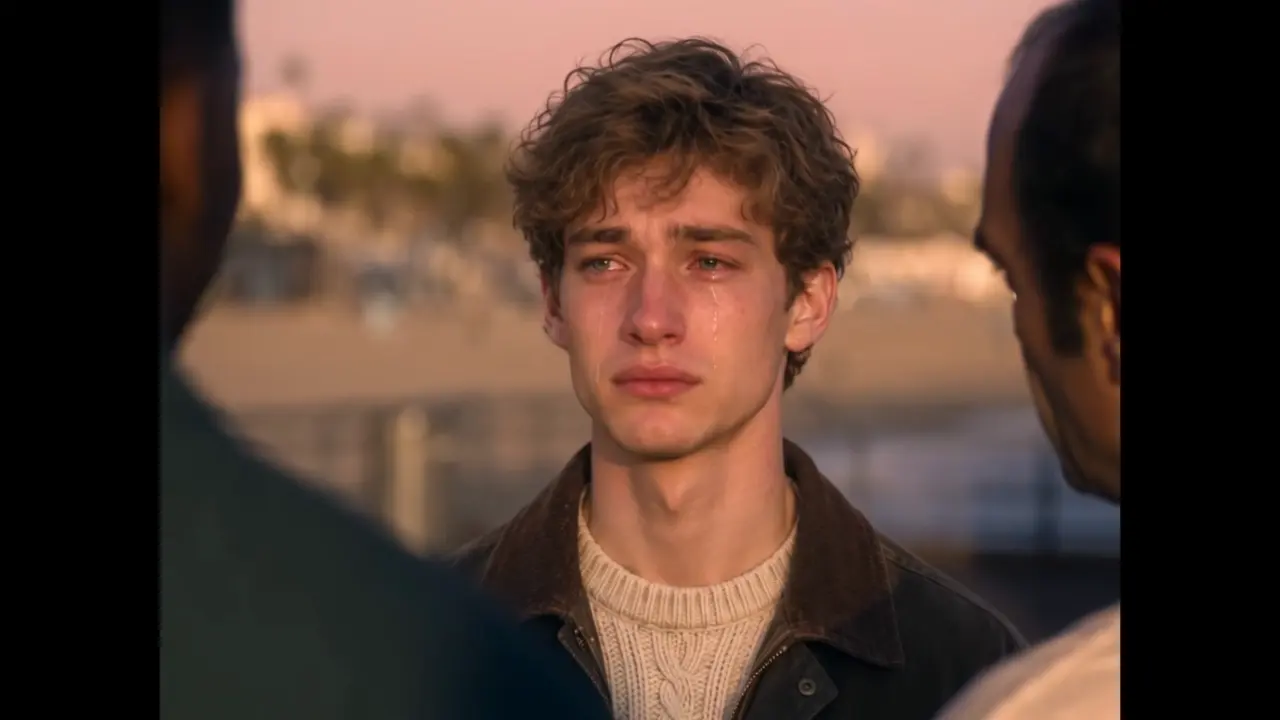
The farewell moment: thirteen years of GTA 5, handed over in one sunset scene.
Where the Trend Comes From
The source material is 13 years deep. GTA 5 launched in 2013, outlived three console generations, and became the best-selling entertainment product of all time — so when Rockstar confirmed GTA 6 for November 19, 2026, the farewell started before the launch did.
The viral format distills that goodbye into one cinematic shot: on a sunset pier, Michael, Franklin and Trevor — the GTA 5 trio — hand you the game and the car keys, and you drive off toward the horizon, into the new era. The AI versions started appearing around November 16 as generators released farewell templates, and launch week turned it into a genre: farewell edits, getaway memes, and tributes from players counting down the final hours.
The scene works because it's a literal passing of the torch — one generation of players handing the keys to the next. Which is why casting matters more than anything else.
Three Ways to Make Your Own Video
Route 1: One-Photo Generator (Fastest)
The Goodbye GTA 5 AI Video Generator has the whole scene pre-built — sunset pier, the trio, the handover, the drive-off.
- Upload one clear, front-facing photo of yourself (JPG/PNG/WebP, up to 10 MB).
- Click generate — the AI casts you as the driver receiving the keys.
- Download the finished cinematic clip and post it.
Effort: ~2 minutes. No prompt writing, no editing, no game footage needed.
Route 2: The DIY Pipeline (Full Control)
The tutorial crowd builds it with a two-tool combo:
- Character art — Nano Banana, ChatGPT or Midjourney, with a prompt like: "ultra-photorealistic live-action character at a sunset pier, cinematic lighting, farewell scene, holding car keys"
- Animation — Kling or a similar video AI to bring the still into motion
Effort: an hour or more, plus color-matching between clips. Worth it only if you want full control over every frame.
Route 3: Don't Make One — Curate Instead
Some of the best-performing farewell posts are just commentary: reaction threads, "13 years of GTA 5" screenshot collections, or duet-style replies to other people's clips.
Effort: near zero. Works if your strength is timing, not editing.
Generator vs DIY: Which Route Is Right for You?
| One-Photo Generator | DIY Pipeline | |
|---|---|---|
| Time | ~2 minutes | 1+ hour |
| Skills needed | One photo | Prompt writing + two AI tools + color matching |
| Consistency | Scene pre-built, one visual style | You match the style across every clip |
| Control | Scene fixed (that's the meme) | Every frame adjustable |
| Best for | Posting during launch week | Portfolio pieces, unusual casts |
For launch week, speed wins: the trend's window is now through about a week after launch, and Route 1 gets you posted inside the window. Route 2 is for after — when the wave has calmed and only the best-executed versions still travel.
Casting Ideas for Launch Week
- The 13-year veteran — for everyone who's had the same session since 2013. The most relatable cast.
- Duo handover — one video for you, one for your co-op partner, posted side by side on launch day.
- The pet inherits the keys — your dog receiving the keys to Los Santos. The comments will not survive it.
- The last ride montage — pair this clip with your favorite GTA 5 screenshots for a complete tribute thread.
- Launch-day caption — "keys received. see you in Vice City." + this video = the definitive launch-day post.
- Complete the handover — after the farewell clip, turn your photo into a GTA 6 style photo for the welcome-to-Vice-City profile picture — farewell and welcome, posted together.
FAQ
What is the Goodbye GTA 5 AI trend?
A launch-week AI video format saying farewell to GTA 5 (2013–2026) as GTA 6 launches: one photo becomes the driver in a sunset-pier scene where the GTA 5 trio — Michael, Franklin and Trevor — hands over the game and the car keys.
When does GTA 6 come out?
November 19, 2026, per Rockstar's official announcement. The farewell trend runs through launch week, typically peaking in the 48 hours around release.
Where did the sunset pier scene come from?
It's a fan-created format, not a scene from any trailer: the GTA 5 trio handing over the keys is an invented "passing of the torch" shot that AI generators turned into a template during launch week.
Is this an official Rockstar Games product?
No — every version of this trend, including the one-photo generator route, is fan-made. Nothing here is affiliated with Rockstar Games or Take-Two Interactive.
What photo works best for the generator?
A clear, front-facing photo with even lighting. The handover is a close-up moment, so face sharpness matters more than the background.
How do I post it for maximum reach?
Post during the launch-week window (now through a week after November 19), add a caption like "keys received — see you in Vice City," and use the launch-day hashtags trending in your region. Then turn your photo into a GTA 6 style photo as the follow-up post: farewell and welcome, back to back.
Post Your Farewell During Launch Week
Thirteen years deserve a proper send-off — and this week, the whole internet is at the pier. Make yours in the Goodbye GTA 5 AI Video Generator, post it on launch day, and welcome the new era.
Uploaded photos and generated videos are automatically deleted after 7 days and are never used for training.