Outstanding Tiny Desk AI Video Generator
Create viral TikTok "Outstanding" Tiny Desk memes in one click! Use the Oimi AI template to upload a photo and swap any face into the classic Funk-Soul band performance video.
How to Make an Outstanding Tiny Desk AI Video (Step-by-Step)
Create your own viral Outstanding Tiny Desk meme in minutes using Oimi AI’s pre-configured canvas template. No complex video editing or manual face-swapping skills required.
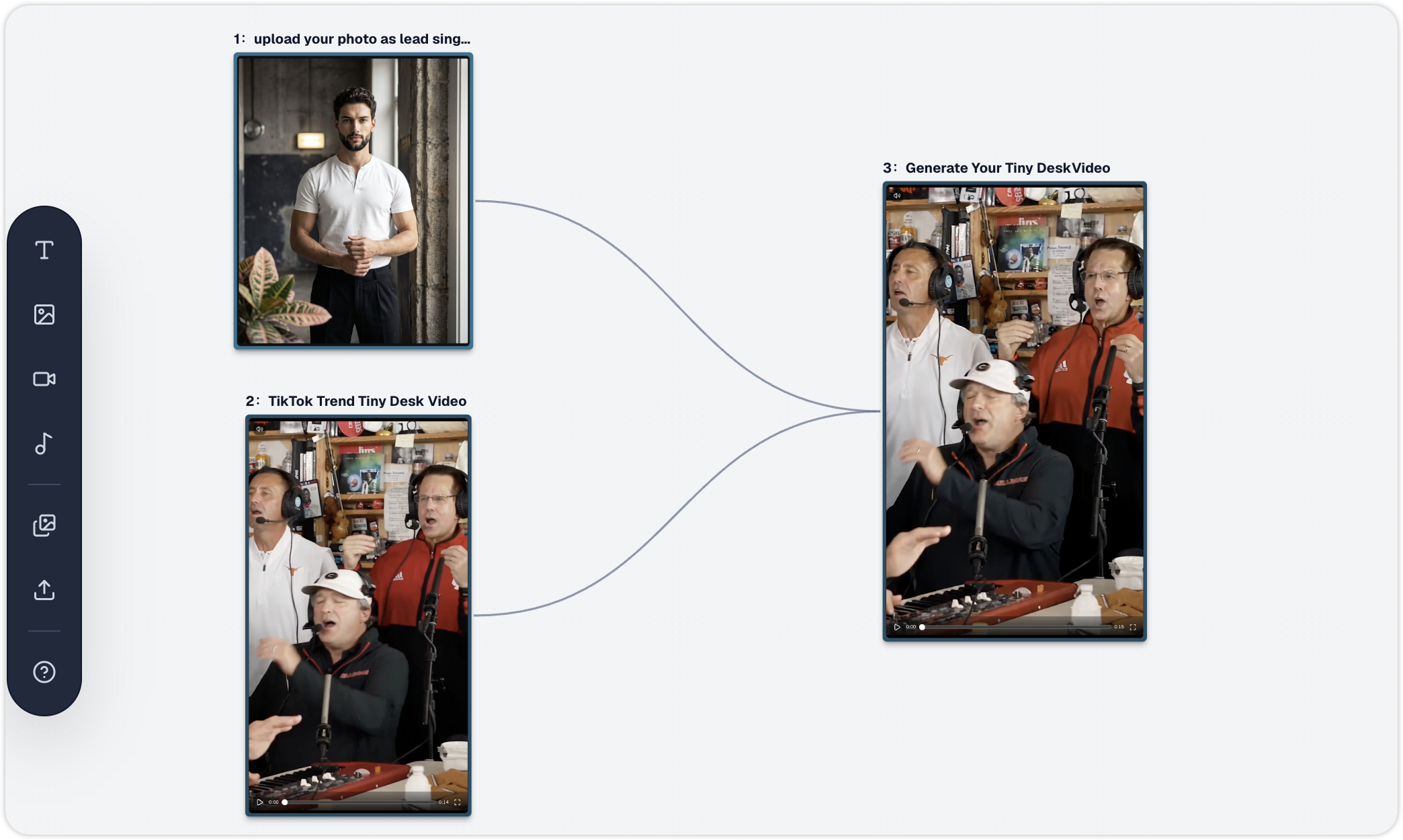
just open this workflow on infinite canvas, and do the next:
-
Step 1: Upload Your Photo as the Lead Singer
Upload a clear, front-facing portrait of yourself, a friend, a sports coach, or your favorite character. High-resolution photos with good lighting and unobstructed facial features deliver the best AI identity preservation. -
Step 2: Check the Reference Trend Video & Prompt
theTikTok Trend Tiny Desk Videocomes pre-loaded with the iconic upbeat funk-soul concert rhythm and camera movement.
In Node3: Generate Your Tiny Desk Video, the AI prompt is already structured by timestamp (0–5sgroup sway,5–11slead singer close-up with a broad smile, and12–15ssaxophone solo). You can keep the default prompt or tweak outfit and band details if needed. -
Step 3: Generate & Download Your 9:16 TikTok Video
Click Generate on Node3(powered by Seedance 2.0 in vertical9:16format). Wait a few moments for the AI to render your 15-second parody performance with synchronized movement and studio lighting, then download and share it directly to TikTok, Instagram Reels, or YouTube Shorts!
Frequently Asked Questions (FAQ)
1. What is the "Outstanding Tiny Desk" meme on TikTok?
The Outstanding Tiny Desk meme (often called the "Outstanding Tiny Desk Set") originated from Charlie Wilson’s 2023 NPR Tiny Desk Concert finale performing The Gap Band's classic hit "Outstanding." In October 2026, TikTok creator @theburnerfromhe11 went viral by using AI to swap that weekend's losing college football coaches into the final seconds of the joyful, funk-soul performance. Because every weekend brings new sports upsets and pop-culture moments, creators use AI to put different people into the band every week.
2. How does the Outstanding Tiny Desk AI template work?
Oimi AI’s template combines reference-video motion learning with portrait identity preservation. By linking your uploaded portrait (Image 1) with the reference concert clip on the canvas, the Seedance 2.0 video model recreates the warm record-room studio vibe, handheld concert camera shake, and joyful swaying rhythm while seamlessly placing your subject into the lead singer closeup (5–11s).
3. What kind of photo works best for the lead singer slot?
For the most realistic lip-sync and facial expressions:
- Use a clear, front-facing photo with even lighting (similar to a portrait or headshot).
- Avoid heavy sunglasses, masks, or extreme side profiles.
- Make sure only one main face is prominent in the image so the AI accurately maps the lead singer’s broad smile and laugh.
4. Can I customize the other band members or the scene?
Yes! While the default template focuses on swapping the lead singer via {{Image 1}} for a quick 1-click experience, you can customize the entire band using multi-image references on the canvas:\
- **Lock Full-Band Identities:** Generate or upload custom reference shots matching each camera angle—for example,
{{Image 1}}for the lead singer (6–11s),{{Image 2}}for the keyboard player and backing vocalists (0–5s), and{{Image 3}}for the saxophonist (12–15s).\ - **Wire & Reference in Node
3:** Connect all three reference images to the video generation node and update the timestamped prompt (e.g.,@Image 1,@Image 2,@Image 3) to lock in specific faces, hairstyles, outfits, and studio lighting across every cut.
For more tutorials, refer to: How to Generate the Outstanding Tiny Desk AI Video: Prompt, Template, and Posting Guide
5. What video aspect ratio and duration does this template output?
The template is pre-set to a vertical 9:16 aspect ratio and a 15-second duration, which is natively optimized for TikTok, Instagram Reels, and YouTube Shorts. You can also adjust the resolution or switch between supported video models directly in the Oimi AI canvas controls before generating.
6. Do I need external video editing software to add the music?
The prompt instructs the AI model to generate upbeat funk-soul performance audio that matches the band's actions. When posting to TikTok or Reels, you can either use the generated audio or mute it and select the official trending "Outstanding" Tiny Desk sound directly inside the TikTok app for maximum algorithm reach.
7. Which workflow should I choose: Simple or Advanced?
This template includes two workflow options on the canvas, designed for both beginners and advanced creators:
- Simple Workflow (Beginner-Friendly): Built for speed and ease of use. Simply upload a single portrait to swap the lead singer and click generate—no prompt editing required.
- Advanced Workflow (Fully Customizable): Designed for pros and power users. It gives you deeper control to connect multiple reference images, customize individual band members (like the saxophonist and backup singers), and fine-tune the timestamped prompts and studio details.