AI GIF Generator | Free Text-to-GIF & Image-to-GIF Online
Generate GIFs with AI from text or photos — native GPT-Image-2.6 generation, not video trimming. Seamless loops, consistent characters, sticker-ready output. Free credits to start.
Create with this template
Adjust the media or text in each step, then click Generate to see the results.
Step 2: Generate GIF
Keep this page open while generating.
What Is an AI GIF Generator?
An AI GIF generator creates animated GIFs from scratch — you type a scene or upload a picture, and the model generates the motion itself. That's the difference from the tools that dominate this space: most "GIF makers" are editors (trim a video, crop it, stamp text on top). A generator invents the animation — characters move, expressions change, scenes loop — from a prompt or a single still image.
This template runs on GPT-Image-2.6, OpenAI's image model with native GIF generation, through two workflows:
- Text to GIF — describe a scene, get a looping animated GIF
- Image to GIF — upload a photo, character, or sticker, and watch it move — with the subject kept consistent frame to frame
No timeline editing, no frame-by-frame work. The motion, the loop, and the caption (if you want one) come out of the prompt.
Two Ways to Make a GIF
Workflow 1: Text to GIF — Describe It, Loop It
Type a scene; the workflow generates an animated GIF designed to loop cleanly. Two prompt styles cover most needs:
The action loop — motion that returns to its starting pose, so the seam disappears:
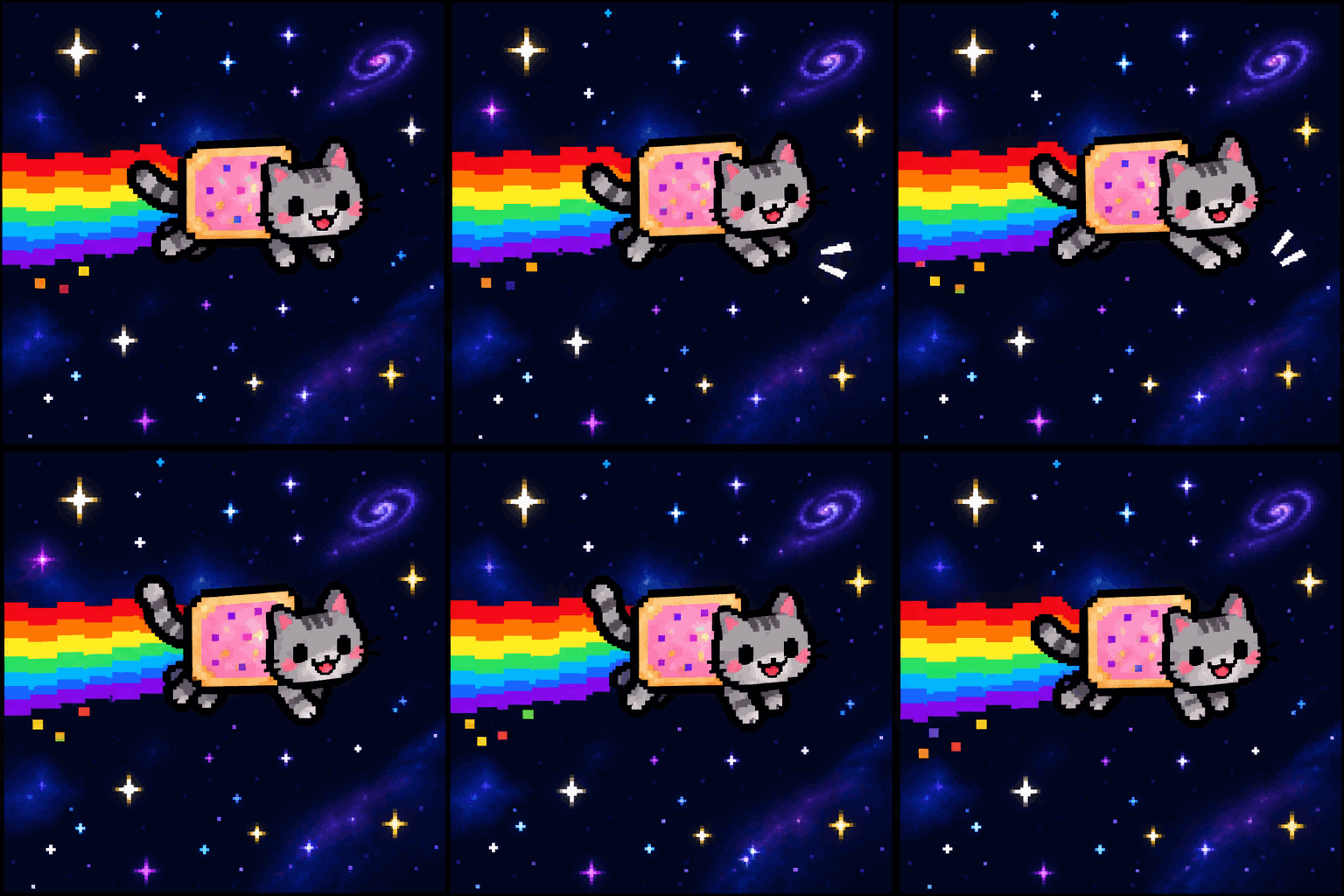
"A tiny pixel-art gray tabby cat with a pink frosted toaster-pastry body flying across a dark starry sky, a long rainbow trail scrolling continuously behind it, twinkling stars, retro arcade colors, playful upbeat motion, seamless loop, 8-bit style."
The ambient loop — the subject stays still while the world moves:
"A cartoon yellow dog in a tan sweater sits calmly at a table holding a coffee mug, cartoon flames flickering and rising around the room in a continuous loop while the dog stays perfectly still, comic-panel style, muted warm palette, seamless ambient loop."
The first is an homage to the most iconic GIF on the internet; the second is the reaction-GIF format that lives in every group chat. Both prompts are prefilled in the template — edit the nouns and keep the structure.
Workflow 2: Image to GIF — Animate What You Upload
Upload a still image and the workflow animates it while keeping your subject recognizably the same — same face, same outfit, same style, frame to frame. Built for exactly the things people want moving:
- Mascots & stickers — upload a transparent-PNG sticker (make one in the GPT-Image-2.6 generator) and it waves, bounces, or raises a toast — an animated sticker ready for chat apps
- Characters & OCs — artists animate their characters without animation software: upload the reference, describe the emotion
- Pets & people — a photo becomes a small looping moment; the subject stays themselves
Example — upload a transparent capybara-barista sticker:
"Keep the character exactly as in the uploaded image — same outfit, colors, and proportions. The capybara waves one paw and raises the coffee cup in a toast, gentle two-beat bounce, soft clay-render lighting, centered composition, seamless loop."
One image in, a reusable animated sticker out — the two-step sticker pack chain (generate → animate) runs entirely inside Oimi.
How to Use the AI GIF Generator
- Pick a tab — Text to GIF or Image to GIF.
- Type a scene or upload your image — JPG/PNG/WebP up to 10 MB; a transparent PNG gives you a sticker-style result.
- Describe the motion in one sentence — one subject, one action, and a motion that returns to its start ("waves", "bounces", "blinks").
- Generate and download — the output is a looping GIF, ready for chats,Discord, streams, and comment sections. Want a longer animated scene instead? The same image continues on the AI Infinite Canvas into ideo models like Seedance 2.0.
Three Loop Techniques (What Separates a Good GIF from a Broken One)
A GIF repeats forever — so the loop is the craft. The three patterns that cover almost every good GIF you've ever seen:
| Technique | How it works | Use for |
|---|---|---|
| Action-return loop | The motion ends where it began — a wave, a bounce, a blink | Characters, stickers, mascots |
| Ambient loop | The subject holds still while the background cycles — flames flicker, rain falls, stars twinkle | Reaction GIFs, mood scenes |
| Scroll loop | An element travels continuously through the frame — a trail, a conveyor, a road | Journeys, pixel scenes |
Prompt the loop explicitly: write seamless loop (or seamless ambient loop / continuous scroll), keep one subject and one action, and avoid
motion that must "reset" — a cat jumping onto a table has to get down; a cat
mid-pounce bouncing back to its crouch doesn't.
Why Generate GIFs on Oimi
- Generated, not assembled — the animation comes from GPT-Image-2.6 itself; there's no timeline, no cropping, no frame-by-frame editing.
- From text or from your image — one template covers both, and the uploaded subject stays consistent across frames.
- Sticker-ready chain — transparent PNG in, animated sticker out; the full create-then-animate loop lives on one platform.
- Part of a bigger canvas — every result can continue on the AI Infinite Canvas: restyle it, switch models, or extend it into video with Seedance 2.0.
- Free credits to start — new accounts generate before paying; failed tasks auto-refund.
- Privacy-first — uploads are used only for your generation and auto-delete after about a week.
Frequently Asked Questions
How do I make a GIF with AI?
Type a description of the scene and the motion, then generate — this template handles it in one step. For GIFs of a specific character or photo, use the Image to GIF tab: upload the image, describe the action, keep the subject locked.
What is the best AI GIF generator?
Look for native generation (the AI creates the motion, not a video editor), loop-aware output, and character consistency for image-to-GIF. This template runs on GPT-Image-2.6, which was built with GIF generation as a first-class feature.
Is this AI GIF generator free?
New Oimi accounts get free credits, so your first GIFs cost nothing. Failed generations refund automatically, and one balance works across every model and template on the platform.
Can I turn a photo into a GIF?
Yes — that's the Image to GIF workflow. Upload a photo of a person, pet, character, or sticker, describe the motion, and the workflow animates the subject while keeping it consistent with the original.
Can AI make GIFs from text only?
Yes — Text to GIF generates fully animated scenes from a description alone,
no upload needed. Detailed prompts (subject, action, style, seamless loop)
produce the cleanest results.
How do I make a GIF loop seamlessly?
Design motion that returns to its starting pose (waves, bounces, blinks),
keep one subject and one action, and write seamless loop in the prompt.
The full technique breakdown is in the loop section above.
Can I make anime or pixel-art GIFs?
Yes — name the style in the prompt (8-bit pixel art, anime style,
chibi, clay 3D) and the generator follows it. Style words are the
strongest lever you have in text-to-GIF prompts.
Do GIFs have sound?
No — the GIF format is silent by design. If you want audio, generate a video instead: the same prompt can continue on Oimi's canvas into Seedance 2.0, which generates native audio.
Can I use the GIFs commercially?
In general, yes — for personal and commercial purposes, provided you hold the rights to any uploaded material and follow the platform's content policy.
Will my uploaded images be stored?
Uploads are used only to process your generation and auto-delete after about a week. Never used for training or public display.