Image to Prompt Generator |Describe Any Image with AI
Upload any image and get a ready-to-use AI prompt in seconds. Generate from it in one click and compare results side by side. Free to try.
Create with this template
Adjust the media or text in each step, then click Generate to see the results.
Step 2: Reverse-engineer prompt with Mj-Describe
Step 3: To English Prompt
Step 4: Prompt To Image With Mj V8.2
Keep this page open while generating.
What Is an Image to Prompt Generator?
An image to prompt generator works in the reverse direction of a normal AI image tool: instead of turning text into a picture, it looks at a picture and writes the prompt that could recreate it. Upload any image — an AI artwork you admire, a photo with lighting you want to reuse, a style you can't describe in words — and it reverse-engineers a detailed, structured prompt covering subject, environment, composition, camera, lighting, art style, texture, and aspect ratio.
This template runs that reverse-engineering through three ready-to-use workflows: a Midjourney-style describe pipeline, a photorealistic recreation pipeline, and a style-transfer pipeline that turns any AI image you like into a reusable effect for your own photos. No Discord, no Midjourney subscription, no prompt-writing skills needed.
Image Description vs. Image Prompt — Why Most Tools Get It Wrong
Most "describe image with AI" tools output a description — a paragraph telling you what the image looks like. That's useful for alt text and captions, but paste a description into Midjourney and the result falls apart, because a description is missing everything a generation model actually needs.
A usable prompt is different. It encodes the decisions a creator made, in the language image models understand:
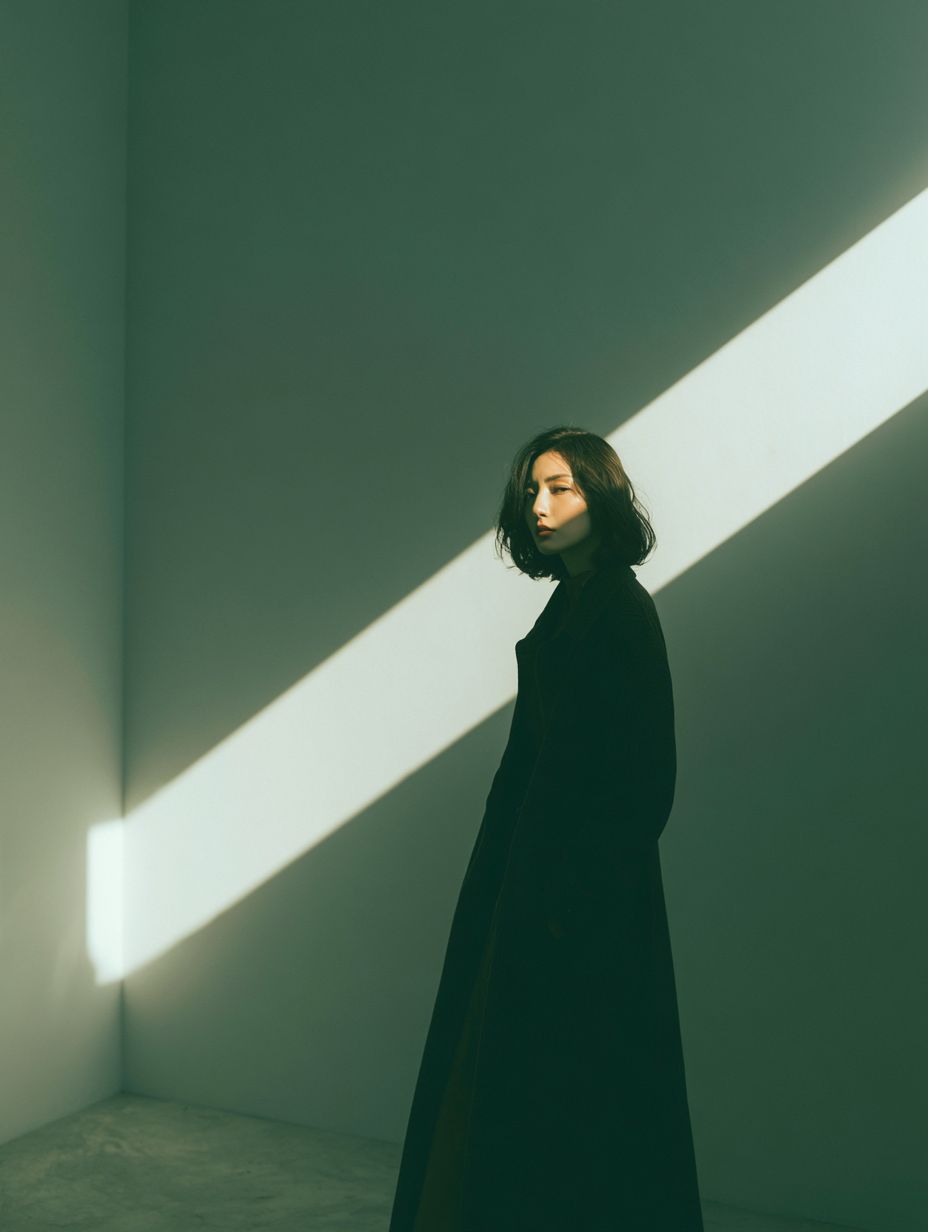
ElementDescription (what describers output)Prompt (what this template outputs)Subject"a woman in a coat""woman in a long charcoal-gray coat, three-quarter pose, glancing back"Camera(usually missing)"medium-long focal length full shot, eye-level"Lighting"there is light""warm white beam cutting diagonally, casting a crisp shadow"Style & texture(usually missing)"textured concrete floor, serene yet dramatic atmosphere"Aspect ratio(missing)"portrait 3:4"
That gap is exactly what this template closes: every output is generation-ready — After generating the prompt, you can continue to generate images one by one and compare the results. Likewise, you can also copy it into Midjourney, ChatGPT, Nano Banana, or any image model, and it will work directly.
What You Can Do — Three Workflows in One Template
Workflow 1: Image to Midjourney Prompt — Describe, Translate, Recreate
Built for Midjourney users. Upload a reference image and the Mj-Describe engine writes a rich scene description, polishes it into a ready-to-use English prompt, and can regenerate the image with Midjourney to verify the prompt actually works.
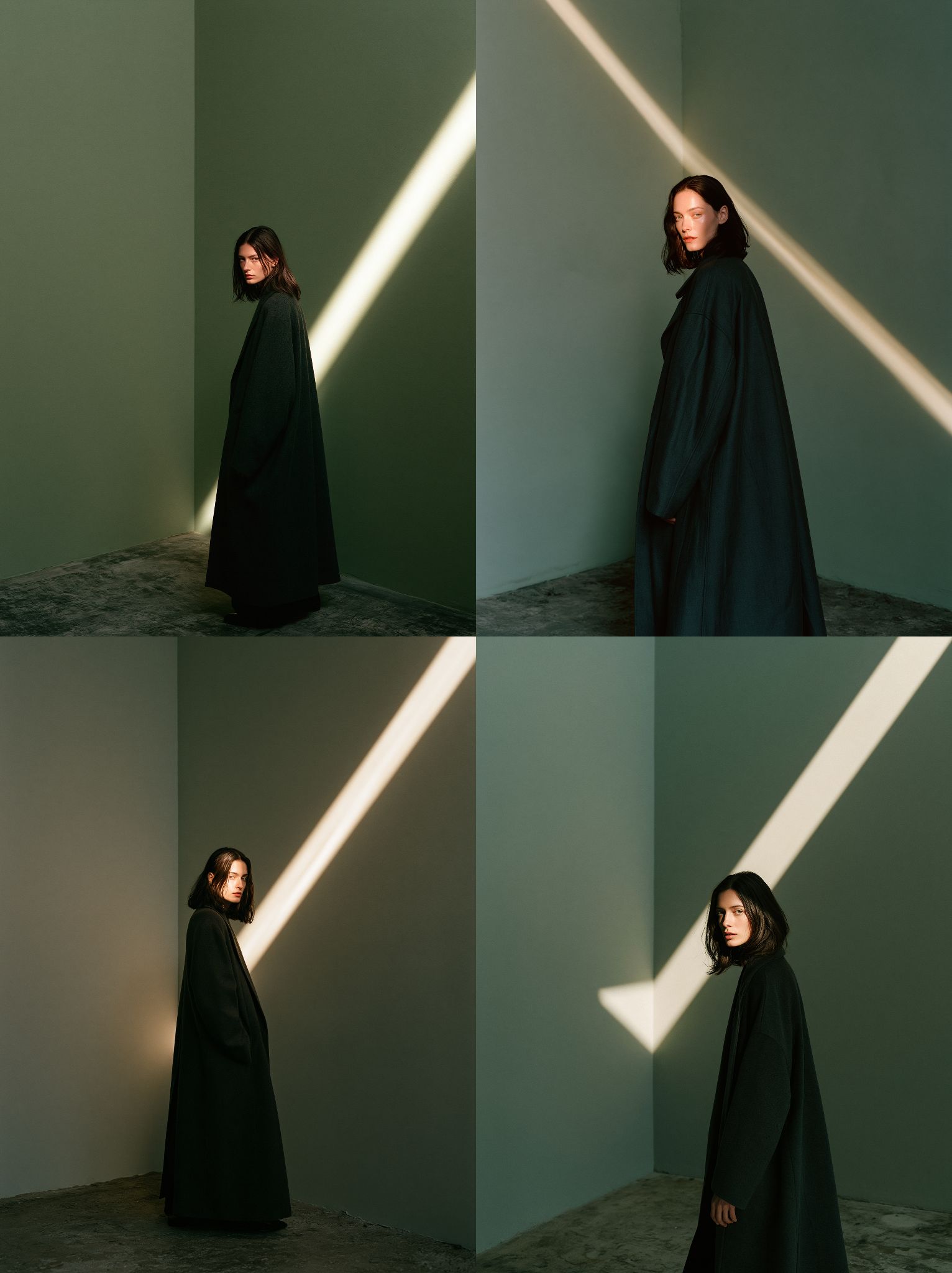
Example — upload a minimalist portrait of a woman in a sage-green interior with a diagonal beam of light, and the workflow returns:
"A woman stands in the corner of a minimalist interior, captured in a medium-long focal length full shot. The walls are a smooth and soft pale sage green. A warm beam of white light cuts diagonally from the upper right to the lower left of the frame, casting a crisp shadow across the dimly lit scene. She has shoulder-length dark brown hair and is turned in a three-quarter pose toward the camera, glancing back over her shoulder. Her face is partially illuminated by the light. She wears a long, deep charcoal gray coat. The floor is textured concrete. The overall atmosphere is serene yet dramatic."
Feed it to Midjourney at aspect ratio 3:4 and the four-image grid closely recreates the original composition and mood.
Workflow 2: Image to Prompt for Hyper-Realistic Recreations
Built for photorealistic images. A structured system prompt forces the analyzer to output a generation prompt — not an analysis — in universal form any model can use.
Example — upload a frontal studio portrait and get back:
"A direct frontal portrait photo of a woman in her 30s with hazel-brown eyes, a gentle smile, and wavy shoulder-length dark brown hair parted on the side. She wears a plain charcoal dark grey crewneck sweatshirt. The background is a minimalist, plain light grey studio backdrop. Centered headshot, eye-level angle, 85mm lens, sharp focus, soft studio lighting, ultra-realistic skin texture. Aspect ratio: portrait 3:4."
Copy it into any image model — or run it here with one click — and the recreation is strikingly close to the original.
Workflow 3: Reverse Style Transfer — Turn Any AI Image into a Reusable Effect
The most creative of the three. Upload an AI-generated image whose style you love, and the analyzer derives a reusable image-to-image prompt: it extracts the visual transformation rule while preserving subject identity, outfit, and pose. Then upload your own photo and apply the prompt — the style becomes yours.
Example — upload the viral "person posing next to a pencil-sketch mural of themselves" image, and the reverse prompt captures the entire effect:
"Preserve the identity, outfit, and pose of the primary subject… On the wall beside them, create a large monochrome graphite pencil sketch mural depicting the exact same subject in a matching pose. Surround the sketch with whimsical hand-drawn graphite doodles such as crowns, hearts, and sparkles. Frame the scene with scattered autumn leaves… photographic style for the real subject, tactile drawn line art for the mural."
Upload your own photo, and now it's you in the mural — someone else's viral idea becomes your content in one step.
How to Use — Reverse Any Image into a Prompt
- Upload your image — any AI artwork, photo, or style reference. Clear, high-resolution images produce the most precise prompts.
- Generate the prompt — reverse-engineering runs in seconds and returns a structured, ready-to-use English prompt.
- Copy, verify, or apply — paste it into Midjourney, Stable Diffusion, or any model; or generate right here to check the recreation, or apply it to your own photo for style transfer.
Why This Image to Prompt Generator Stands Out
- Prompts, not descriptions — every output is generation-ready, with camera, lighting, style, and aspect ratio tokens included.
- Three workflows, one page — Midjourney describe, photorealistic recreation, and style transfer, each with its own tuned system prompt.
- Midjourney describe without Discord — the closest thing to Midjourney's /describe, without the subscription or the Discord bot.
- A verify loop, not a guessing game — regenerate the image from the reversed prompt and compare before you take it elsewhere.
- Works on any image — Midjourney PNGs, photos, wallpapers, other AI tools' output. If you can upload it, it can be reverse-prompted.
- Stuck for ideas? Open the prompt library — browse a curated AI image prompts library with trending effects across GPT-Image, Midjourney, Nano Banana, Seedream and more. Copy a prompt to create, or reverse-engineer the image behind it — both directions work here.
- Universal credits, way beyond this one tool — the same balance unlocks other viral Trend videos and templates on OimiTV. Professional creators can also call 30+ top models — images, video, music, and text in one workspace.
- Privacy-first — uploaded images are used only to generate your prompt and are auto-deleted after about a week.
Best Practices for Accurate Reverse Prompts
Do:
- Use high-resolution images with one clear main subject
- Note the original aspect ratio if you plan to recreate the image
- For style transfer, choose images with a distinct, repeatable effect — sketch murals, toy figurines, vintage film looks
Avoid:
- Low-resolution, heavily compressed, or multi-subject collages — subjects blur together in the prompt
- Expecting pixel-perfect output: reverse prompts capture style, composition, and lighting; seed randomness always remains
Frequently Asked Questions (FAQ)
What is an image to prompt generator?
A tool that reverses text-to-image AI: you upload an image, and it writes the detailed prompt that could recreate that image — subject, environment, composition, camera, lighting, style, texture, and aspect ratio included.
How is this different from an AI image describer?
An image describer writes a description of what the image looks like — fine for alt text and captions. This template writes a generation prompt: the camera, lighting, and style decisions an image model needs to recreate the image. Descriptions tell people what they're seeing; prompts tell AI how to make it.
How does this compare to Midjourney's /describe?
It runs the same describe-style analysis without needing a Midjourney subscription or Discord, and adds a translate-and-verify loop plus two workflows /describe doesn't have: photorealistic recreation prompts and style transfer.
Can I extract the prompt from a Midjourney image?
Yes. Reverse-engineering works visually, so it doesn't matter whether the image came from Midjourney, another AI tool, or a real photo — if you can upload it, this template can reverse-prompt it.
Is the prompt output in English?
Yes — the final prompt is polished, ready-to-use English regardless of the image, so it works in Midjourney and every major image model like GPT-Image-2.5,Nano Banana 2.1,Seedream 5 Pro. You can change the language setting (Lang) to output any other language.
Can the prompts generated via reverse-engineering be used directly to create images?
Yes, the entire workflow forms a complete, closed loop: upload an image → reverse-engineer a prompt from it → use that prompt to generate an image → compare and verify → fine-tune the prompt → repeat the process. By default, image generation uses GPT-Image-2; however, the platform offers access to world-class AI image generation models, including GPT-Image-2.5, Midjourney v8.2, Nanao Banana 2.1, Jimeng 5, Grok Image, and more. Open the AI Infinite Canvas to explore and switch between these models for your creative projects.
Can I recreate the exact same image from the prompt?
You can get very close — same subject, composition, lighting, and style — but not pixel-identical, since generation always involves randomness. The verify loop lets you regenerate and compare before taking the prompt elsewhere.
Which images work best?
Clear, high-resolution images with a single main subject. For style transfer, pick images with a distinct, recognizable effect — sketch murals, toy figurines, vintage film looks.
Can I try it for free?
New accounts receive free credits. Failed tasks automatically refund credits, and the same balance works across all templates and models on the platform.
Will my images be stored or used for training?
No. Uploads are used only to generate your prompt, never for commercial purposes or public display, and are auto-deleted after roughly one week.