 1 / 2
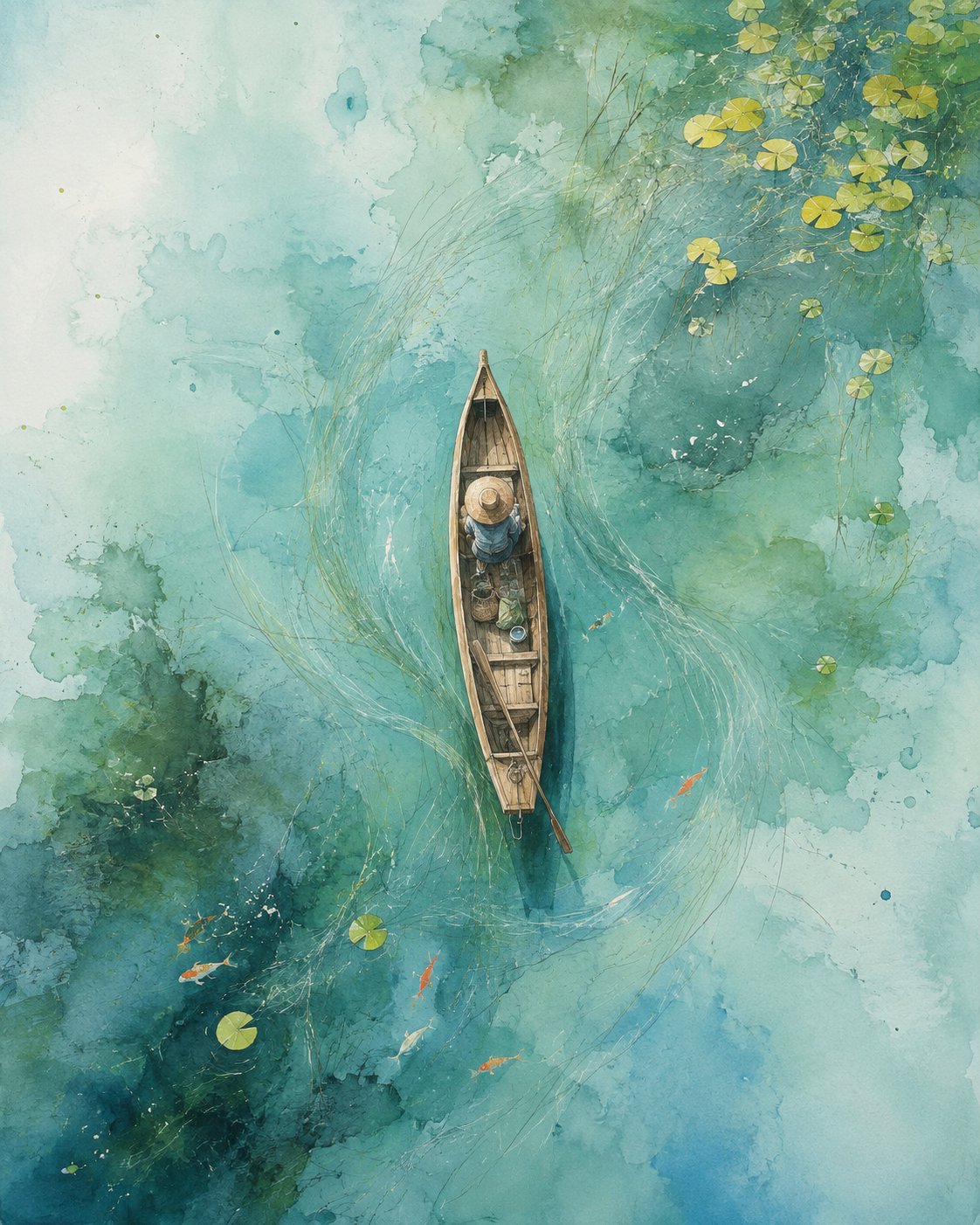
Top-Down Pond with Wooden Boat Watercolor Illustration
A top-down view of a turquoise pond with a long wooden boat cutting through the composition, a small-scale figure in a wide-brimmed hat surrounded by scattered belongings. Water grasses and flow lines radiate outward, lotus leaves cluster at the edges, and koi fish swirl faintly beneath the surface. Rendered in transparent watercolor washes with loose pencil lines, leaving large unpainted areas and an intentionally unfinished feel.
Full prompt
手绘环境插画,现代水彩概念场景风格,以透明水彩铺色和松散铅笔墨线为主,仅局部出现不透明厚涂、干刷颗粒与即兴笔触。 正上方俯视一片青绿色池塘,一艘尺度较大的狭长木船纵向贯穿画面中部,略微偏离中心,船内坐着戴宽檐帽的人物,并放有包袋、划桨和少量生活杂物,人物仅作为小尺度叙事元素。 细长水草和浅绿色水流线从船体周围向外弯曲延伸,形成自由、放射状的流动动线。少量亮黄绿睡莲叶不均衡地散落在画面边缘,局部聚集,大片水面保持空旷。水下深苔绿色植物、蓝绿旋涡和数条橙白红小锦鲤若隐若现,避免全部清晰刻画。 整体以湖水蓝、青绿和深苔绿为主,淡黄绿与橙红仅作少量跳色。 船体相对清晰,周围水面逐渐抽象松散,保留大块透明色域、不均衡留白与未完成感,避免纹理均匀铺满。
Create with this prompt
Fine-tune the prompt or upload a reference image as needed, click Generate, review the results, and download them promptly.
Open in AI Infinite Canvas(Optional)
Generate image
Please do not close this page while generation is in progress. If you close it, you can check the progress and results in History in the top-right corner.
You can change the boat style, figure pose, and pond color palette, and adjust the density of lotus leaves and koi to control visual rhythm. Transparent watercolor washes and loose pencil lines are the core features; if the texture becomes too uniform, increase white space prompts or reduce detail strength.
How to use
Edit the prompt
Review the prefilled prompt in the creation form. Adjust the subject, scene, colors, or style to suit your idea.
Upload image or change ratio
If the page offers a reference image upload, you can upload an image or leave it empty. Only upload images you have the right to use, and adjust the aspect ratio as needed.
Generate an image
The model is already configured. Click Generate and wait a moment for your result.
Review and download
Review the result and download your image. To try another direction, edit the prompt or reference image and generate again.
FAQ
Is this suitable for beginners?
Yes. The generation model is already configured, so you can edit the prompt and generate directly in the creation form without learning complex settings or canvas controls. Professional users can create in AI Infinite Canvas to organize materials, switch models, and refine their work, with the Canvas Agent helping develop ideas, create content, and adjust workflows.
Are prompts and image generation free?
Prompts are free to view, copy, and edit. Sign up to receive starter credits; image generation uses credits, with usage shown before you generate. You can subscribe or purchase more credits as needed.
Can I switch other AI image models?
Yes. This prompt uses a default, preconfigured model. To switch models, continue creating in AI Infinite Canvas. Oimi AI Studio brings together leading AI image models including GPT-Image-2.6, GPT-Image-2.5, GPT-Image-2, Nano Banana 2.1, Nano Banana Pro, Midjourney V8.2, Niji Journey (NJ), Seedream 5 Pro, and Grok Image, with 1K, 2K, and 4K options depending on the model. You can use these models through OimiTV templates, prompt pages, and AI Infinite Canvas; available models and settings vary by page.
Do I need a reference image, and why might my result differ from the example?
The reference upload is optional in the form. To preserve a particular person, object, or composition, use a reference according to the prompt’s requirements. Results vary with the model, prompt, references, and randomness. Only upload images you have the right to use, and obtain permission when using another person’s likeness.
What happens if image generation fails or errors out?
Credits charged for tasks that fail due to a system error are automatically refunded. Check History for details. Content policy violations are excluded from automatic refunds. Content Policy
How long are my images stored, and are they used for training?
Uploaded photos and generated images are stored temporarily for about a week, during which you can view and download them in History. They are then deleted. Oimi does not use these photos for training, so download any work you want to keep. Privacy policy