 1 / 4
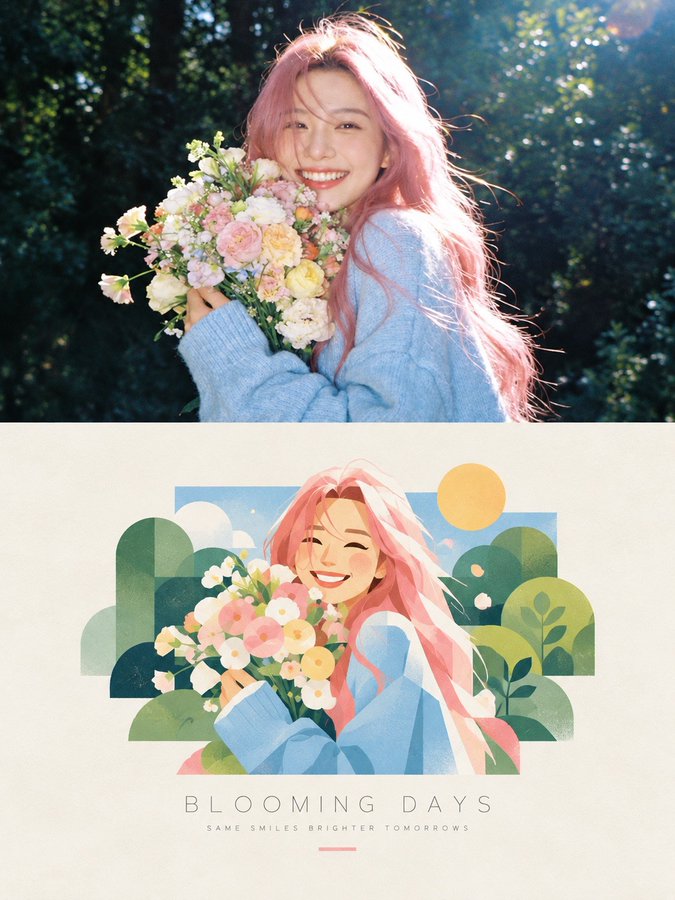
Split Poster: Photo & Hand-Drawn Illustration Collage
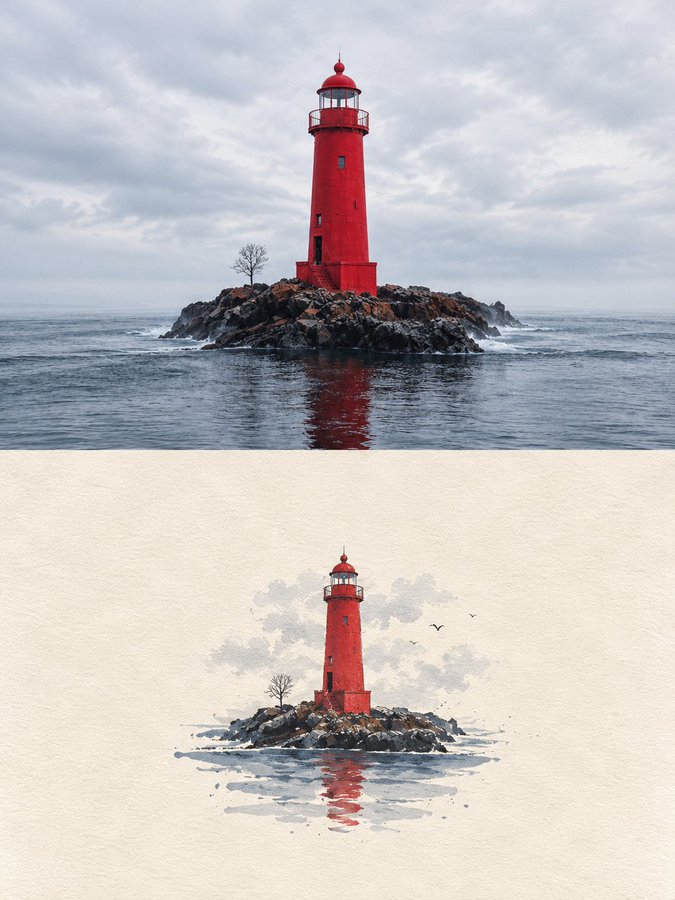
A strict 50/50 vertical split composition combining a faithful photographic top half with a minimalist hand-drawn paper illustration of the same scene at the bottom, creating a poetic and refined independent art publication cover.
Full prompt
Create one independent high-end editorial poster for each uploaded photo. Never combine photos. FORMAT Strict 3:4 vertical composition with an exact 50/50 horizontal split. The top and bottom halves must be equal in height and visually connected as one refined editorial cover. TOP HALF: ORIGINAL PHOTO Use the original photo faithfully. Preserve the subject, identity, facial features, proportions, pose, clothing, objects, composition, lighting, shadows, atmosphere, and color mood. Keep it fully photorealistic with only subtle premium editorial color grading. Never stylize, distort, replace, or alter the main subject. Extend only surrounding background when necessary, seamlessly and naturally. BOTTOM HALF: HAND-DRAWN ILLUSTRATION Reinterpret the same scene as a minimalist handmade paper illustration. Preserve the recognizable subject, silhouette, pose, key objects, and main visual story. Use delicate imperfect lines, simple acrylic-style flat color shapes, visible brush marks, rough paper texture, organic edges, and subtle handmade imperfections. Keep the illustration small and centered, occupying about 10–20% of the bottom half, with generous negative space. Use a rough white, warm off-white, or pale natural paper background with only minimal environmental details. COLOR Extract colors from the original photo and reduce them to a maximum of 4 restrained, harmonious colors. Use controlled flat color blocks while maintaining subtle paper grain and brush texture. TYPOGRAPHY Optional minimal editorial text only when appropriate, such as a short title, keyword, location, or number. Keep it understated and never force text into the design. STYLE Quiet, poetic, refined, minimal, relaxed, artistic, thoughtful, premium, high-recognition. FINAL Maintain the exact 50/50 split. The top must remain a faithful photograph, while the bottom is a simplified handmade illustration of the same scene. Avoid clutter, excessive colors, heavy typography, artificial effects, or unnecessary details. The result should feel like a premium contemporary independent art publication cover.
Create with this prompt
Fine-tune the prompt or upload a reference image as needed, click Generate, review the results, and download them promptly.
Open in AI Infinite Canvas(Optional)
Generate image
Please do not close this page while generation is in progress. If you close it, you can check the progress and results in History in the top-right corner.
Generate one poster per uploaded photo. The top half must faithfully preserve the original photo's subject, lighting, and mood with only subtle color grading. The bottom half should reinterpret the same scene as a minimalist hand-drawn illustration, with the subject small and centered (occupying 10–20% of the bottom area), using a rough paper texture background and a maximum of 4 restrained colors extracted from the photo. Optional minimal typography (short title, keyword) is allowed; avoid clutter and over-design.
How to use
Edit the prompt
Review the prefilled prompt in the creation form. Adjust the subject, scene, colors, or style to suit your idea.
Upload image or change ratio
If the page offers a reference image upload, you can upload an image or leave it empty. Only upload images you have the right to use, and adjust the aspect ratio as needed.
Generate an image
The model is already configured. Click Generate and wait a moment for your result.
Review and download
Review the result and download your image. To try another direction, edit the prompt or reference image and generate again.
FAQ
Is this suitable for beginners?
Yes. The generation model is already configured, so you can edit the prompt and generate directly in the creation form without learning complex settings or canvas controls. Professional users can create in AI Infinite Canvas to organize materials, switch models, and refine their work, with the Canvas Agent helping develop ideas, create content, and adjust workflows.
Are prompts and image generation free?
Prompts are free to view, copy, and edit. Sign up to receive starter credits; image generation uses credits, with usage shown before you generate. You can subscribe or purchase more credits as needed.
Can I switch other AI image models?
Yes. This prompt uses a default, preconfigured model. To switch models, continue creating in AI Infinite Canvas. Oimi AI Studio brings together leading AI image models including GPT-Image-2.6, GPT-Image-2.5, GPT-Image-2, Nano Banana 2.1, Nano Banana Pro, Midjourney V8.2, Niji Journey (NJ), Seedream 5 Pro, and Grok Image, with 1K, 2K, and 4K options depending on the model. You can use these models through OimiTV templates, prompt pages, and AI Infinite Canvas; available models and settings vary by page.
Do I need a reference image, and why might my result differ from the example?
The reference upload is optional in the form. To preserve a particular person, object, or composition, use a reference according to the prompt’s requirements. Results vary with the model, prompt, references, and randomness. Only upload images you have the right to use, and obtain permission when using another person’s likeness.
What happens if image generation fails or errors out?
Credits charged for tasks that fail due to a system error are automatically refunded. Check History for details. Content policy violations are excluded from automatic refunds. Content Policy
How long are my images stored, and are they used for training?
Uploaded photos and generated images are stored temporarily for about a week, during which you can view and download them in History. They are then deleted. Oimi does not use these photos for training, so download any work you want to keep. Privacy policy