 1 / 4
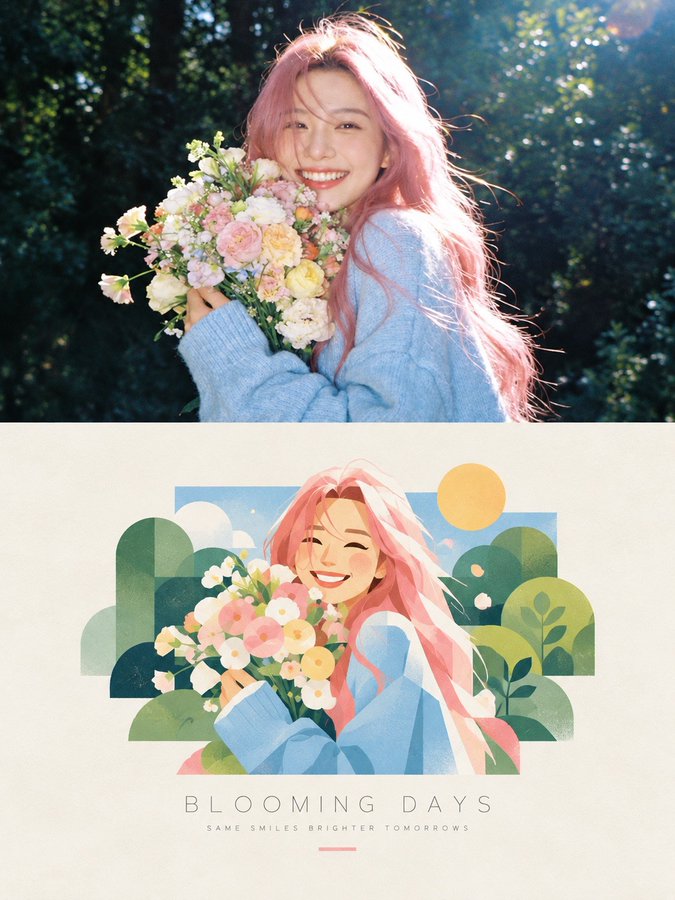
Photo to Split Design Poster: Photography × Abstract Symbol
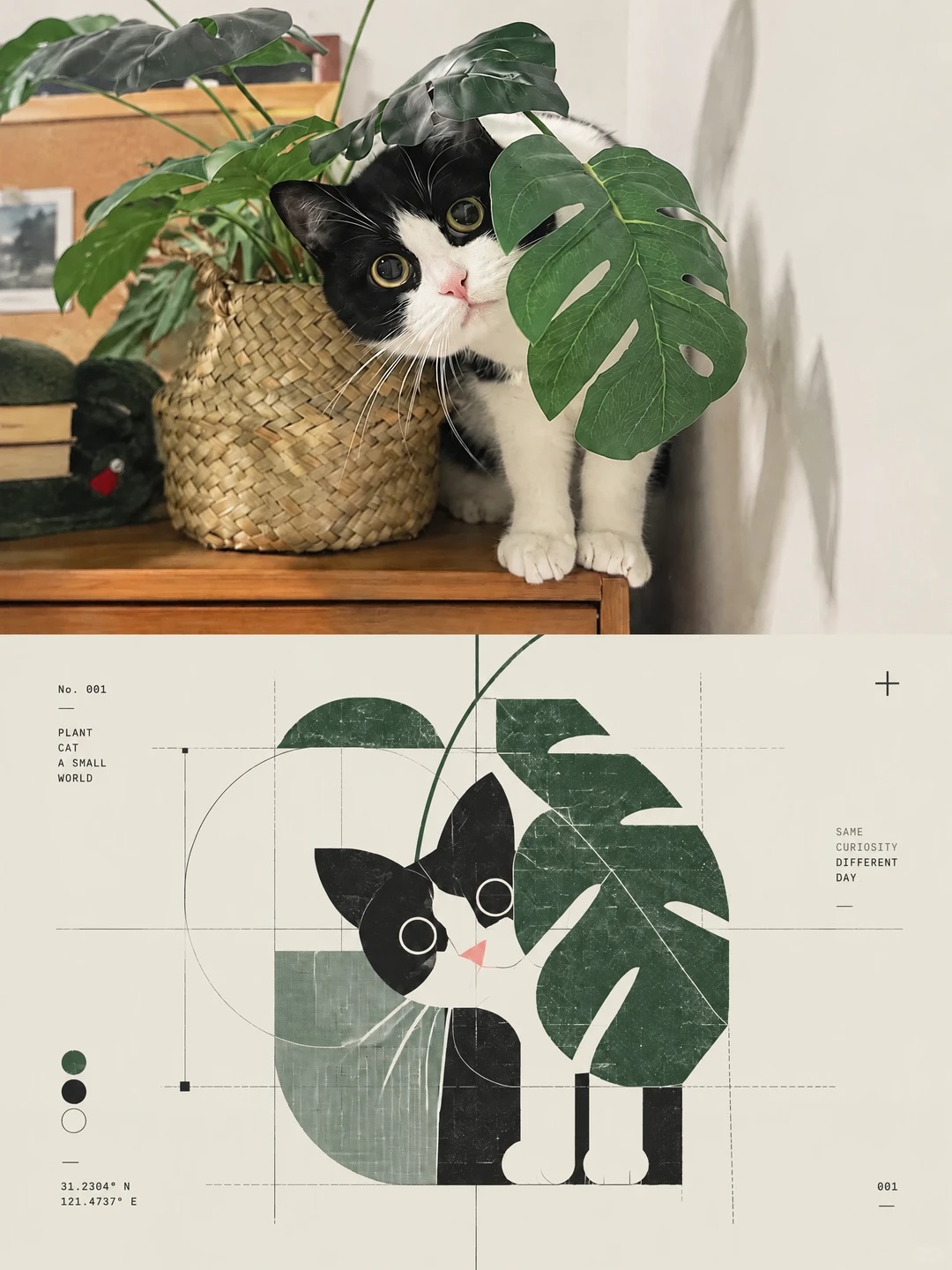
Turn a photo into a 3:4 split poster: real photography above, an abstract symbol distilled from the subject below, with Swiss-style annotations and riso grain.
Full prompt
请将我上传的照片制作成一张独立的3:4竖版高级设计海报;整张画布上下严格1:1划分,上半区占50%,下半区占50%,上半部分为真实摄影,下半部分为提炼自主体内核的抽象视觉符号。 上半部分保留原图主体结构、真实质感、自然光影与原生色彩氛围,仅做轻量高级调色,达到艺术摄影、独立出版物质感。可自然延展背景适配画幅,严禁拉伸、扭曲、改动主体本身。 下半部分提取照片核心识别信息:主体轮廓、结构、姿态、叙事关系,不复刻完整物象,压缩成可识别的抽象视觉标识。运用几何解构、模块化形态、线条结构、负空间、符号化手法,做成高端品牌标识、实验设计系统里的核心符号。抓核心气质而非细碎细节,保证极简图形仍能关联原图对象。视觉风格:post-digital graphic design、deconstructed Swiss design、generative symbol system、diagrammatic abstraction。使用几何模块、细线条、圆弧轨迹、网格、微型符号、编号逻辑、抽象节点搭建系统化符号。追求秩序 × 误差、精密 × 手工痕迹、数字 × 模拟、理性 × 情绪的对冲感,以最少元素塑造强识别度,拒绝繁复。构图高度克制,主体符号为唯一视觉焦点,居中或微偏移,大面积留白透气。禁止堆砌多图标、做成信息图表,对标艺术机构、建筑事务所、实验厂牌、高端品牌的核心视觉标识。文字仅作为系统组件,不做主标题;可搭配极小的编号、字母、短句,和符号形成索引关联,字体精细克制,是档案、实验刊物式的标注感。色彩从上图提取标志性色调,重构为品牌色彩体系。少量高识别色作为功能编码,如青绿、蓝、洋红、橙,搭配灰白、暖白底色形成对比;色彩是系统标记而非装饰,避开杂乱配色、廉价霓虹、流水线商业渐变。材质融合:xerox texture、risograph grain、print registration error、scanner noise、subtle paper texture。增加微弱印刷错位、颗粒、扫描噪点、边缘不完美感,赋予数字符号实体印刷质感。最终目标是从照片萃取独立自洽的视觉基因:克制精简、带有文化记忆与系统美学的抽象 Logo。
Create with this prompt
Fine-tune the prompt or upload a reference image as needed, click Generate, review the results, and download them promptly.
Open in AI Infinite Canvas(Optional)
Generate image
Please do not close this page while generation is in progress. If you close it, you can check the progress and results in History in the top-right corner.
Requires an uploaded photo as input; any subject works. Keep the strict 1:1 vertical split and 3:4 ratio: the top half only gets light grading with no stretching or warping of the subject, while the bottom distills the subject's outline, posture, and signature colors into one minimal symbol with generous negative space. Text stays as tiny index-like annotations; refine the symbol and palette based on actual results.
How to use
Edit the prompt
Review the prefilled prompt in the creation form. Adjust the subject, scene, colors, or style to suit your idea.
Upload image or change ratio
If the page offers a reference image upload, you can upload an image or leave it empty. Only upload images you have the right to use, and adjust the aspect ratio as needed.
Generate an image
The model is already configured. Click Generate and wait a moment for your result.
Review and download
Review the result and download your image. To try another direction, edit the prompt or reference image and generate again.
FAQ
Is this suitable for beginners?
Yes. The generation model is already configured, so you can edit the prompt and generate directly in the creation form without learning complex settings or canvas controls. Professional users can create in AI Infinite Canvas to organize materials, switch models, and refine their work, with the Canvas Agent helping develop ideas, create content, and adjust workflows.
Are prompts and image generation free?
Prompts are free to view, copy, and edit. Sign up to receive starter credits; image generation uses credits, with usage shown before you generate. You can subscribe or purchase more credits as needed.
Can I switch other AI image models?
Yes. This prompt uses a default, preconfigured model. To switch models, continue creating in AI Infinite Canvas. Oimi AI Studio brings together leading AI image models including GPT-Image-2.6, GPT-Image-2.5, GPT-Image-2, Nano Banana 2.1, Nano Banana Pro, Midjourney V8.2, Niji Journey (NJ), Seedream 5 Pro, and Grok Image, with 1K, 2K, and 4K options depending on the model. You can use these models through OimiTV templates, prompt pages, and AI Infinite Canvas; available models and settings vary by page.
Do I need a reference image, and why might my result differ from the example?
The reference upload is optional in the form. To preserve a particular person, object, or composition, use a reference according to the prompt’s requirements. Results vary with the model, prompt, references, and randomness. Only upload images you have the right to use, and obtain permission when using another person’s likeness.
What happens if image generation fails or errors out?
Credits charged for tasks that fail due to a system error are automatically refunded. Check History for details. Content policy violations are excluded from automatic refunds. Content Policy
How long are my images stored, and are they used for training?
Uploaded photos and generated images are stored temporarily for about a week, during which you can view and download them in History. They are then deleted. Oimi does not use these photos for training, so download any work you want to keep. Privacy policy