 1 / 4
Minimalist Geometric Fashion Illustration
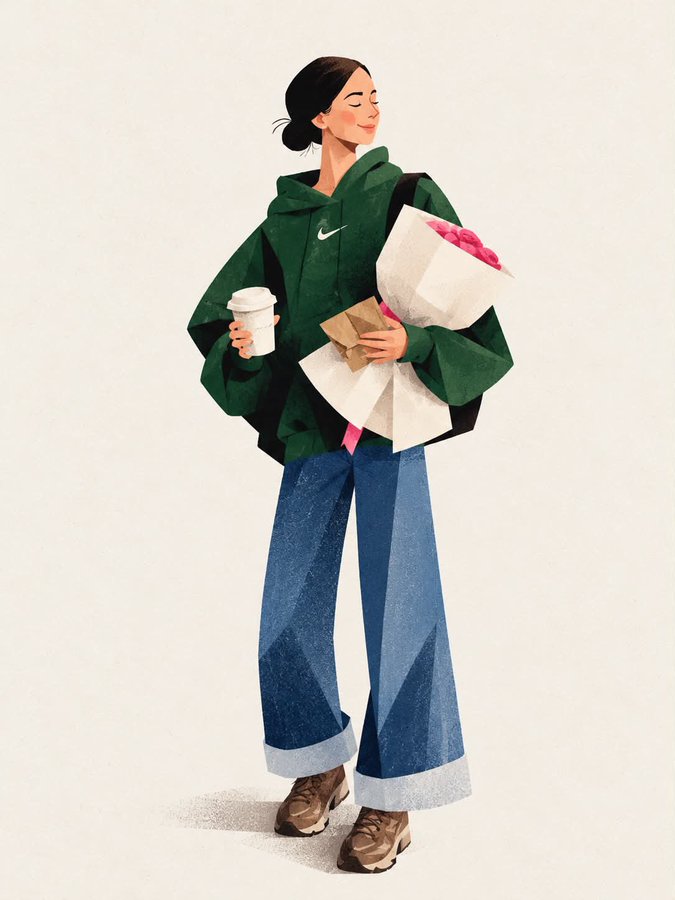
A magazine-style digital hand-painted fashion illustration featuring a young woman in an oversized hoodie and wide-leg jeans, carrying roses, coffee, and a shoulder bag, rendered with minimalist geometric textures and a warm negative-space background.
Full prompt
Create a stylish, full-body editorial fashion illustration of a young woman in a modern casual outfit, using a minimalist, textured geometric art style. She wears an oversized forest-green hoodie, wide-leg blue denim jeans with folded cuffs, and chunky brown sneakers. Her dark hair is tied in a neat low bun. She carries a bouquet of vibrant pink roses wrapped in white paper, a takeaway coffee cup, and a black shoulder bag. Show her walking naturally in a relaxed pose, viewed from a three-quarter rear angle, with soft, elegant body proportions and simplified facial details. Use a warm ivory background with plenty of negative space, soft ground shadows, subtle paper grain, visible brush textures, and angular polygonal shading across the clothing and shoes. The color palette features deep forest green, denim blue, warm brown, cream, and vivid pink. Soft diffused lighting, clean composition, contemporary lifestyle magazine aesthetic, hand-painted digital illustration, refined edges, artistic fabric textures, vertical 3:4 composition, high detail. No photorealism, no 3D rendering, no extra objects, no text or watermark.
Create with this prompt
Fine-tune the prompt or upload a reference image as needed, click Generate, review the results, and download them promptly.
Open in AI Infinite Canvas(Optional)
Generate image
Please do not close this page while generation is in progress. If you close it, you can check the progress and results in History in the top-right corner.
You can change the hairstyle, clothing colors, and accessories (bouquet, bag, drink) to fit different themes. The warm ivory background and negative space can be adjusted, but keeping it minimal is recommended. Adjust the geometric texture strength and brush texture as needed for the final look.
How to use
Edit the prompt
Review the prefilled prompt in the creation form. Adjust the subject, scene, colors, or style to suit your idea.
Upload image or change ratio
If the page offers a reference image upload, you can upload an image or leave it empty. Only upload images you have the right to use, and adjust the aspect ratio as needed.
Generate an image
The model is already configured. Click Generate and wait a moment for your result.
Review and download
Review the result and download your image. To try another direction, edit the prompt or reference image and generate again.
FAQ
Is this suitable for beginners?
Yes. The generation model is already configured, so you can edit the prompt and generate directly in the creation form without learning complex settings or canvas controls. Professional users can create in AI Infinite Canvas to organize materials, switch models, and refine their work, with the Canvas Agent helping develop ideas, create content, and adjust workflows.
Are prompts and image generation free?
Prompts are free to view, copy, and edit. Sign up to receive starter credits; image generation uses credits, with usage shown before you generate. You can subscribe or purchase more credits as needed.
Can I switch other AI image models?
Yes. This prompt uses a default, preconfigured model. To switch models, continue creating in AI Infinite Canvas. Oimi AI Studio brings together leading AI image models including GPT-Image-2.6, GPT-Image-2.5, GPT-Image-2, Nano Banana 2.1, Nano Banana Pro, Midjourney V8.2, Niji Journey (NJ), Seedream 5 Pro, and Grok Image, with 1K, 2K, and 4K options depending on the model. You can use these models through OimiTV templates, prompt pages, and AI Infinite Canvas; available models and settings vary by page.
Do I need a reference image, and why might my result differ from the example?
The reference upload is optional in the form. To preserve a particular person, object, or composition, use a reference according to the prompt’s requirements. Results vary with the model, prompt, references, and randomness. Only upload images you have the right to use, and obtain permission when using another person’s likeness.
What happens if image generation fails or errors out?
Credits charged for tasks that fail due to a system error are automatically refunded. Check History for details. Content policy violations are excluded from automatic refunds. Content Policy
How long are my images stored, and are they used for training?
Uploaded photos and generated images are stored temporarily for about a week, during which you can view and download them in History. They are then deleted. Oimi does not use these photos for training, so download any work you want to keep. Privacy policy