 1 / 6
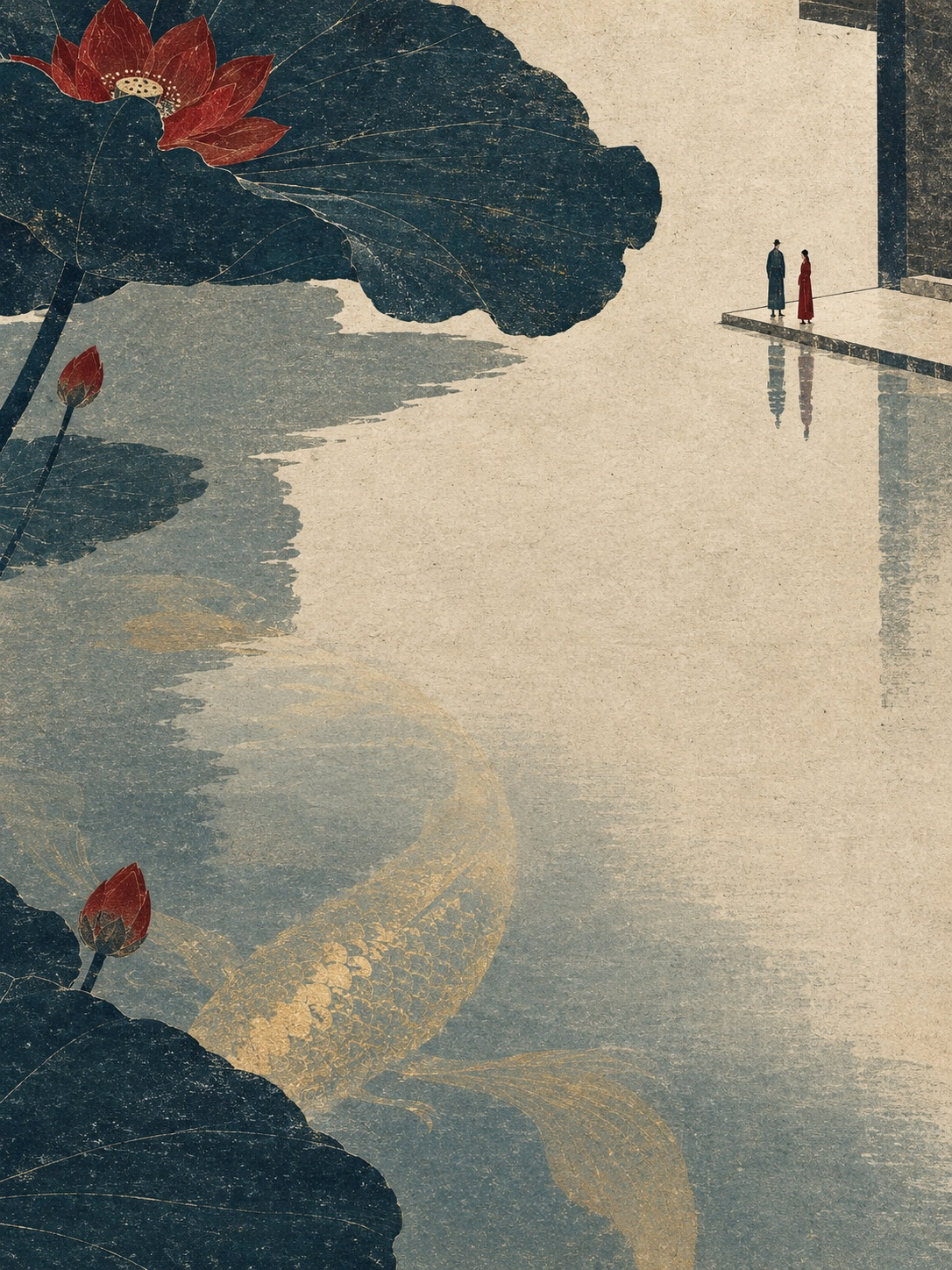
Eastern Aesthetics Illustration: Chinese Megastructure
A surreal Eastern courtyard built with minimalist water surface and giant lotus leaves, using a limited palette of deep indigo and warm off-white, combined with woodblock and silkscreen textures to create a poetic, silent, dreamlike atmosphere.
Full prompt
竖版东方超现实艺术插画,空旷的米白庭院被想象成一片极简水面,一片巨大的深靛色荷叶从画面边缘伸入,暗红荷花作为小面积点缀,水下隐约出现一尾比例巨大的金色锦鲤。岸边站着两位极小人物,留下细长倒影。 大片负空间,平静水面,非对称构图,深浅几何色块,诗意、寂静、梦境般的东方氛围。传统木版画与丝网印刷质感,平面色彩,粗粝油墨颗粒,旧纸纤维,深靛蓝、暖米白、灰青、暗金、朱红限定配色。 无文字、无印章、无logo、无水印
Create with this prompt
Fine-tune the prompt or upload a reference image as needed, click Generate, review the results, and download them promptly.
Open in AI Infinite Canvas(Optional)
Generate image
Please do not close this page while generation is in progress. If you close it, you can check the progress and results in History in the top-right corner.
Template: Create a vertical-format art illustration embodying Eastern aesthetics.
The composition centers on [Subject or Story] set within [Environment], naturally incorporating elements such as traditional Chinese architecture, courtyards, eaves, windows, palace walls, landscapes, flora, or artifacts. Include [Figure or Creature] to provide a sense of scale and a narrative thread, ensuring they do not overpower the main subject.
Employ a bold yet restrained modern graphic composition. Utilize techniques such as framing, occlusion, cropping, low-angle shots, long shots, or close-ups; there is no need to display every object in its entirety. Emphasize contrasts in density and scale, the interplay of positive and negative space, and visual rhythm, while maintaining a sense of "breathing room." Elements of exaggerated scale and surreal spatial relationships may be used, provided the overall image remains elegant and believable.
The atmosphere is quiet, understated, detached, and poetic, evoking Eastern philosophical thought and a sense of suspended time. Lighting is clean and distinct, creating stylized long shadows and geometric contrasts between light and dark.
The visual style blends traditional Chinese woodblock prints, vintage screen printing, and modern Eastern editorial illustration. It features flat color blocks and delicate line work, characterized by the textures of natural paper fibers, coarse ink grains, slight color registration shifts, and the imperfections of manual printing.
Use a restrained, limited palette of low-saturation colors—primarily warm off-white, ink black or deep indigo, and grey-green—accented by touches of dark gold, vermilion, ochre, or pine green. The contrast is high yet gentle on the eyes; the style bridges the classical and the modern, offering a refined, serene quality reminiscent of collectible art prints.
Keep the composition clean: avoid cluttering with elements or excessive ornamentation, and steer clear of photorealistic or 3D-rendered aesthetics. The image should be purely visual, free of any text, letters, numbers, calligraphy, seals, titles, borders, logos, or watermarks.
How to use
Edit the prompt
Review the prefilled prompt in the creation form. Adjust the subject, scene, colors, or style to suit your idea.
Upload image or change ratio
If the page offers a reference image upload, you can upload an image or leave it empty. Only upload images you have the right to use, and adjust the aspect ratio as needed.
Generate an image
The model is already configured. Click Generate and wait a moment for your result.
Review and download
Review the result and download your image. To try another direction, edit the prompt or reference image and generate again.
FAQ
Is this suitable for beginners?
Yes. The generation model is already configured, so you can edit the prompt and generate directly in the creation form without learning complex settings or canvas controls. Professional users can create in AI Infinite Canvas to organize materials, switch models, and refine their work, with the Canvas Agent helping develop ideas, create content, and adjust workflows.
Are prompts and image generation free?
Prompts are free to view, copy, and edit. Sign up to receive starter credits; image generation uses credits, with usage shown before you generate. You can subscribe or purchase more credits as needed.
Can I switch other AI image models?
Yes. This prompt uses a default, preconfigured model. To switch models, continue creating in AI Infinite Canvas. Oimi AI Studio brings together leading AI image models including GPT-Image-2.6, GPT-Image-2.5, GPT-Image-2, Nano Banana 2.1, Nano Banana Pro, Midjourney V8.2, Niji Journey (NJ), Seedream 5 Pro, and Grok Image, with 1K, 2K, and 4K options depending on the model. You can use these models through OimiTV templates, prompt pages, and AI Infinite Canvas; available models and settings vary by page.
Do I need a reference image, and why might my result differ from the example?
The reference upload is optional in the form. To preserve a particular person, object, or composition, use a reference according to the prompt’s requirements. Results vary with the model, prompt, references, and randomness. Only upload images you have the right to use, and obtain permission when using another person’s likeness.
What happens if image generation fails or errors out?
Credits charged for tasks that fail due to a system error are automatically refunded. Check History for details. Content policy violations are excluded from automatic refunds. Content Policy
How long are my images stored, and are they used for training?
Uploaded photos and generated images are stored temporarily for about a week, during which you can view and download them in History. They are then deleted. Oimi does not use these photos for training, so download any work you want to keep. Privacy policy