 1 / 1
Anime Food Storyboard: 15-Second Golden Fried Rice Cooking Sheet
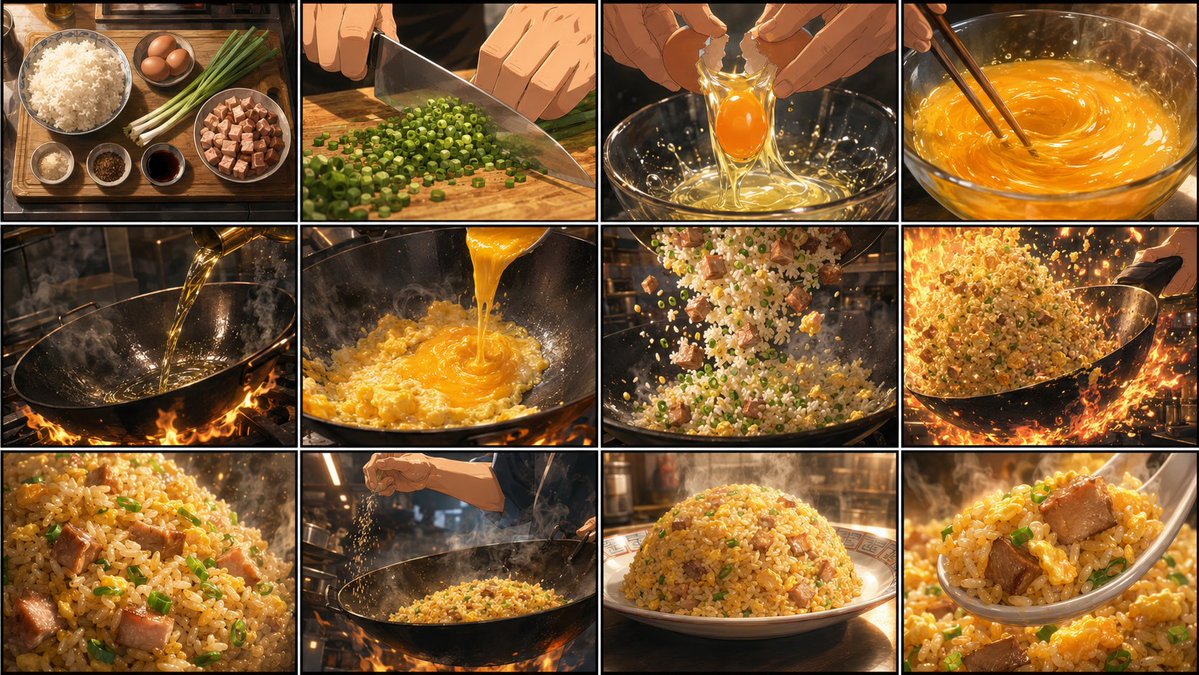
A 16:9 anime cooking storyboard featuring 12 continuous shots of golden fried rice. Includes cinematic lighting and dynamic angles for animation pre-production.
Full prompt
Create an ultra-high-quality, highly detailed horizontal 16:9 storyboard sheet for a 15-second anime cooking video. Theme: "Golden Fried Rice." Format: one wide 16:9 storyboard sheet with about 12 chronological panels. Overall visual style: Premium anime film quality, elite cooking-anime key animation, cinematic lighting, high detail, and an appetite-triggering food-porn look. Every panel should clearly show the final video's camera angle, cooking movement, hand action, flames, steam, oil shimmer, and ingredient textures. Do not use photorealistic style. Render everything as high-quality anime illustration. Storyboard sequence: 1. Beautiful overhead shot: white rice, eggs, long green onion, char siu pork, and seasonings arranged neatly on a cutting board. Clean kitchen atmosphere, opening-shot feeling. 2. Hand close-up: finely chopping long green onion with a knife. Emphasize rhythmic cutting motion, onion cross-sections, and sharp knife trails. 3. Extreme close-up: cracking an egg. The shell breaks and yolk and egg white fall into a bowl. Show glossy liquid, splashing droplets, and vivid yellow. 4. Close-up: whisking the egg with chopsticks or a small whisk. Show swirling egg liquid, light reflections, and smooth texture. 5. Low-angle shot: oil being poured into a heated wok. Show the shiny wok surface, heat haze, rising steam, and kitchen heat. 6. Dynamic shot: egg mixture poured into the wok, instantly puffing and setting. Half-cooked egg edges bloom, steam rises. 7. Dynamic composition: rice, green onion, and char siu tossed into the wok. Ingredients fly through the air and fall into the pan like a satisfying match cut. 8. Main cooking shot: the chef shakes a Chinese wok and stir-fries. Flames rise, rice grains fly, steam and oil shimmer spread through the frame, strong cooking-anime energy. 9. Extreme close-up: golden fried rice inside the wok. Individual rice grains, egg coating, char siu, and green onion are visible with rich shine and aroma. 10. Fast artisan shot: seasonings are added and the final stir-fry begins. Wrist movement, wok motion, rising steam, speed, and professional confidence. 11. Plating shot: fried rice is beautifully served onto a plate with a spoon. Rounded mound, rising steam, high anticipation before completion. 12. Hero shot: finished golden fried rice. Extreme close-up with sparkling separated grains, fluffy texture, char siu and scallion accents, rising steam, shallow depth of field, cinematic highlights, irresistibly appetizing. Each panel should vary the camera angle: overhead, hand close-up, extreme macro, low angle, diagonal composition, quick pan, and match-cut framing. The storyboard must feel ready for video, with rhythm, motion direction, and clear emphasis on flames, steam, oil, and ingredient motion trails. Layout requirements: Keep panel borders clear and readable. You may include tiny timecodes or shot numbers, but no large text blocks, subtitles, logos, or watermarks. Maintain the same kitchen, same cooking world, and same premium anime film style across the whole sheet.
Create with this prompt
Fine-tune the prompt or upload a reference image as needed, click Generate, review the results, and download them promptly.
Open in AI Infinite Canvas(Optional)
Generate image
Please do not close this page while generation is in progress. If you close it, you can check the progress and results in History in the top-right corner.
You can substitute the dish name or adjust the panel grid layout. Maintain a 16:9 aspect ratio for consistent lighting and art style across panels.
How to use
Edit the prompt
Review the prefilled prompt in the creation form. Adjust the subject, scene, colors, or style to suit your idea.
Upload image or change ratio
If the page offers a reference image upload, you can upload an image or leave it empty. Only upload images you have the right to use, and adjust the aspect ratio as needed.
Generate an image
The model is already configured. Click Generate and wait a moment for your result.
Review and download
Review the result and download your image. To try another direction, edit the prompt or reference image and generate again.
FAQ
Is this suitable for beginners?
Yes. The generation model is already configured, so you can edit the prompt and generate directly in the creation form without learning complex settings or canvas controls. Professional users can create in AI Infinite Canvas to organize materials, switch models, and refine their work, with the Canvas Agent helping develop ideas, create content, and adjust workflows.
Are prompts and image generation free?
Prompts are free to view, copy, and edit. Sign up to receive starter credits; image generation uses credits, with usage shown before you generate. You can subscribe or purchase more credits as needed.
Can I switch other AI image models?
Yes. This prompt uses a default, preconfigured model. To switch models, continue creating in AI Infinite Canvas. Oimi AI Studio brings together leading AI image models including GPT-Image-2.6, GPT-Image-2.5, GPT-Image-2, Nano Banana 2.1, Nano Banana Pro, Midjourney V8.2, Niji Journey (NJ), Seedream 5 Pro, and Grok Image, with 1K, 2K, and 4K options depending on the model. You can use these models through OimiTV templates, prompt pages, and AI Infinite Canvas; available models and settings vary by page.
Do I need a reference image, and why might my result differ from the example?
The reference upload is optional in the form. To preserve a particular person, object, or composition, use a reference according to the prompt’s requirements. Results vary with the model, prompt, references, and randomness. Only upload images you have the right to use, and obtain permission when using another person’s likeness.
What happens if image generation fails or errors out?
Credits charged for tasks that fail due to a system error are automatically refunded. Check History for details. Content policy violations are excluded from automatic refunds. Content Policy
How long are my images stored, and are they used for training?
Uploaded photos and generated images are stored temporarily for about a week, during which you can view and download them in History. They are then deleted. Oimi does not use these photos for training, so download any work you want to keep. Privacy policy