
6 Trending Seedance 2.0 Prompts for AI Video (Copy & Try)
A strong Seedance 2.0 prompt should make the motion easy for the model to follow. The six examples below cover fashion ads, anime shorts, product videos, food scenes, character action, and motion-path one-take videos you can copy and adapt.
The most reliable Seedance 2.0 prompts usually do two things: define the visual reference first, then describe motion, camera direction, timing, and constraints. Several examples below combine GPT Image 2 storyboard frames with Seedance 2.0 image-to-video generation.
How to use these Seedance 2.0 prompts
- Pick a prompt style: fashion, anime, product ad, food video, character action, or motion-path video.
- Open the template if you want the full reference-image workflow already wired in Canvas.
- Generate the video directly, or adjust the subject, scene, product, path, or camera direction before running the prompt.
6 Trending Seedance 2.0 prompts to copy
1. AI Fashion Outfit Scan Video
Generate a luxury fashion storyboard with GPT Image 2, then turn it into a Street style Seedance 2 short.
Best for
fashion ads, outfit scan videos, luxury street-style shorts
Why this prompt works
The prompt separates the visual storyboard from the final motion prompt. It gives Seedance 2.0 a locked fashion reference, clear dialogue beats, and a simple head-to-toe camera action.
Seedance 2.0 prompt
Photorealistic cinematic fashion video set on an elegant London shopping street inspired by Bond Street. A stylish British woman in her late 20s walks confidently past a luxury boutique. She wears gold earrings, a burgundy double-breasted blazer, matching mini skirt, a light blue ruffled silk blouse, a structured dark red leather shoulder bag, and metallic pointed heels. Her chestnut hair is styled in a sleek low bun. Her phone rings. She glances at the screen, stops gracefully, and answers. A male voice asks, “Hello there, can you please scan your outfit?” She smiles and replies in a soft British accent, “I guess so.” The camera performs a smooth head-to-toe scan, displaying elegant text labels for each outfit item, then ends on a confident editorial pose in front of the boutique window. Bright natural sunlight, shallow depth of field, smooth gimbal movement, luxury editorial aesthetic, polished and sophisticated mood
Try the AI Fashion Outfit Scan Video workflow
Open the full Canvas setup with reference images, video node, and Seedance 2.0 prompt already connected.
Open Workflow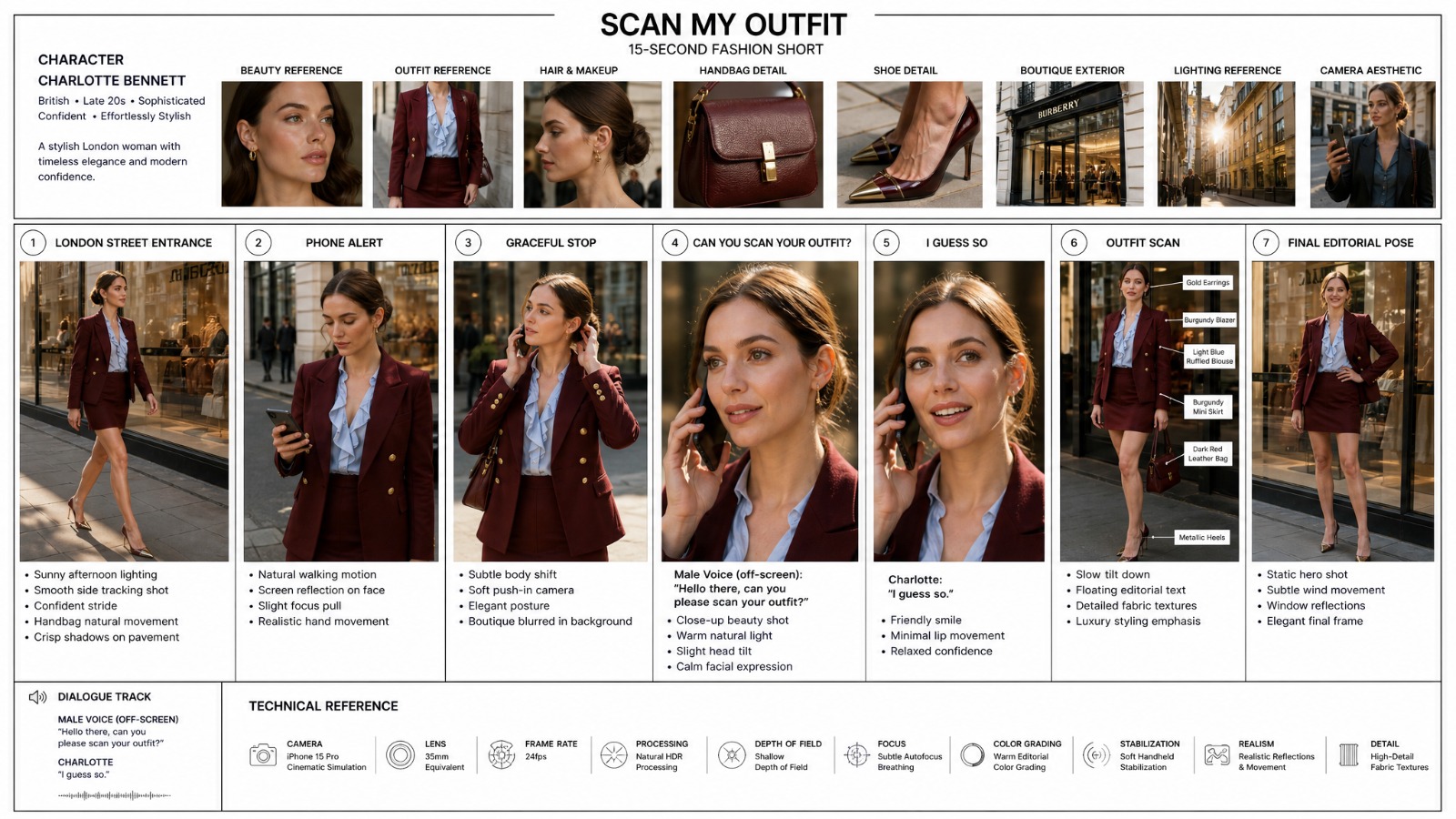
2. AI Anime Storyboard to Video Generator
Create an anime character sheet and storyboard board with GPT Image 2, then turn it into a cinematic animated scene with Seedance 2.0.
Best for
anime shorts, emotional ambience, cinematic B-roll
Why this prompt works
It starts from a clear storyboard frame and uses motion language instead of repeating visual details. That helps Seedance 2.0 focus on atmosphere, camera movement, and subtle animation.
Seedance 2.0 prompt
TITLE The Lost Wind Chime REFERENCE Use the uploaded storyboard board and character sheet as the main visual reference. Keep all character designs, environment details, wind chime design, kitten appearance, countryside lighting, and emotional story beats visually consistent. Do not add extra characters. Do not change the story. SUBJECTS Girl: A cheerful young anime girl around 10 years old with soft black ponytail hair, warm brown eyes, and soft expressive anime facial features. She wears an oversized light-blue summer dress, crossbody satchel, white socks, and brown shoes. Her acting should feel gentle, nostalgic, peaceful, emotionally warm. Kitten: A tiny fluffy gray-and-white kitten with playful anime behavior and expressive eyes. The kitten slowly becomes attached to the girl throughout the sequence. Wind Chime: A beautiful Japanese glass wind chime with painted flowers and a paper strip attached underneath. The wind chime acts as the emotional centerpiece of the story. ENVIRONMENT Bright countryside summer setting. Wooden porch. Blue sky. Moving grass. Sunflowers. Warm sunlight. Golden-hour anime lighting. Soft wind movement everywhere. STYLE Premium anime movie quality. Soft nostalgic anime atmosphere. Beautiful painterly anime backgrounds. Detailed sunlight rendering. Soft glowing highlights. Natural character acting. Gentle cinematic pacing. Dreamy emotional tone. No chaos. No comedy exaggeration. No subtitles. No logos. No text overlays. No social media UI. AUDIO No background music. Only natural ambience and soft environmental sounds. CAMERA 16:9 cinematic anime framing. Slow cinematic movement. Gentle push-ins. Soft depth of field. Warm lens bloom. Dreamy summer atmosphere. One emotional wide ending shot. TIMELINE 0:00-0:02 Wide anime shot. Bright summer wind blows across a countryside porch. The girl notices a beautiful glass wind chime moving softly in sunlight. SFX: soft wind, distant cicadas, light chime ringing. 0:02-0:04 Medium shot. A tiny fluffy kitten watches the girl from nearby flowers. The girl smiles softly toward it. SFX: cicadas, gentle grass movement, soft kitten sound. 0:04-0:06 Close-up. The wind chime rings softly in warm sunlight. Its paper strip moves beautifully in the wind. SFX: delicate wind chime ringing, soft summer breeze. 0:06-0:08 Medium shot. The girl lowers the wind chime toward the kitten. The kitten carefully reaches toward the moving paper strip. SFX: soft bell ringing, playful kitten paw movement. 0:08-0:10 Low close shot. The kitten begins playing gently with the paper strip. The girl laughs softly nearby. SFX: playful kitten sounds, soft wind, distant cicadas. 0:10-0:12 Emotional wide ending shot. The girl and kitten sit on the wooden porch while the wind chime moves slowly in golden summer light. The mood is warm, quiet, nostalgic, and healing. SFX: soft chime, gentle breeze, distant cicadas.
Try the AI Anime Storyboard to Video Generator workflow
Open the full Canvas setup with reference images, video node, and Seedance 2.0 prompt already connected.
Open Workflow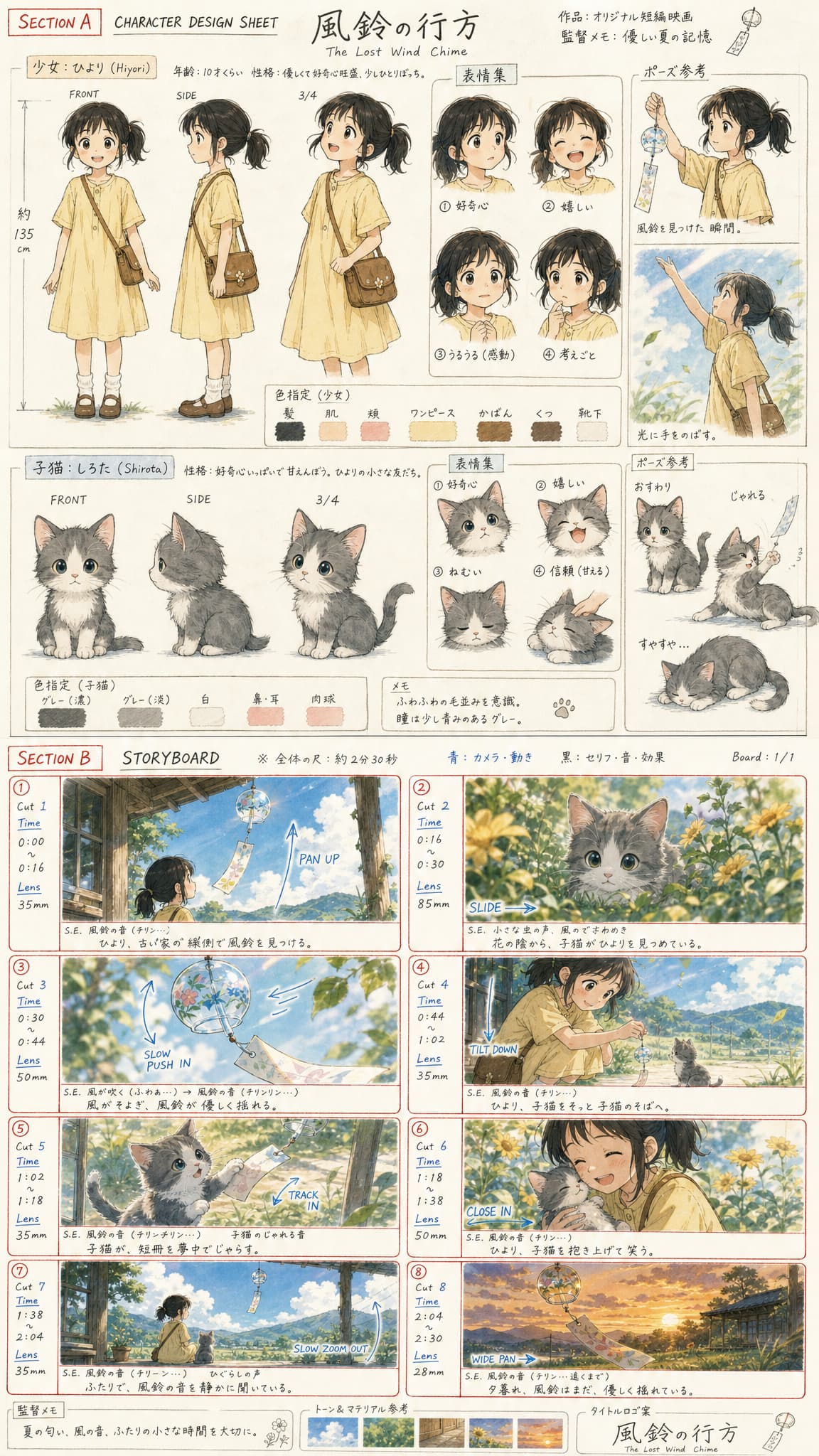
3. AI Anime Tennis Character to Video Generator
Generate a 16:9 anime tennis character design poster, then turn it into a high-energy sports battle video with Seedance 2.0.
Best for
character videos, sports action, anime-style motion
Why this prompt works
The prompt keeps the character concept consistent while asking for a focused athletic action. This is useful when you need Seedance 2.0 to preserve a designed character through movement.
Seedance 2.0 prompt
Character A — LUNA SOLACE 17-year-old female tennis prodigy. Light skin, sharp almond eyes, sporty messy bun with loose strands, neon yellow visor. Oversized off-white cropped sports tee with loose silhouette. Layered neon yellow tennis skirt-shorts with black inner compression shorts. Chunky white sneakers with neon accents. Aggressive baseliner with explosive footwork and heavy topspin attacks. Personality: calm, analytical, quietly dominant. Character B — MINT ASHE 17-year-old female tennis player. Light olive skin, cool-toned makeup, teal headband, dark oversized performance shirt. White tennis shorts with teal accents. White-and-mint sneakers. Counter-defense specialist with elegant movement and precision timing. Personality: composed, tactical, mentally unshakable. ENVIRONMENT: Outdoor hard court tennis arena during bright summer afternoon. Clean blue sky with drifting clouds. Palm trees and modern city architecture visible in the far background. Strong sunlight creates vivid shadows on the court surface. Slight wind movement in clothing, hair, and tennis net. Stylized sports anime atmosphere. MUSIC: Fast-paced electronic sports soundtrack with energetic percussion and bass progression. Music gradually intensifies during the rally. Final finishing point accompanied by dramatic beat drop and cinematic pause. VISUAL STYLE: Stylized anime sports cinematic. Painterly digital illustration style. Large summarized color blocks. Visible hard-edge brush strokes. Heavy shadows and bright sunlight contrast. Simplified structure with dynamic hand-painted texture preserved. No photorealism. No realistic CGI. No commercial sports ad feeling. Inspired by modern anime openings and stylized sports key visuals. SHOT 1 — Aggressive Opening Serve Smooth transition, medium shot, 50mm lens, low-angle tracking shot. LUNA SOLACE tosses the tennis ball upward confidently and launches a powerful spin-heavy serve. Neon yellow motion streaks follow the racket swing. The ball slams into MINT ASHE’s court with explosive bounce and visible topspin trails. MINT instantly reacts with elegant lateral movement and completes a precise defensive return. Clear racket-to-ball contact shown. Sunlight flashes dynamically across the court. SFX: Powerful racket hit Ball bounce Sneaker friction Wind ambience SHOT 2 — Tactical Rally Exchange Smooth transition, side medium shot, 50mm lens, horizontal tracking. After the return, the spinning tennis ball bounces sharply. LUNA quickly transitions into a deceptive backhand feint attack. The tennis ball curves dramatically with visible painterly spin trails. MINT ASHE calmly adjusts footwork and prepares counter positioning. Camera tracks the ball horizontally at high speed. SFX: Sharp racket impact Fast air slicing Rapid footsteps SHOT 3 — POV Counterattack Smooth transition, POV shot from LUNA perspective, 35mm lens, forward tracking. A high-speed spinning tennis ball rushes directly toward camera. MINT ASHE appears calm and focused across the court. LUNA swings explosively and launches a diagonal topspin counterattack. Dynamic motion blur and stylized speed lines burst outward from the impact point. Court lines streak rapidly beneath the frame. SFX: Heavy racket impact Air rush Court friction SHOT 4 — Extreme High-Speed Rally Smooth transition, side medium-long shot, 50mm lens, horizontal moving tracking. Both players enter a rapid high-pressure rally phase. MINT ASHE continuously performs elegant slice returns and defensive counterattacks with graceful movement. LUNA aggressively responds with explosive diagonal drives, jumping smash attacks, and relentless offensive pressure. Every racket-to-ball impact is clearly visible. Camera movement becomes increasingly dynamic. Painterly speed effects and sunlight flashes intensify continuously. Background crowd becomes blurred from speed and motion. SFX: Continuous racket impacts Rapid ball bounce rhythm Sneaker screeches Crowd ambience building SHOT 5 — Final Winning Point Smooth transition, dramatic close-up shot, 50mm lens, slow orbiting camera. LUNA SOLACE leaps upward under intense sunlight and delivers the final finishing smash. The tennis ball flies at extreme speed with neon yellow spin trails toward MINT ASHE. MINT desperately attempts a final return but narrowly misses. The tennis ball lands perfectly inside the court. The soundtrack suddenly pauses for impact emphasis. LUNA lowers her racket slightly and reveals a subtle confident smile. Bright sunlight shines across her face while wind moves her hair softly. Camera slowly rotates around her. SFX: Final smash impact Ball landing Heavy breathing Crowd eruption
Try the AI Anime Tennis Character to Video Generator workflow
Open the full Canvas setup with reference images, video node, and Seedance 2.0 prompt already connected.
Open Workflow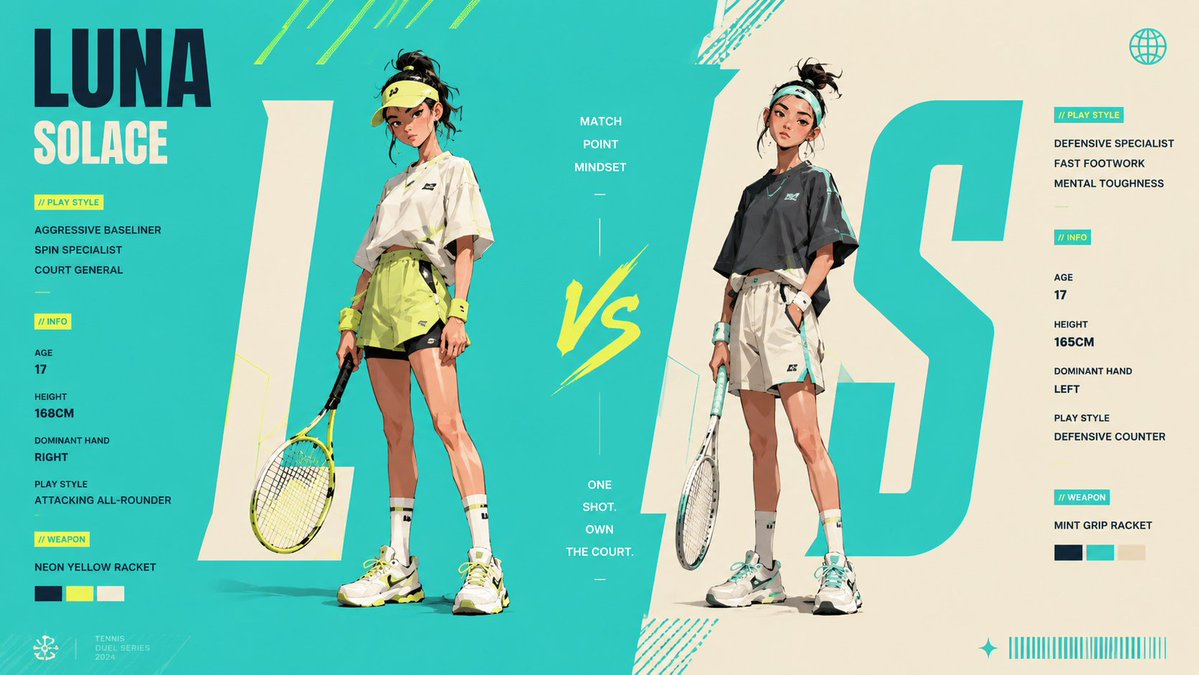
4. AI Anime Cooking Storyboard to Video Generator
Create a 16:9 golden fried rice anime storyboard, then turn it into a fast-paced cooking animation with Seedance 2.0.
Best for
food videos, anime cooking scenes, social video concepts
Why this prompt works
Food prompts work best when they describe texture, timing, and camera proximity. This template gives Seedance 2.0 a specific dish scene and a motion target instead of a vague cooking request.
Seedance 2.0 prompt
Create a 15-second horizontal 16:9 anime cooking video based on the uploaded storyboard image. Theme: Golden Fried Rice. Follow the storyboard panel order closely and turn it into a fast-paced cooking sequence with fluid camera movement and strong appetite appeal. Flow: Ingredients → chopping green onion → cracking and mixing eggs → heated Chinese wok → adding egg and rice → wok tossing with rising flames → golden fried rice close-up → plating → final hero shot. Style: High-quality anime film look, cinematic lighting, elite cooking-anime key animation, high detail, vivid colors, strong sizzling energy, steam, flames, shimmering oil, glossy rice grains, fluffy egg, char siu, and green onion textures. The image should feel hot, beautiful, clean, and impactful. Editing: Use rhythmic fast cuts, close-ups, extreme macro shots, low angles, overhead shots, quick pans, and satisfying match cuts. Keep the video energetic, stylish, and satisfying while making the cooking process easy to understand. Important: Do not make a static slideshow. Naturally animate the hand movements, Chinese wok motion, flying rice grains, steam, flames, and oil shimmer. Maintain the same kitchen atmosphere, same anime style, and continuous golden fried rice visual identity throughout the whole video. No subtitles, logos, watermarks, or social media UI. Sound: Include crisp chopping sounds, egg mixing, sizzling hot oil, spatula and wok impacts, flame whooshes, fried rice tossing sounds, and a soft final plating sound.
Try the AI Anime Cooking Storyboard to Video Generator workflow
Open the full Canvas setup with reference images, video node, and Seedance 2.0 prompt already connected.
Open Workflow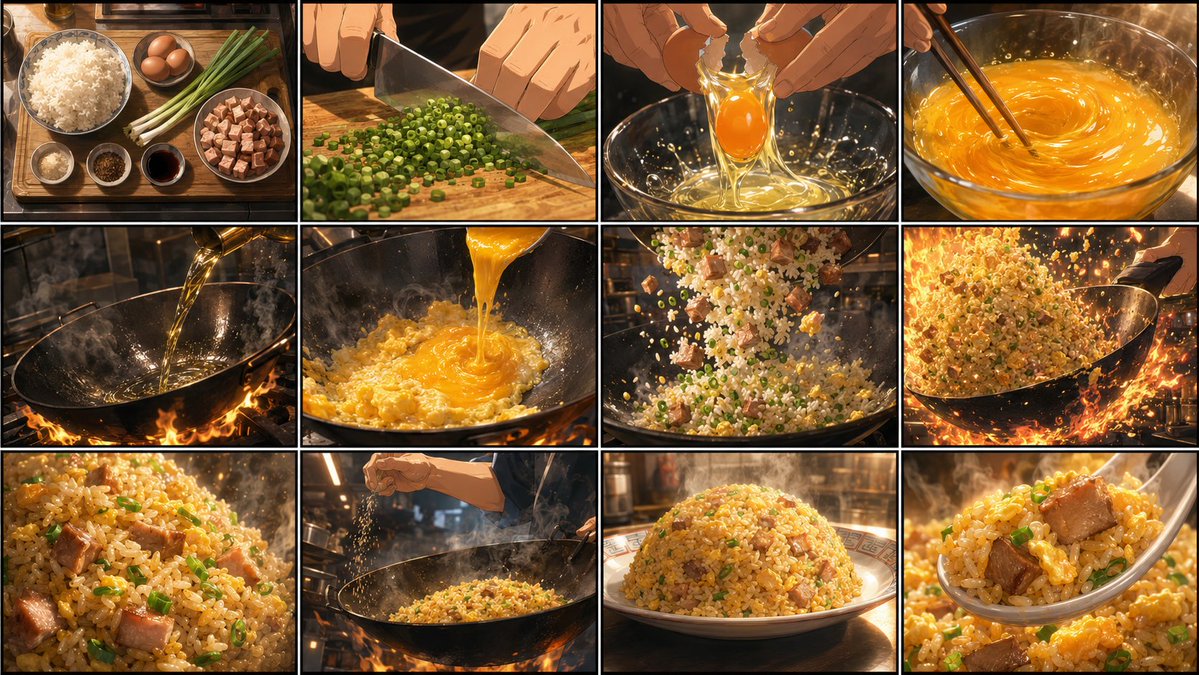
5. AI Storyboard to Video
Create a storyboard first, then turn it into a short video.
Best for
product ads, sneaker commercials, launch videos
Why this prompt works
The product is established visually before the video step. The motion prompt can then focus on impact, camera energy, and commercial pacing while preserving the shoe design.
Seedance 2.0 prompt
Transform this storyboard into a high-energy basketball shoe advertisement. Follow each storyboard shot in sequence: empty dark court with lights instantly turning on, shoe close-up showcasing air midsole details, athlete lacing up, explosive jump for dunk with frozen mid-air moment, background motion blur, shoe hitting ground hard with dust rising, athlete roaring in celebration, finally ending with brand logo + tagline + shoe side profile panorama. Fast-cut rhythm, high contrast, top-tier sports ad quality.
Try the AI Storyboard to Video workflow
Open the full Canvas setup with reference images, video node, and Seedance 2.0 prompt already connected.
Open Workflow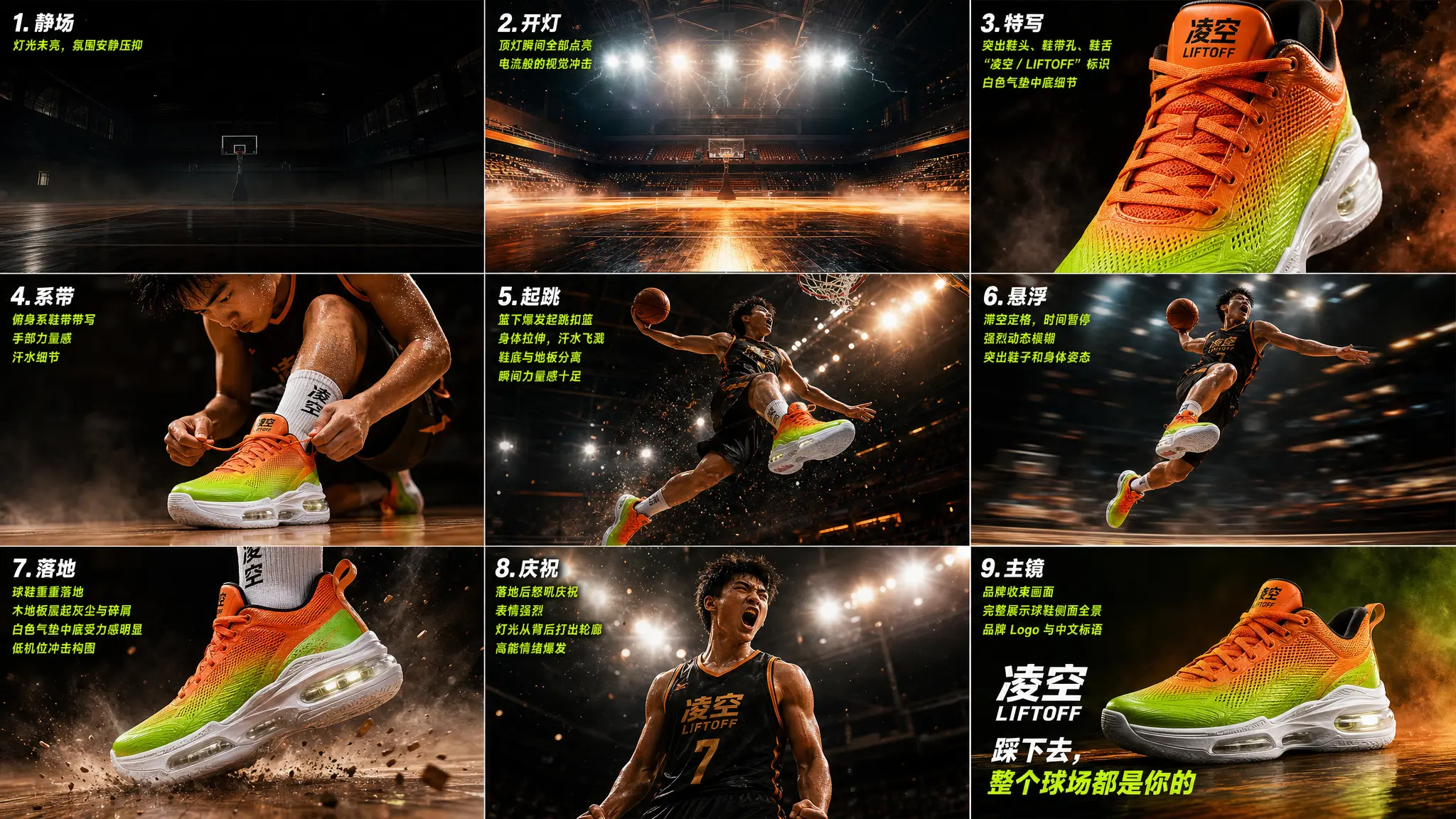
6. Seedance 2.0 Cat Motion Path Video
Generate a living-room scene and cat POV with GPT Image 2, then use Seedance 2.0 to create a one-take POV tracking video of a white cat moving through the room.
Best for
motion-path videos, POV tracking shots, one-take camera experiments
Why this prompt works
This is a strong example of reference-guided prompting: a generated scene, a cat POV frame, and a red path reference combine to control the final one-take movement.
Seedance 2.0 prompt
Third-person POV, one-take following the white cat as it follows the red path. Strictly follow the red path depicted in the provided image. The cat jumps up on to the people according to the red path. No on-screen path lines, no arrows, no jump cuts - ONE CONTINUOUS TAKE
Try the Seedance 2.0 Cat Motion Path Video workflow
Open the full Canvas setup with reference images, video node, and Seedance 2.0 prompt already connected.
Open Workflow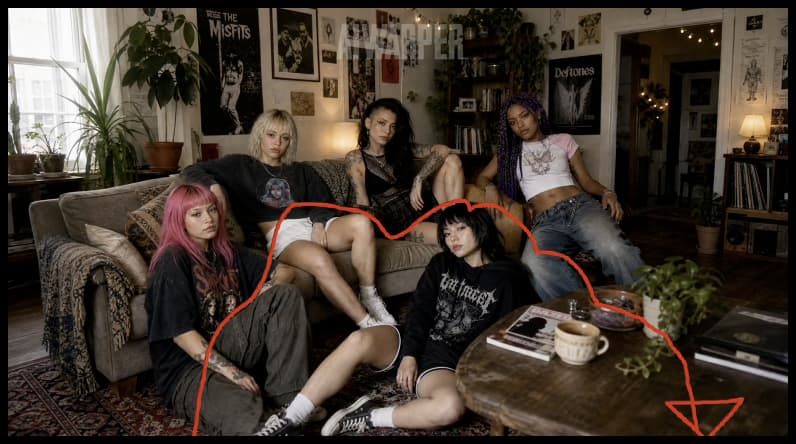
How to write a good Seedance 2.0 prompt
A good Seedance 2.0 video prompt is usually motion-first. Let the reference image define the look, then use the prompt to explain what changes over time: who moves, how the camera moves, how fast the scene unfolds, whether the shot has cuts, and what details must remain stable.
For more structured prompting advice, read the full Seedance 2.0 prompt guide. If your workflow starts from storyboard images, the Storyboard to Video AI page explains how to generate panels first and animate each shot afterward.
Key takeaway
These six Seedance 2.0 prompts show the same pattern: lock the visual reference, then use the video prompt to control motion. Start with one example, replace the subject or scene, and keep the camera instructions clear.
Frequently Asked Questions
What is a Seedance 2.0 prompt?
A Seedance 2.0 prompt is a structured AI video instruction for generating or animating a shot with Seedance 2.0. It usually defines the subject, reference image, action, camera movement, timing, transition style, and details that must stay consistent.
How do I use these Seedance 2.0 prompts?
Open a Seedance 2.0 template, review the reference image and video prompt, then generate the video directly or adjust the subject, scene, product, motion path, or camera direction before running the prompt.
How do I write a good Seedance 2.0 prompt?
Start with a clear reference image, then describe the motion over time: who moves, how the camera moves, how fast the action happens, whether the shot has cuts, and what visual details must remain stable.
Should I use GPT Image 2 before Seedance 2.0?
For storyboard-to-video and product videos, yes. GPT Image 2 can define the keyframe or storyboard first, while Seedance 2.0 focuses on motion, camera direction, and timing. This usually gives more control than prompting video from scratch.
Where can I try Seedance 2.0 prompts?
You can try Seedance 2.0 prompts in Oimi Canvas by opening a ready-made template, replacing the reference image or prompt details, and generating a new AI video in the same workflow.
What types of Seedance 2.0 prompts work best?
Seedance 2.0 works well with prompts that have a clear reference image, a specific action, professional camera language, and constraints such as one continuous take, no jump cuts, consistent character, or product detail preservation.