
LinkedIn Headshot AI Prompts: 10 Copy-Paste Looks (2026)
By Chris Morgan
A professional headshot is the first thing people read on LinkedIn — before your headline, before your about section. The usual fix is a few hundred dollars and a studio booking; the fast fix is a LinkedIn headshot AI prompt. Paste one of the ten below into ChatGPT, Gemini, or Midjourney, attach one clear photo of your face, a studio-grade AI headshot you can use as your LinkedIn profile picture — suit, lighting, backdrop and all — in about a minute.
Quick answer: copy a prompt, attach a front-facing photo of yourself, and add this line at the very front if the prompt doesn't already lock your face: keep the exact same face, skin tone, and features from the photo I upload. Do not change my identity. Every example on this page was generated from the prompt shown with it, so what you see is what the text actually produces.
Prefer one workspace? Every prompt on this page also runs inside Oimi AI Studio Canvas — 30+ top image models including GPT-Image-2.5 and Nano Banana 2 in one place, free to try. Paste the prompt, drop in your photo, and see which model keeps your face best under the studio lights.
How to use these prompts
- Pick your lane. The first three are classic headshot looks recruiters expect. The middle four add presence and personality — color backdrops, magazine energy. The last three are lifestyle and editorial shots for when a plain studio headshot feels too stiff.
- Upload the right photo. Front-facing, even light, no sunglasses, no hat, face filling a good part of the frame, and taken recently enough that it still looks like you. The AI can restyle everything except the one thing that matters: your face.
- Fill the brackets, keep the scaffolding. Wherever a prompt says "the reference image" or "the uploaded face," that slot is your photo. The words around it are the photography direction — lens, lighting, backdrop — and they're what make the result look shot, not rendered.
- Fix in one line, not a redo. Keep everything the same, only make the background lighter beats regenerating from scratch and hoping.
Two ground rules worth keeping: upload only your own photo — never a colleague's, a celebrity's, or anyone else's — and keep real people out of your prompts. A headshot is a claim about who you are; make it a true one.
The headshot classics
The classic corporate headshot
Gray suit, white shirt, navy tie, soft studio gradient — the safest possible first impression, written as a structured JSON brief. The clever part is the reference_usage block: it borrows the photography from a shot you like while explicitly refusing to copy the face.
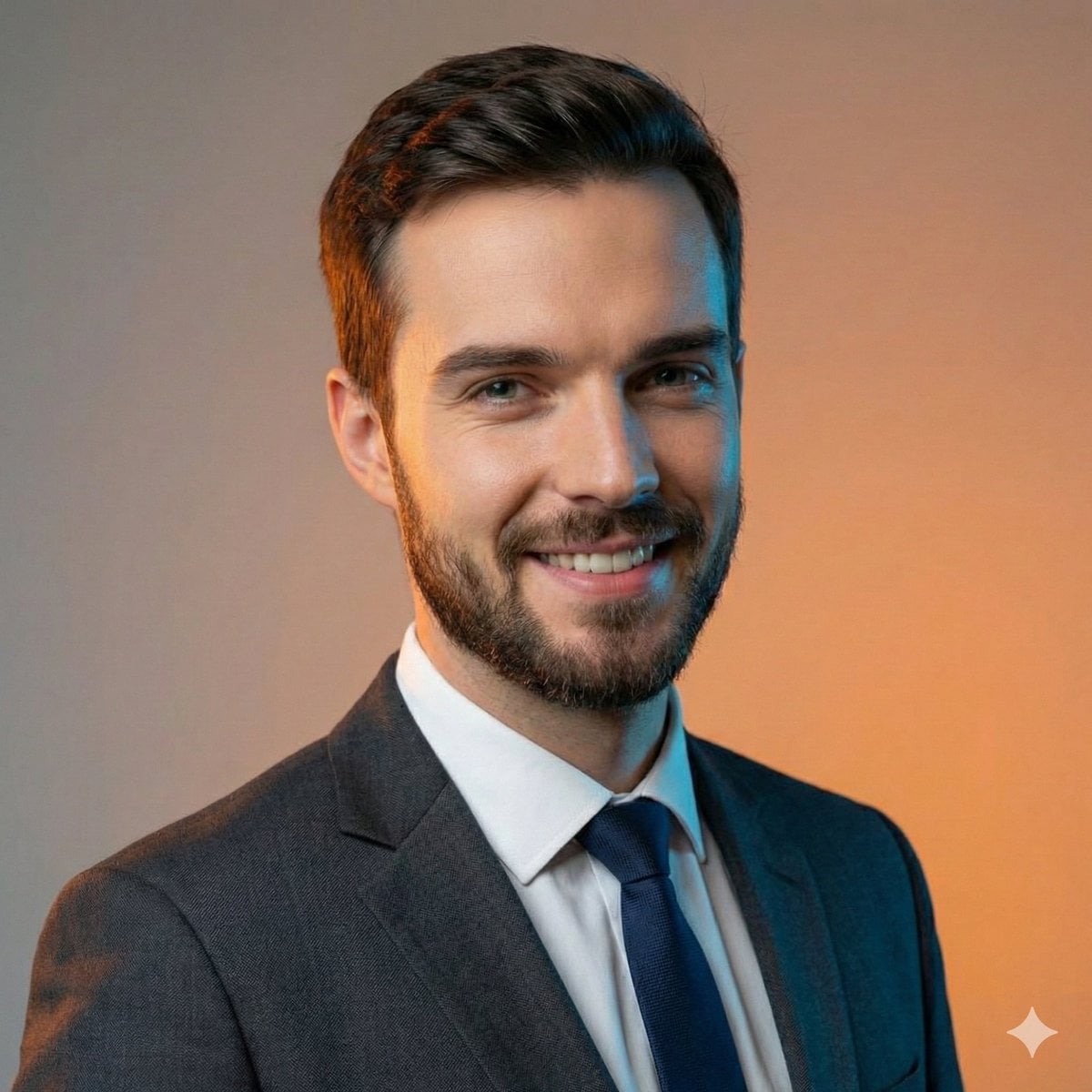
{
  "reference_usage": {
    "use_reference_for": [
      "pose",
      "framing",
      "camera_angle",
      "lighting_style",
      "background_style",
      "overall_composition"
    ],
    "do_not_copy": [
      "face",
      "facial_structure",
      "identity",
      "celebrity_likeness"
    ]
  },
  "scene": {
    "type": "studio",
    "background": "smooth_neutral_gradient_same_as_reference",
    "lighting": "soft_balanced_professional_studio_lighting_same_as_reference"
  },
  "subject": {
    "identity": "generic_adult_male_not_a_real_person",
    "age_range": "late_20s_to_mid_30s",
    "pose": "upright_head_and_shoulders_pose_same_as_reference",
    "expression": "confident_friendly_smile_similar_intensity",
    "gaze": "direct_eye_contact_with_camera",
    "hair": {
      "style": "short_neatly_groomed",
      "color": "dark_brown_or_black"
    },
    "facial_features": "original_unique_face_not_matching_reference"
  },
  "outfit": {
    "type": "formal_business",
    "jacket": "tailored_dark_gray_suit",
    "shirt": "clean_white_dress_shirt",
    "tie": "navy_blue_classic"
  },
  "camera": {
    "framing": "tight_head_and_shoulders",
    "angle": "straight_on_same_as_reference",
    "lens": "85mm_portrait",
    "aperture": "f2.8",
    "depth_of_field": "shallow",
    "focus": "razor_sharp_on_face"
  },
  "style": {
    "look": "photorealistic_high_end_corporate_portrait",
    "skin_texture": "natural_realistic",
    "contrast": "clean_professional",
    "detail_level": "high"
  },
  "negative_prompt": [
    "celebrity",
    "famous person",
    "lookalike",
    "same face as reference",
    "identity match",
    "overly stylized",
    "cartoon",
    "illustration",
    "blur",
    "low quality"
  ]
}
Tweak: the JSON format is the point — swap "jacket": "tailored_dark_gray_suit" for "tailored_navy_suit" and everything else holds. If your result drifts from your face, the do_not_copy block is doing its job; add but keep my face exactly as in the uploaded photo after the JSON.
The ID-photo look
Direct flash, cool blue backdrop, a hint of print glare — it reads like the most trustworthy photo in a stack of applications. The scanned-photo finish is what separates it from every glossy avatar out there.
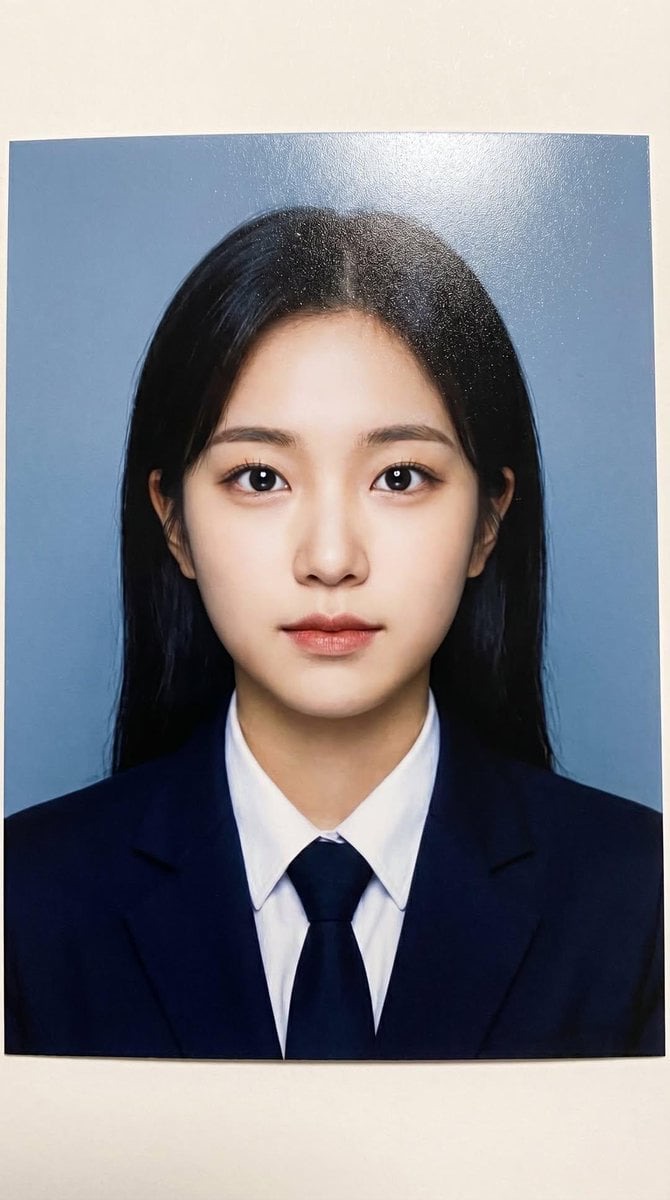
Photorealistic printed portrait of a young woman using the exact same face from the reference image. Centered head-and-shoulders composition like a school ID photo. She wears a navy blazer, white shirt and tie. Direct flash lighting creates even exposure and bright eye reflections. Subtle semi-gloss print shine with mild glare and fine paper grain. Cool blue backdrop, slight ink warmth, realistic scanned photo look.
Tweak: swap "cool blue backdrop" for light gray and you get the European passport vibe; for LinkedIn specifically, keep the blazer and lose the tie by writing navy blazer over a white shirt, open collar.
The executive power pose
Full-length, low angle, olive suit against a dark plinth with volumetric haze — this is the "about to keynote" shot. It works as your profile picture cropped tight, and doubles as the speaker-bio image you'll be asked for eventually.
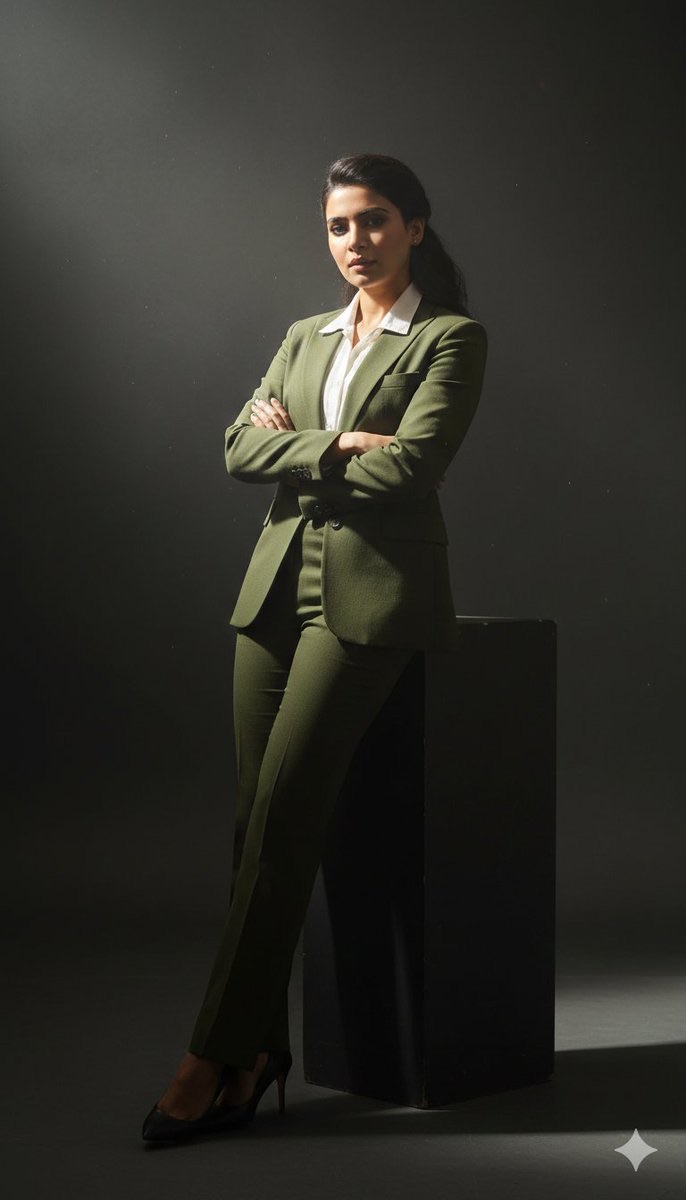
{
  "prompt": "Cinematic full-body studio portrait of a subject using the uploaded face as exact reference (preserve identity, facial structure, and proportions). Slightly low-angle perspective with a 35mm lens for a commanding, sophisticated presence. Subject leaning casually against a dark minimalist plinth, arms crossed. Wearing a perfectly tailored slim-fit olive green suit and a crisp white dress shirt, top buttons undone. Intense chiaroscuro lighting with a single powerful volumetric spotlight from the upper-left, cutting through subtle atmospheric haze with swirling smoke and micro-dust particles. Sharp rim highlights along shoulders and silhouette, deep velvety shadows across the body, high-contrast moody aesthetic. Hyper-realistic textures, visible fabric weave, subtle reflections on a polished studio floor, professional cinematic lighting, ultra-detailed, 8K resolution, no text, no watermark.",
  "resolution": "7680x4320",
  "camera": {
    "lens": "35mm",
    "angle": "slightly low-angle",
    "aperture": "f/2.0",
    "iso": "100",
    "shutter_speed": "1/125"
  },
  "quality": "ultra-high",
  "style": "cinematic, hyper-realistic, studio photography",
  "negative_prompt": "blurry, low-resolution, overexposed, underexposed, flat lighting, cartoon, CGI, plastic skin, extra limbs, distorted hands, bad anatomy, asymmetry, watermark, logo, text"
}
Tweak: the low angle is what adds the authority — if the result feels too aggressive for your field, change "slightly low-angle" to "eye-level" and the same image turns approachable.
Presence & personality
The violet-background corporate portrait
A three-point-lit classic headshot that refuses the boring gray backdrop. The saturated violet does the differentiating; the striped tie and charcoal-navy wool keep it credible.
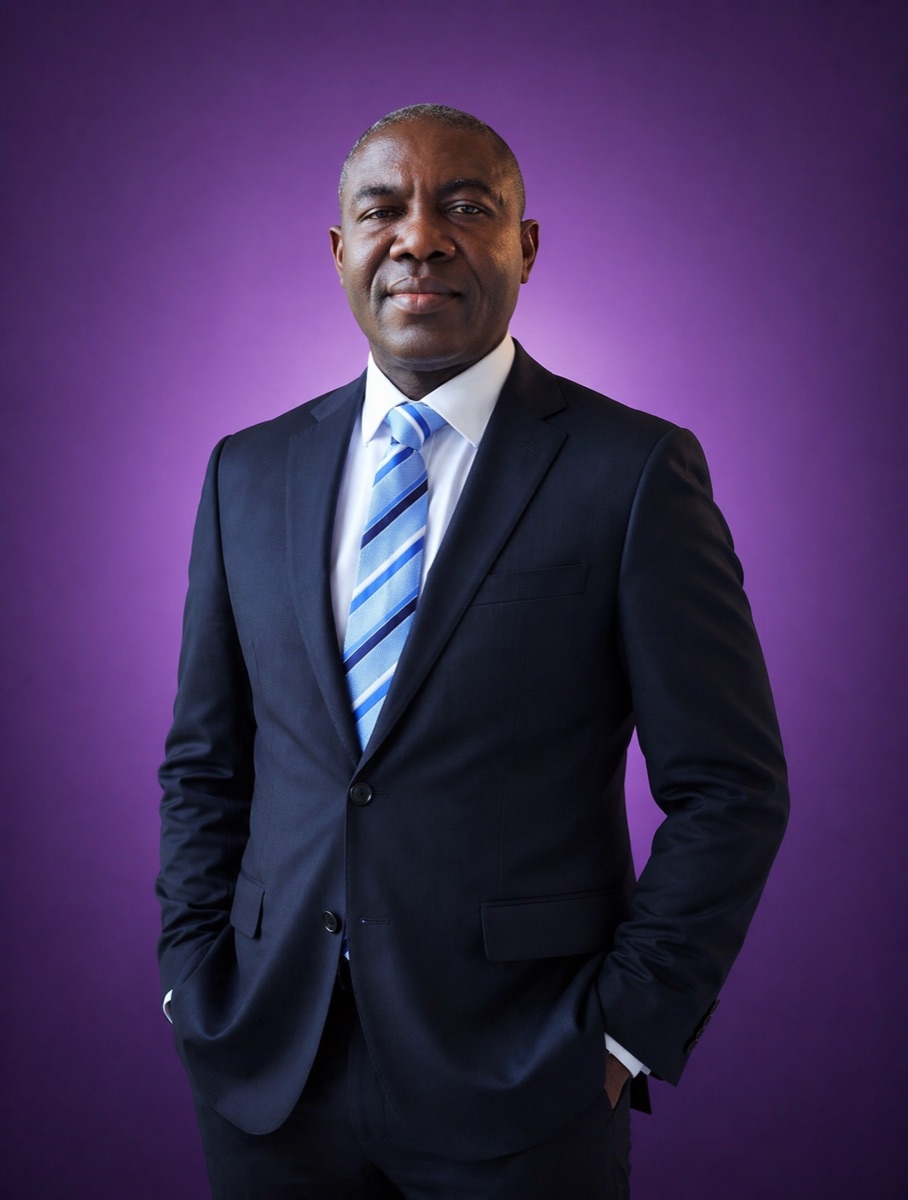
A professional middle-aged man with a dark complexion stands in a centered portrait pose, wearing a tailored charcoal navy wool suit and a crisp white shirt accented by a diagonal blue-striped silk tie. The lighting is a clean, multi-point studio setup that creates soft facial modeling and minimal shadows, emphasizing the fine texture of the fabric and skin. A vibrant, solid violet backdrop provides high-contrast color separation, with a subtle radial gradient emanating from behind the subject to create depth. The composition is a classic corporate headshot, maintaining sharp focus on the eyes and facial features while ensuring the formal attire remains crisp and well-defined against the saturated monochromatic background.

* **Style:** Professional corporate studio photography
* **Key elements:** Middle-aged man, tailored suit, striped tie, solid violet background
* **Lighting:** Three-point studio lighting, soft diffused frontal key light, neutral color temperature
* **Camera:** Medium shot, 85mm lens, eye-level, f/5.6 aperture
Tweak: "vibrant, solid violet" is a variable, not a constant — deep burgundy, forest green, or slate blue all keep the same lighting math while matching your industry's palette.
The tech-founder portrait
Black turtleneck, matte blazer, lime-green rim light — the Jobs-by-way-of-2026 look. Written in four short paragraphs that each own one job: face, backdrop, camera, and the face-lock line at the end.
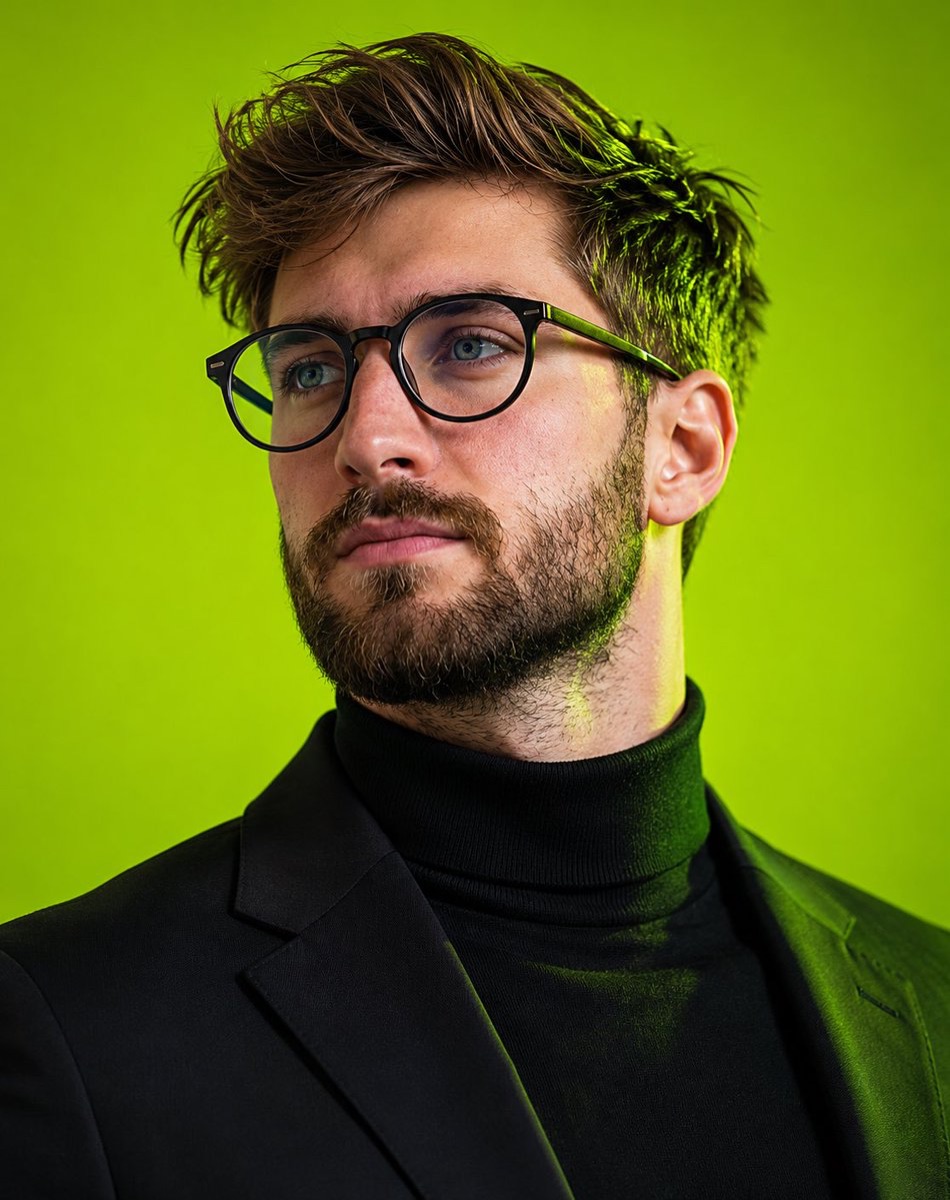
Ultra-realistic editorial portrait of a young man with tousled textured brown hair, piercing blue eyes, and a neatly groomed short beard. Wearing matte black round eyeglasses, a black turtleneck sweater, and a tailored black blazer. Medium close-up framing, looking slightly off-camera with a calm, intelligent, confident expression.

Vibrant neon lime-green seamless studio background with subtle gradient. Dramatic green rim lighting illuminating the hair, jawline, neck, and shoulders, creating a futuristic cinematic atmosphere. Professional fashion photography, luxury magazine cover aesthetic, ultra-detailed skin texture, visible pores, natural beard detail, sharp eyes, realistic reflections on glasses, high dynamic range.

Soft key light from the front, subtle fill light, shallow depth of field, crisp focus on facial features, premium color grading, modern tech-founder style, minimalist composition, photorealistic, hyper-realistic, 8K, HDR, commercial advertising campaign quality.

Shot on an 85mm lens, f/1.8, ISO 100, studio lighting setup, ultra-sharp detail, centered composition, clean background, Vogue editorial photography, award-winning portrait photography.

Add for face consistency:

Face closely matches the uploaded reference image, preserving the same facial structure, hairstyle, eye shape, beard pattern, skin tone, and overall identity while adapting only the pose, lighting, wardrobe, and background.
Tweak: if you don't wear glasses, delete the eyeglasses sentence entirely — don't let the model add frames your colleagues have never seen on you. Same logic for the beard.
The magazine-cover moment
The "30 under 30" energy shot: seated on a luxury sofa, glowing skin, elegant glasses, editorial lighting. The version below keeps the magazine generic so your mock cover doesn't borrow a real masthead's brand.
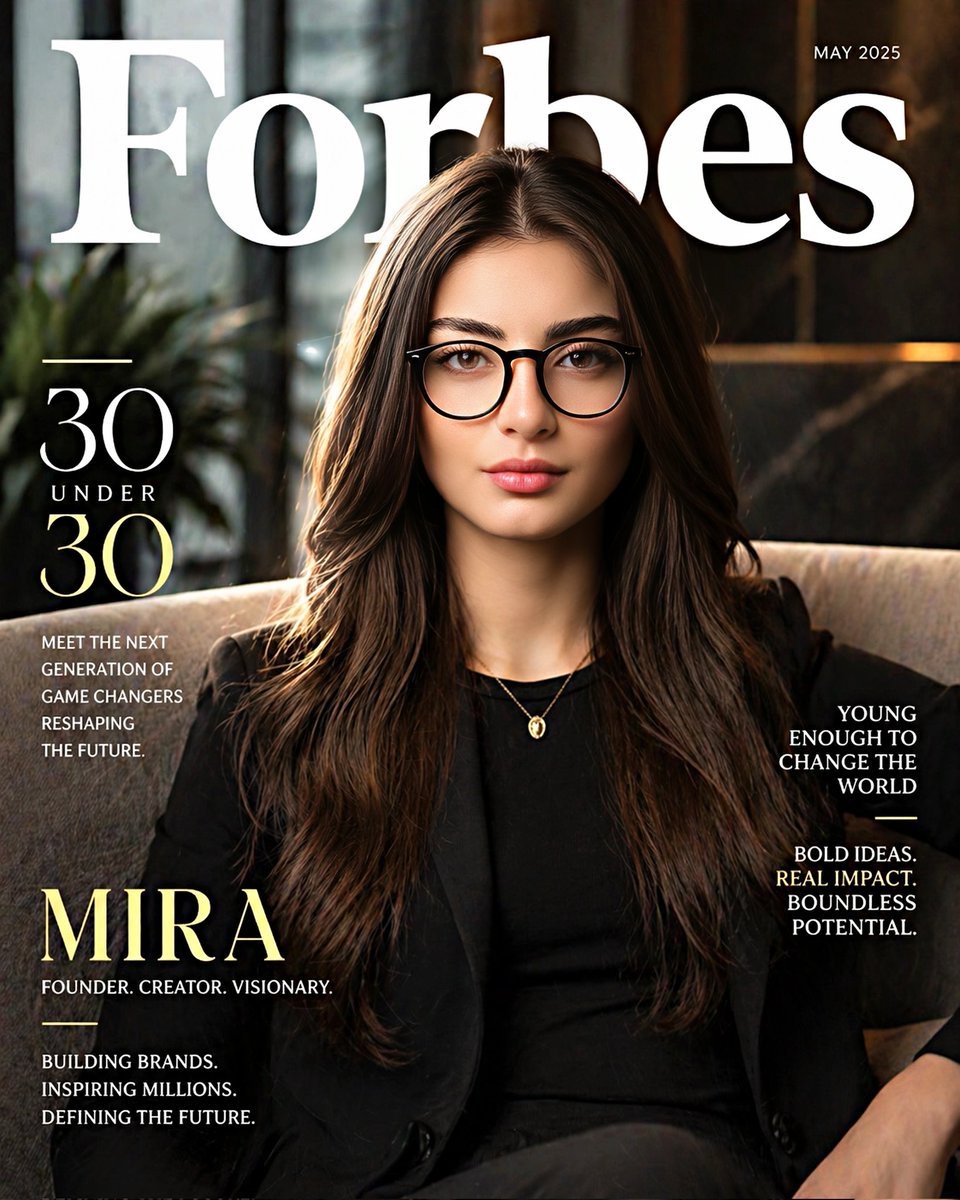
Create a hyper-realistic top business magazine “30 Under 30”-style cover portrait of the same woman from the reference image (preserve her exact facial features, identity, and expression 100%). She is sitting confidently on a modern luxury sofa in a high-end office or studio environment. She has a radiant, glowing skin tone with soft, natural makeup, subtle highlights on cheekbones, and bright, sharp eyes behind elegant glasses. Her expression is calm, confident, and successful. Outfit: smart professional attire (minimalist black or neutral tones), clean and modern.
Tweak: ask for with bold cover typography around the subject if you want the full magazine layout for a post; keep it plain for the actual profile picture, where text just turns to noise at thumbnail size.
The all-black executive
Monochrome black-on-black tailoring against a royal blue seamless backdrop — the fashion-campaign version of a headshot. Direct eye contact and clasped hands do the "confident but listening" thing that's hard to fake in a selfie.
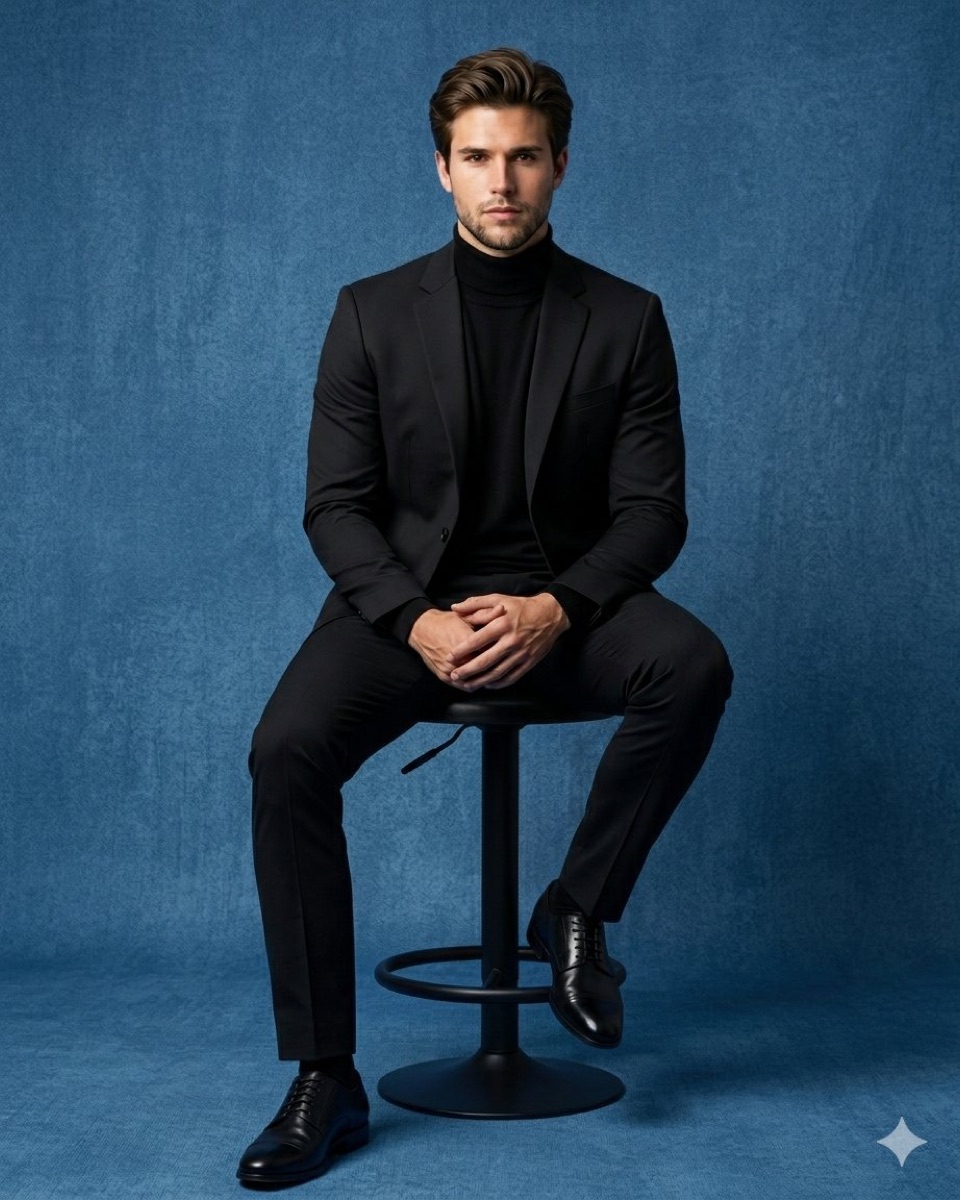
Hyper-realistic luxury studio full-body portrait of a confident young man seated on a premium matte-black designer stool. He has neatly styled brown hair, a well-groomed beard and mustache, and is looking directly into the camera with a calm, powerful, and professional expression. He wears an elegant monochrome all-black outfit: a fitted black turtleneck beneath a perfectly tailored black blazer, paired with slim-cut black trousers. His hands are naturally clasped together on his lap, projecting confidence and sophistication. Polished black leather Oxford shoes with subtle reflections; left foot firmly grounded, right foot resting on the stool's circular footrest.
Background: crystal-clear vibrant royal blue seamless studio backdrop with a flawless gradient transition, ultra-clean and distraction-free, creating a premium luxury editorial look. Soft cinematic key lighting combined with subtle rim lighting enhances facial features, fabric textures, and silhouette separation. Rich contrast, realistic skin texture, razor-sharp focus, depth and dimension, fashion-magazine quality, luxury menswear campaign aesthetic, high-end commercial photography, ultra-detailed fabrics, natural shadows, professional color grading, HDR, photorealistic, 8K masterpiece, award-winning studio portrait, extremely realistic, premium visual impact.
--ar 4:5 --stylize 250 --quality 2
Tweak: the trailing --ar 4:5 line is Midjourney syntax — in Midjourney it runs as-is, and on ChatGPT or Gemini just delete it and say vertical 4:5 portrait in plain English instead. Swap "royal blue" for warm gray and this becomes the most conservative look on the page.
Lifestyle & editorial
The approachable café portrait
Gray blazer, brick wall, warm café light, coffee cup at the edge of frame — the "I'm professional and also a person" shot that performs well for client-facing roles. Written as a full JSON scene brief.
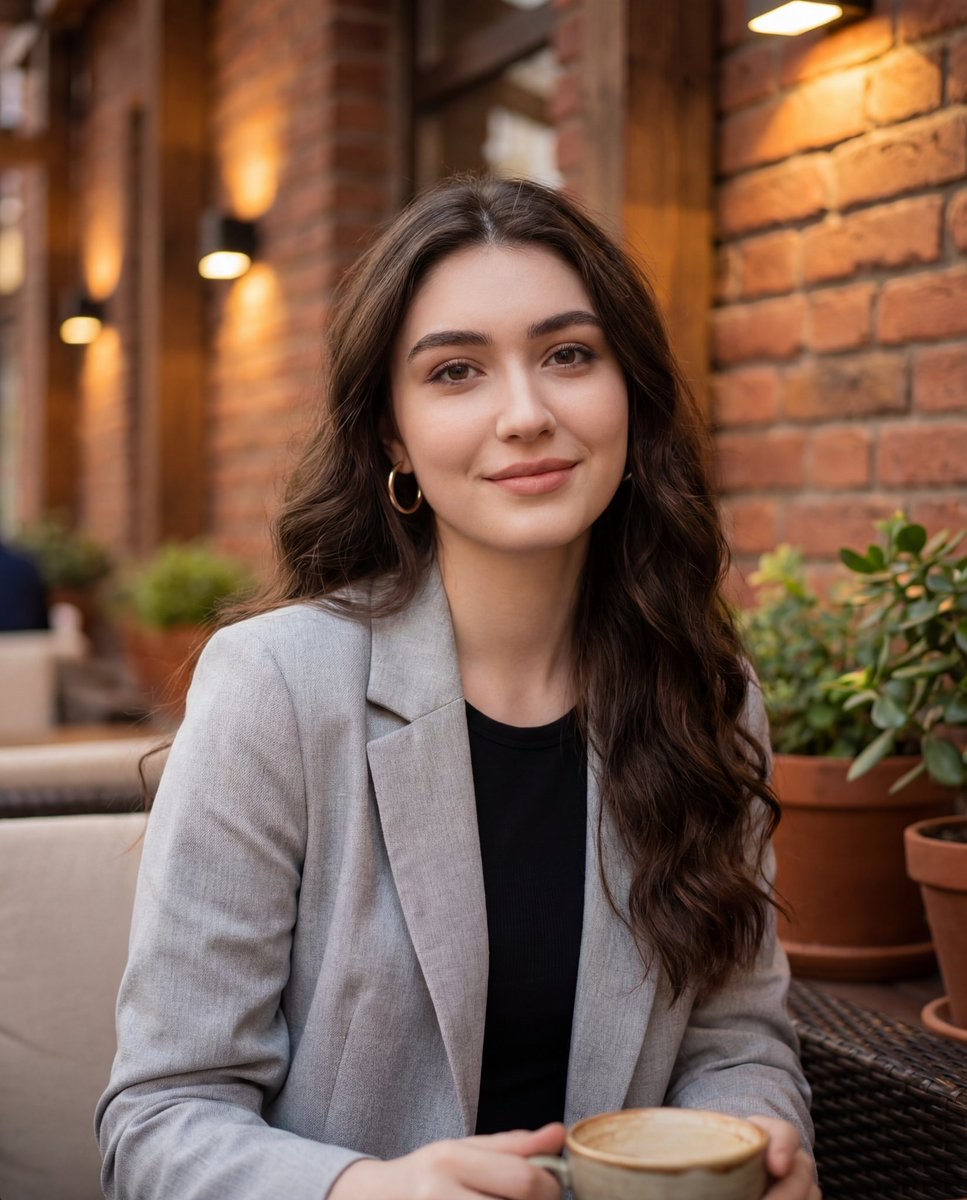
{ "image_type": "photograph", "genre": "casual lifestyle portrait", "orientation": "portrait", "composition": { "framing": "medium close-up", "camera_angle": "eye-level", "subject_position": "centered with slight right bias", "crop": "head and upper torso visible", "depth_of_field": "shallow, softly blurred background", "perspective": "natural human-eye perspective" }, "subject": { "count": 1, "gender_presentation": "female-presenting", "age_range": "young adult", "pose": "seated, relaxed posture", "expression": "soft smile, calm and approachable", "gaze": "directly at camera", "skin_tone": "light to medium warm complexion", "facial_features": { "face_shape": "oval", "eyes": "large, dark-colored", "eyebrows": "full, well-defined", "lips": "medium-full with subtle gloss", "makeup": "natural glam; defined eyelashes, eyeliner, even complexion, soft blush, neutral lip color" }, "hair": { "color": "dark brown", "length": "long", "texture": "wavy", "part": "slightly off-center", "styling": "loose, natural waves" }, "accessories": [ "medium-sized gold hoop earrings" ], "clothing": { "outerwear": "light gray coat or blazer", "innerwear": "black top", "style": "casual-chic" } }, "environment": { "setting": "outdoor café or courtyard", "background_elements": [ "brick wall", "wooden beams", "warm wall-mounted lights", "potted green plants", "outdoor seating" ], "location_type": "urban, cozy, semi-enclosed outdoor space", "time_of_day": "late afternoon or early evening" }, "lighting": { "type": "natural ambient with warm artificial accents", "direction": "front and slightly above", "quality": "soft, diffused", "shadows": "minimal, gentle facial contouring", "color_temperature": "warm-neutral" }, "color_palette": { "dominant_colors": [ "warm browns", "brick red", "gray", "black", "natural green" ], "overall_tone": "warm and inviting", "contrast": "moderate" }, "technical_details": { "camera_style": "smartphone or mirrorless camera", "lens_effect": "background blur resembling wide aperture", "sharpness": "high on subject, soft background", "noise": "minimal", "resolution": "high" }, "artistic_style": { "mood": "intimate, relaxed, friendly", "aesthetic": "modern lifestyle photography", "post_processing": "light color correction, subtle skin smoothing, enhanced warmth" }, "props": [ "cup held near bottom frame (partially visible)" ], "background_blur": { "type": "bokeh", "intensity": "medium" } }
Tweak: this one is written without a face-lock line — attach your photo and most models will carry your face into the scene, but for a guaranteed match, open the prompt with the subject is the person in my uploaded photo: keep my face exactly and simplify the facial_features block to "as in the uploaded photo".
The Scandinavian four-shot set
One prompt, four coordinated portraits: hands clasped under the chin, eyes lowered, profile with arms crossed, a close-up with the sweater sleeve near the face. Camel knit, off-white backdrop, quiet lighting — the whole set looks like one photographer spent an afternoon on you.
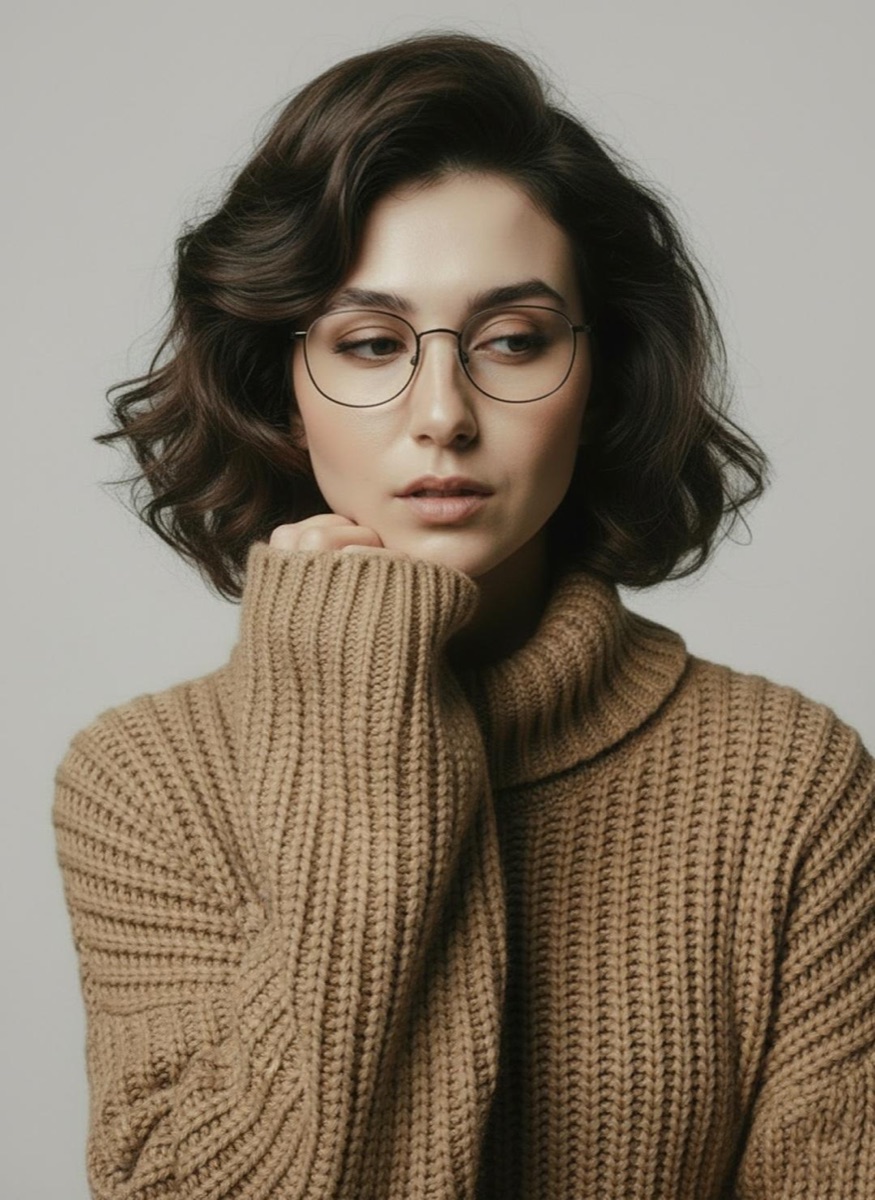
{
  "Objective": "Create a minimalist fashion studio portrait series with a calm, Scandinavian editorial mood",
  "PersonaDetails": {
    "Subject": {
      "Type": "Young woman",
      "Hair": "Short, softly waved dark-brown hair",
      "Accessories": "Thin round eyeglasses",
      "Expression": "Calm, introspective",
      "Skin": "Natural skin texture with minimal retouching"
    }
  },
  "Wardrobe": {
    "Top": "Chunky camel-colored knit turtleneck sweater",
    "Bottom": "Beige trousers",
    "Style": "Timeless autumn fashion"
  },
  "SceneDescription": {
    "Environment": "Minimalist studio",
    "Background": "Neutral off-white backdrop",
    "OverallFeel": "Clean, airy, understated"
  },
  "PortraitSeries": {
    "SeriesType": "Four-image set",
    "Poses": [
      {
        "Description": "Seated pose with hands gently clasped under the chin",
        "Mood": "Quiet, reflective"
      },
      {
        "Description": "Front-facing portrait with eyes lowered",
        "Mood": "Soft, contemplative"
      },
      {
        "Description": "Three-quarter side profile with arms crossed",
        "Mood": "Poised, thoughtful"
      },
      {
        "Description": "Close-up portrait with sweater sleeve raised near the face",
        "Mood": "Intimate, tactile"
      }
    ]
  },
  "Composition": {
    "Framing": "Varied framing from close-up to mid-length",
    "NegativeSpace": "Generous, balanced negative space",
    "DepthOfField": "Shallow depth of field for gentle separation"
  },
  "LightingAndColor": {
    "Lighting": "Soft, diffused studio lighting",
    "Highlights": "Subtle, natural highlights",
    "ColorPalette": "Muted warm neutrals (camel, beige, off-white)"
  },
  "ArtDirection": {
    "Style": "Scandinavian editorial photography",
    "Aesthetic": "Minimalist, timeless, understated luxury",
    "TextureEmphasis": "Knit fabric and natural skin detail"
  },
  "PhotographyStyle": {
    "Genre": "Professional fashion studio photography",
    "RealismLevel": "High realism with restrained processing",
    "Finish": "Clean, modern, magazine-ready"
  },
  "Mood": {
    "Tone": "Calm, introspective, serene",
    "SeasonalFeel": "Autumn warmth and quiet elegance"
  },
  "NegativePrompt": [
    "busy background",
    "harsh lighting",
    "bold colors",
    "heavy makeup",
    "over-retouching",
    "glossy fashion look",
    "street photography"
  ],
  "ResponseFormat": {
    "Type": "Portrait series",
    "ImageCount": 4,
    "Orientation": "Portrait",
    "AspectRatio": "2:3"
  }
}
Tweak: like the café shot, this one doesn't mention the reference photo — attach yours and open the prompt with the subject is the person in my uploaded photo, same face and hairstyle so all four frames come back as you. Only need one image? Change "ImageCount": 4 to 1 and keep just the pose you like.
The black-and-white Rembrandt
Single octabox at 45 degrees, deep shadows, silver aviators, black tie — the timeless-Hollywood option, and the strongest possible contrast against a feed full of color headshots.
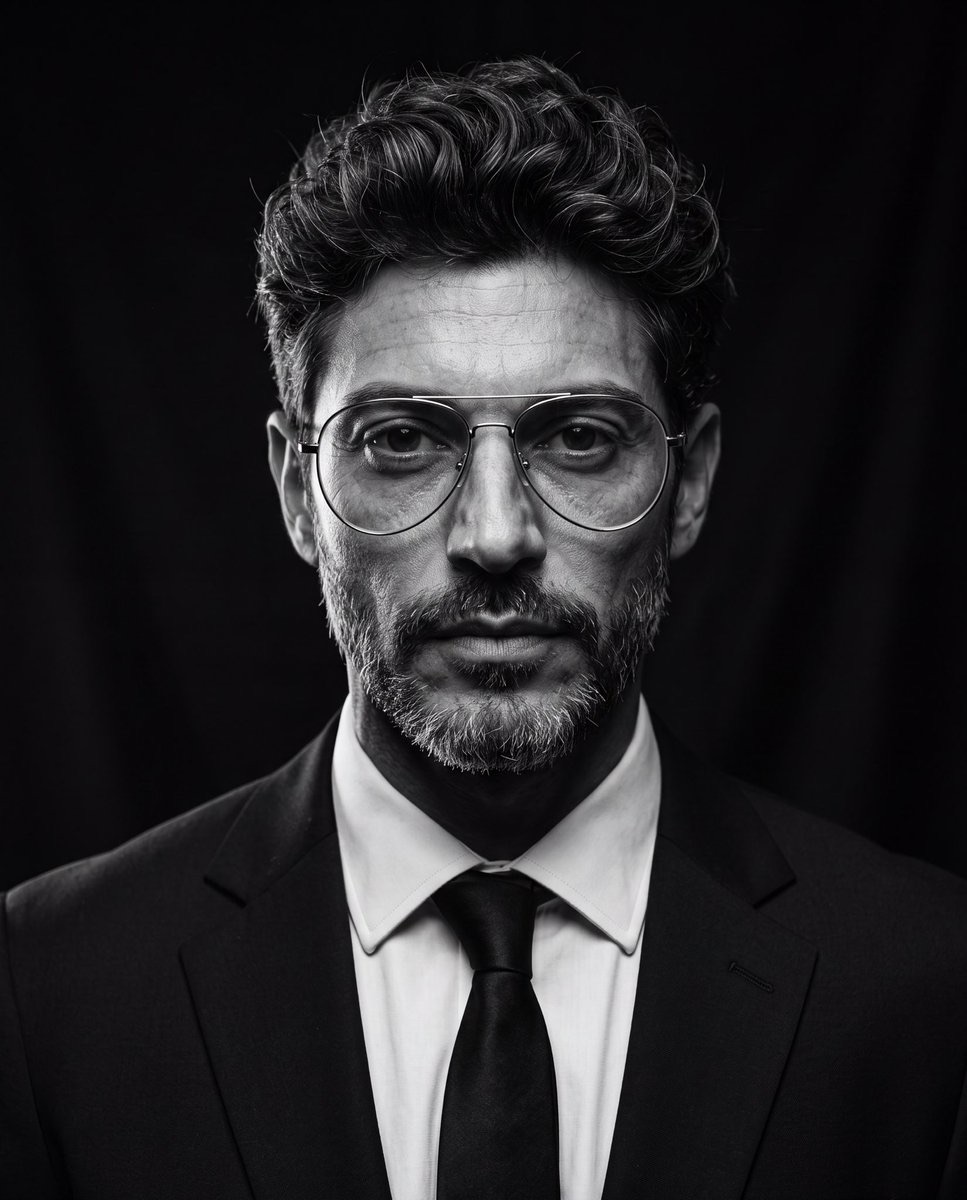
Create an ultra-realistic cinematic studio portrait of the person in the reference image. Preserve the person’s facial features and identity while styling them in a luxury editorial fashion. Give them a modern textured quiff hairstyle with medium-length hair, voluminous top, natural lift, slightly messy brushed-back texture, subtle side taper, clean sides, and realistic individual hair strands. Add thin silver metal aviator eyeglasses with large rounded lenses, minimalist frame, clear lenses, elegant luxury design, perfectly fitted to the face. Dress them in a tailored black suit, crisp white dress shirt, and black tie. Pose them looking directly into the camera with a calm, confident, serious expression. Use dramatic low-key studio lighting with a single large octabox positioned 45° above the subject, classic Rembrandt lighting, deep cinematic shadows, subtle rim light around the hair and shoulders, black seamless background, high contrast black-and-white grading, rich tonal range, crisp eyes with natural catchlights, highly detailed skin texture, realistic pores, subtle facial hair detail, shallow depth of field, Leica SL2 with APO-Summicron 90mm lens, f/2.2, ISO 100, HDR, editorial fashion photography, timeless Hollywood portrait, museum-quality, photorealistic, ultra-sharp, 8K resolution, masterpiece.

Negative Prompt

cartoon, anime, illustration, CGI, plastic skin, beauty filter, overprocessed skin, blurry, low quality, low resolution, distorted face, asymmetrical eyes, duplicate face, extra glasses, oversized glasses, thick frames, text, watermark, logo, cropped head, poor lighting, noisy image, unrealistic hair, exaggerated hairstyle, overexposed, underexposed
Tweak: the hairstyle sentence restyles your hair on purpose — if you want your own cut, replace the whole modern textured quiff... sentence with keep my hairstyle exactly as in the reference photo. The lighting is what you're here for; keep the octabox paragraph untouched.
FAQ
Do AI headshots actually work on LinkedIn?
Yes — linkedin ai headshot generated from your own picture are now common enough that nobody blinks, provided the result still looks like you. What gets flagged by viewers isn't the AI, it's the uncanny valley: plastic skin, over-whitened teeth, a jawline from 2015. The prompts on this page all ask for natural skin texture and realistic detail for exactly that reason. When in doubt, pick the shot where you'd recognize yourself in a video call.
Which photo should I upload as the reference?
One clear, front-facing photo taken within the last year or so: even lighting, no sunglasses, no heavy shadows, face filling a decent part of the frame, and only you in it. The model rebuilds the scene around your face, so garbage in, garbage out — a dim party crop will produce a polished stranger who happens to have your haircut.
ChatGPT, Gemini, or Midjourney — which one for headshots?
All three run every prompt on this page. ChatGPT handles the long structured JSON briefs (numbers 1, 3, 8, and 9) most reliably; Gemini's Nano Banana tends to keep your face most faithful through restyles like the Rembrandt; Midjourney gives the most photographic grain but needs its flags — number 7's --ar 4:5 --stylize 250 --quality 2 tail is Midjourney syntax, and on the other two you just delete it and write vertical 4:5 portrait instead. Oimi AI Studio Canvas covers all three — Midjourney included, so number 7's flags work as-is — alongside Nano Banana 2 and GPT-Image-2.5, so you can run the same prompt on several models and keep the winner, free to start.
Why doesn't my headshot look like me?
Ninety percent of the time it's the source photo, not the prompt: angled selfie, harsh shadow, or a face too small in frame. Re-shoot the reference first. If the identity is close but drifting, add keep the exact same face, skin tone, and features from the uploaded photo. Do not change my identity. at the very front — position matters, because models weight what they read first. Then fix one variable per regeneration; changing the backdrop and the outfit and the lighting at once makes it impossible to know what broke the likeness.
Is it OK to use an AI headshot professionally?
It's your face, your likeness, your profile — restyling a photo of yourself is the same category as a flattering lens, and there's no rule against it. The lines worth respecting: upload only your own photo, never generate a AI headshot in someone else's likeness (celebrity or colleague), keep minors out of it entirely, and don't push the retouching so far that the photo misrepresents you — a headshot's whole job is to match the person who walks into the interview.
Keep reading
- What Is Prompt Seen? The Trend Behind Those AI Portraits (2026) — the viral portrait-prompt format explained, with copy-paste examples
- AI Portrait Poster Prompts: 10 Copy-Paste Designs That Look Art-Directed (2026) — turn any portrait into print-quality poster art, from ink minimalism to glitch
- 10 Trending ChatGPT Photo Editing Prompts to Copy (2026) — upload your photo and try trending portrait edits free
- 100+ Awesome Nano Banana Prompts: Copy & Generate Instantly — a living library of prompts across posters, 3D miniatures, and character design
About the author
Chris Morgan writes about AI image tools and the prompt workflows behind the portraits filling Instagram and LinkedIn — what works, what quietly stops working, and why. This page is part of a running archive of looks still worth copying, refreshed as older styles start to date.