
How to Make the Bicep Heart Trend With AI – 3 Easy Modes
The bicep heart is the flex that broke the internet: curl one arm, press your other hand against the muscle, and the two halves form a heart. Simple idea — one problem. If you don't have the bicep for it, the heart doesn't close. That's why the AI version exploded: everyone gets the heart, no gym membership required.
This guide shows you how to make a bicep heart video with AI in three modes — a gym-scene version, a keep-your-own-background version, and the two-photo couple version.
What You'll Need
- One clear photo (front-facing, full body or upper body works best)
- For the couple version: one photo of each person
- That's it. No prompt writing, no video editing, no CapCut timeline.
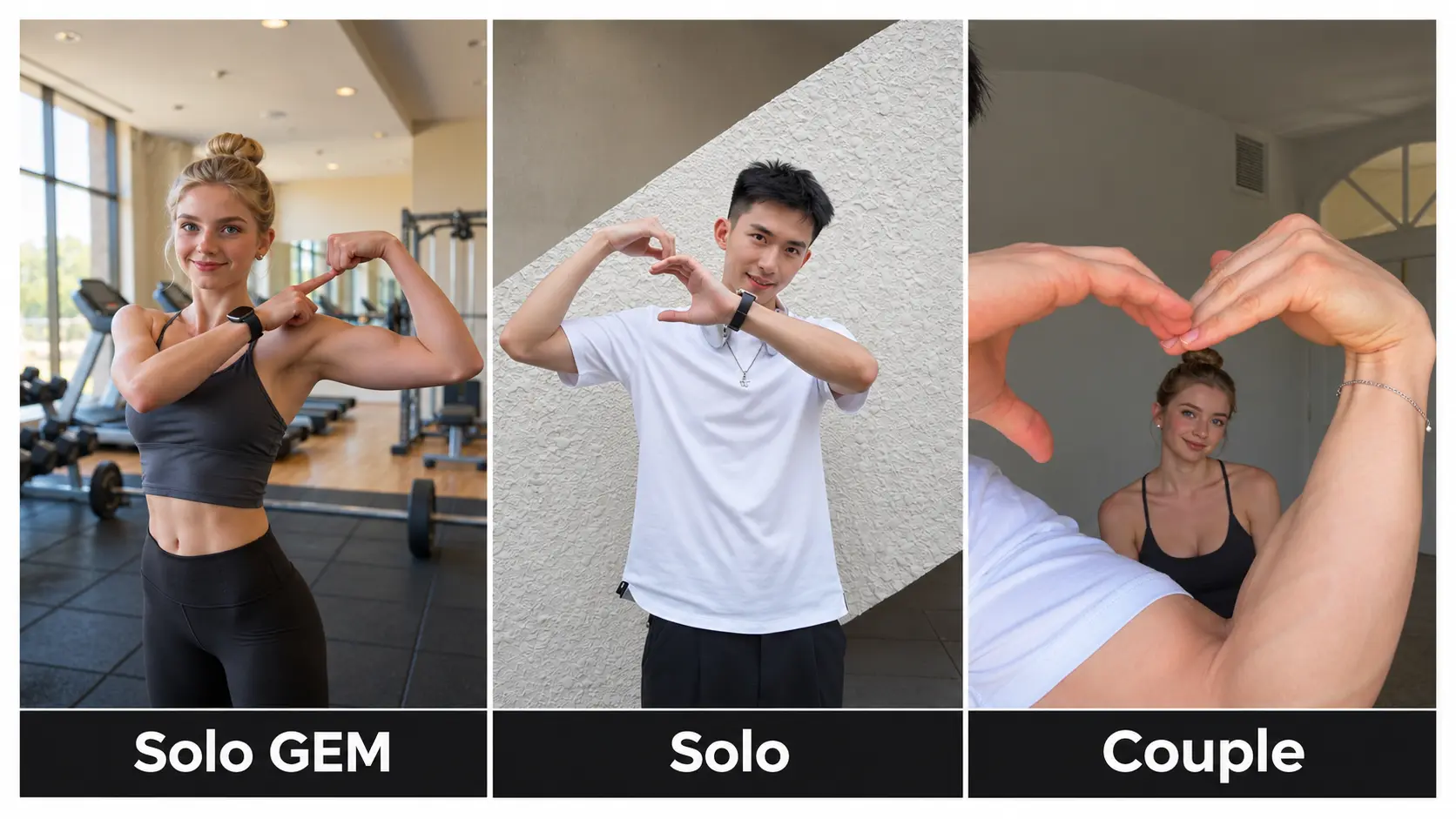
Mode 1: The Gym Scene Version
The classic. Your photo lands in a full gym setting — mirrors, dumbbells, fitness-floor lighting — and the AI performs the bicep heart like you own the place.
Steps:
- Open the Bicep Heart AI Generator and pick the Gym Scene mode.
- Upload one clear, front-facing photo of yourself.
- Click generate — in a few minutes you'll have a short vertical clip of you completing the heart in full gym glory.
Best for: the ironic flex. The more ordinary the person, the harder the gym version hits.
Mode 2: The Original Background Version
Don't want a gym? This mode keeps whatever background your photo already has — your bedroom, your office, a beach — and adds just the move.
Steps:
- Pick the Your Background mode in the generator.
- Upload a photo taken in the scene you want to keep.
- Generate — the bicep heart happens in your own world, no set change required.
Best for: matching the trend to your context: gamers in the setup, chefs in the kitchen, couples on vacation. The background does half the joke.
Mode 3: The Couple Version (Two Photos)
The most-shared format of the trend: one person flexes, the other person's hand completes the heart. Together you close a heart neither of you could alone — which is exactly why couples and best-friend pairs love it.
Steps:
- Pick the Duet mode.
- Upload one photo of each person — the flexer and the heart-hand.
- Generate and download your two-photo heart.
Best for: couples, gym partners, best friends, and the classic group-chat reply.
The Bicep Heart AI Prompt (Copy & Paste)
Want to try it in another AI video tool instead? Here's the prompt behind the trend:
A person facing the camera flexes one arm with the bicep curled, while the other hand curls into a half-heart shape and presses against the flexed bicep, completing a heart. Front-facing, slight proud smile, vertical 9:16, TikTok video style, natural lighting, short clip.
Or skip the prompt entirely — the generator above turns one photo into the finished bicep heart video, no prompt needed.
Tips for the Best Result
- Sharp, front-facing photos — the heart lands in the top third of the frame, so face quality matters most.
- One person per photo (couple mode uses two separate uploads).
- Even lighting on the face; plain backgrounds composite cleanest in the gym mode.
- An expressive or confident face sells the flex better than a neutral one.
Frequently Asked Questions
Can I do the bicep heart if I don't have muscles?
Yes — that's the entire point of the AI version. The AI renders the completed heart regardless of what you're working with in real life.
Can I use a photo of my pet?
Absolutely. Pets doing the bicep heart are a fan-favorite variant — one clear photo works the same way.
Is this different from the CapCut bicep heart template?
CapCut templates require an existing video and editing inside the app. This generator creates the full video from your photo — nothing to film, nothing to edit.
Where did the bicep heart trend come from?
It started as a gym-culture flex on social media in late 2026 — the gesture needs real bicep definition to close the heart, which is exactly what made it a challenge. The AI version removed the barrier and sent it viral.
Make Your Bicep Heart Now
Three modes, one photo (or two), zero prompts. Pick your version in the Bicep Heart AI Generator and post your heart before the trend does another lap.
Note: Uploaded photos and generated videos are automatically deleted after 7 days and are never used for training.