
ChatGPT Images 2.5 (GPT-Image-2.5) released: Faster, Sharper, and Smarter
By Chris Morgan · Update September 9, 2026
OpenAI has officially shipped ChatGPT Images 2.5 — its new flagship image model, and the first major update since Images 2 launched back in April 2026. The headline: image generation is up to 50% faster, details are sharper, lighting is more natural, and a new set of editing tools makes it far easier to change exactly what you want without ruining the rest.
It's rolling out today to all ChatGPT, ChatGPT Work, and Codex users across desktop, mobile, and web — alongside two new API models for developers: GPT-Image-2.5 Flare and GPT-Image-2.5 Sunburst.
GPT-Image-2.5 Sunburst is now available on the Oimi AI Studio infinite canvas; you can access it immediately for a free trial.
Here's the full breakdown of what's new in GPT Image 2.5.
What's new in ChatGPT Images 2.5
1. Up to 50% faster generation
The most immediate change is speed. OpenAI says Images 2.5 cuts generation latency by up to 50% compared to the previous model — which matters when you're iterating through dozens of variations or running a high-volume workflow. The "flow" state (idea → image → tweak → image) now has far less friction.
2. Sharper details, more natural lighting, richer textures
Image quality takes a step up across the board. The new model produces:
- Sharper details and cleaner edges
- More natural lighting and shadows
- Richer textures on skin, fabric, and surfaces
3. Better reference fidelity
If you upload a reference photo, Images 2.5 keeps the subject recognizable across new settings, visual styles, and compositions. Distinctive features carry through more consistently — a big deal for brand work and character-based content.
4. Comment-based edits (edit only what you want)
This is the standout productivity feature. You can now drop a comment directly on an image — point at a region and type something like "delete this area" or "change this to blue." The model edits only that spot and leaves everything else untouched.
5. Consistency across multiple edits
In longer conversations, earlier edits stick. Each new change builds on the previous one instead of degrading the image — so a product shot, a character, or a campaign asset stays coherent through many rounds of revision.
New tools: Sketch and Templates
Sketch — draw instead of describe
Some ideas are easier to draw than to describe. Sketch lets you draw directly inside ChatGPT as a visual guide — type @ Sketch (or "@Sketch") to invoke it, then add a style or detail description and let the model turn your rough drawing into a finished image.
This is especially useful for composition: you can sketch exactly where you want a subject, object, or layout, then describe the style.
Templates — start from a proven format
If you have an idea but need help getting started, Templates gives you ready-made formats for popular image types like posters, flyers, product shots, and merch. Pick a template, add your message, design elements, or style, and make it your own.
Prompt sharing
You can now share your image with its original prompt attached, so others can remix your idea with their own photos — a small but useful nod to collaborative and social creation.
Two new API models: Flare vs Sunburst
Developers get two new endpoints, each tuned for a different job:
GPT-Image-2.5 Flare: Creator content, social posts, product experiences, visual search, rapid prototyping, high-volume generationDefault choice; higher quality than GPT-Image-2 at ~50% lower latency
GPT-Image-2.5 Sunburst: Production-grade campaign creative, polished product imagery, high-precision editsTighter control across edits; longer generation times for extra precision
Supported resolutions (API): 1024×1024, 2048×2048, and 3840×2160 (4K landscape), with the longest side capped at 3840px and total pixels between 655,360 and 8,294,400.
Safety and provenance
Images 2.5 keeps OpenAI's existing safety stack — checks on both prompts and generated images to block harmful outputs — and continues to embed C2PA metadata and an invisible watermark so AI-generated content can be identified.
Note: Neither GPT‑Image 2.5 nor “Luna‑Lisa‑Alpha” has been officially confirmed by OpenAI. This article is based on public testing signals and community discussion. Please refer to official announcements for definitive information.
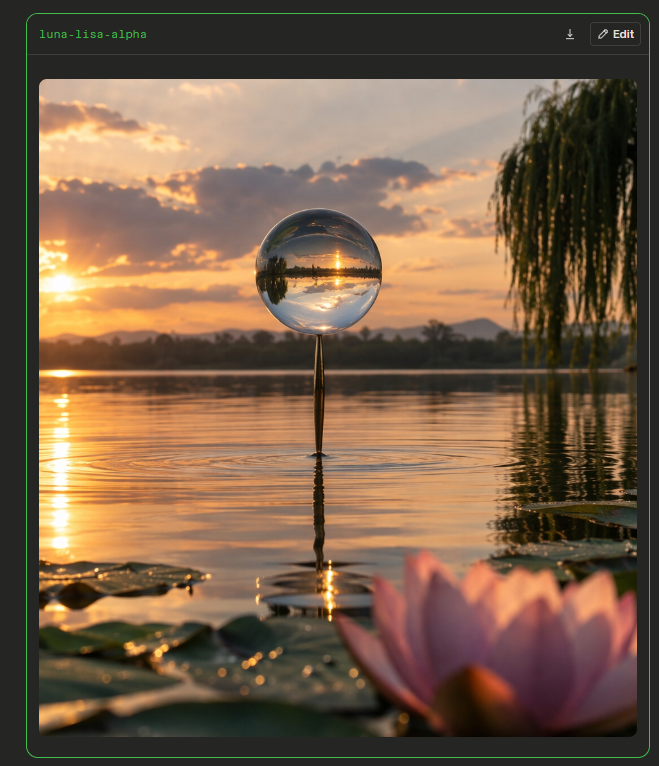
A recent development around OpenAI’s image models has sparked discussion in the AI community. According to information shared by developer Pankaj Kumar on X, an anonymous image model named “Luna‑Lisa‑Alpha” appears to be undergoing testing in Arena and may be related to the next iteration of GPT‑Image.
Original post: GPT-Image 2.5 Leaks: Luna-Lisa-Alpha
Does this mean GPT‑Image 2.5 is about to launch?
It is still too early to say. However, based on the available signals, OpenAI’s image-generation capabilities may be moving toward stronger realism, cleaner image quality, and more consistent details.
What Is “Luna‑Lisa‑Alpha”?
A new anonymous checkpoint called luna-lisa-alpha has appeared in Arena. It is believed to be a successor to an earlier test model known as mona-lisa.
According to the leak, the new model may offer three notable improvements:
- Stronger realism, with more natural people, materials, and environmental details;
- Better overall image quality;
- A significant reduction—or even complete removal—of the noise and grain reported in the previous version.
Anonymous test models do not usually reveal their final product name. Therefore, “Luna‑Lisa‑Alpha” may simply be an internal or temporary testing codename, rather than the future name of a ChatGPT or API model.
Will It Be GPT‑Image 2.5 or GPT‑Image 3?
The most important question is not the version number, but the direction of the capability upgrade.
If this test model is indeed from OpenAI, the next GPT‑Image release may focus more on production readiness than simply generating more visually impressive images: more stable photorealistic output, cleaner visuals, less grain, and image quality better suited to commercial creative workflows.
Whether the final release will be called GPT‑Image 2.5 or GPT‑Image 3 remains pure community speculation. Product naming often depends on release plans, API compatibility, and the scope of new capabilities, so an anonymous model codename alone cannot confirm the version.
Why Do Denoising and Reduced Grain Matter?
In real-world AI image-generation workflows, noise is not merely an aesthetic issue.
For portraits, brand posters, e-commerce product images, and interior visualizations that require high-resolution delivery, excessive grain can make an image look less polished and increase post-production work. This is particularly noticeable in dark areas, skin tones, solid-color backgrounds, and large gradient regions.
Current GPT‑Image‑2 outputs can show substantial noise in darker scenes, often requiring further denoising with other models or tools.
If the next GPT‑Image model handles these issues more effectively, it could offer several practical benefits:
- More images ready for direct use in advertising and social media;
- Fewer Photoshop, upscaling, and denoising steps;
- Better consistency for product visuals, portraits, and brand assets;
- More AI-generated images that are delivery-ready rather than merely inspirational.
What Does This Mean for Creators and Developers?
For creators, the next stage of image-model competition may shift from “can it generate an image?” to “can it reproduce reliable results?”
Generating one impressive image is no longer the hardest part. The real challenge is maintaining character identity, visual style, text accuracy, composition, and quality across multiple angles, layouts, and marketing assets.
For developers, the key areas to watch include:
- Whether text rendering accuracy continues to improve;
- Whether image editing and inpainting become more controllable;
- Whether multi-turn revisions preserve subjects and compositions;
- Whether API pricing, speed, and resolution options change;
- Whether image-safety policies and commercial-use boundaries are updated.