
AI Portrait Prompts: 10 Trending Portrait Styles That Look Shot, Not Rendered (2026)
By Chris Morgan
An AI portrait is the fastest way to get a photo of yourself that no camera ever took — golden hour on a rooftop you have never visited, a rain-streaked café window at midnight, a museum-grade oil painting. The difference between a portrait that looks shot and one that looks generated is almost never the tool. It is the prompt: real photography language — light direction, lens, film stock, mood — instead of "make me look cool." The ten below are complete photography briefs, each paired with the image it actually produced. Paste one into ChatGPT, Gemini, or Midjourney, attach one clear photo of your face, and you have an AI portrait worth posting in about a minute.
Quick answer: copy a prompt, attach a front-facing photo of yourself, and add this line at the very front if the prompt does not already lock your face: keep the exact same face, skin tone, hairstyle, and features. Do not change my identity. Every example on this page was generated from the prompt shown with it, so what you see is what the text actually produces.
Prefer one workspace? Every prompt on this page also runs inside Oimi AI Studio Canvas — 30+ top image models including GPT-Image-2.5 and Nano Banana 2 in one place, free to try. Paste the prompt, drop in your photo, and see which model keeps your face truest under the hardest light.
How to use these prompts
- Pick your light first, your outfit second. Every portrait on this page is defined by where the light comes from — low golden-hour sun, a hard window shape, a single studio key. That one line is what separates a portrait from a render, so resist trimming it.
- Know which of the two modes you are in. Some prompts restyle you: they mention "the reference image" or "the uploaded photo," and they expect your picture attached. Others build a scene with a generated subject — for those, either attach your photo with the identity-lock line in front, or let the model cast the character and keep the prompt as-is.
- Keep the camera words even when you change everything else. 85mm, f/1.8, Kodak Portra 400, medium format are not decoration — image models translate them directly into depth, grain, and color. Swap the subject and the outfit freely; keep the optics.
- Fix one thing per regeneration. Keep everything identical, only lighten the background beats a full re-roll and hope, every time.
Two ground rules worth keeping: upload only your own photo — never anyone else's — and do not generate portraits in a real, identifiable person's likeness, celebrity or otherwise. Keep minors out of portrait generation entirely.
Natural light looks
The golden hour rooftop
Low angle, seventy percent sky, a beige sweatshirt against a deep blue evening — this is the "main character with nowhere to be" shot. The Kodak Portra 400 grading and the airplane contrail are the two details doing the heavy lifting.
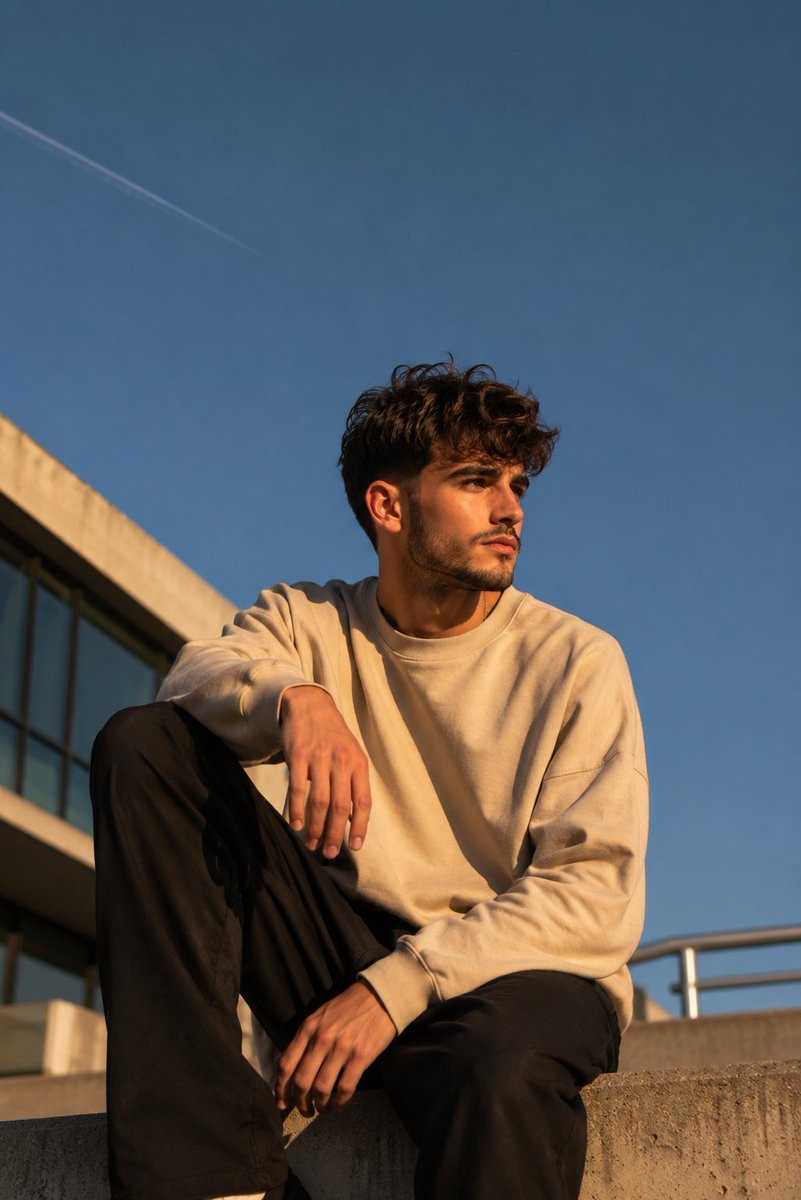
Create a cinematic lifestyle portrait of a stylish young man sitting casually on the edge of a modern concrete rooftop during golden hour. The camera is positioned at a low angle, emphasizing the expansive sky while making the subject appear confident and effortlessly cool.
The subject sits with one knee raised and the other leg hanging naturally. One hand rests casually on the raised knee while the other relaxes near his thigh. His head is turned to the right, gazing into the distance with a calm, thoughtful expression. His face is illuminated by warm late afternoon sunlight, creating soft highlights across the cheekbones and jawline.
He has naturally messy, medium-length dark brown hair with textured volume and loose strands falling across the forehead. He wears an oversized beige crewneck sweatshirt with relaxed sleeves paired with loose black trousers, creating a clean minimalist streetwear look.
The background features a deep blue cloudless sky occupying nearly seventy percent of the composition. A faint airplane contrail crosses the upper left corner. On the left side, a modern concrete building with large glass windows enters the frame, while a blurred metal railing appears on the lower right, adding architectural balance.
Lighting is warm golden hour sunlight from camera left, producing long natural shadows and cinematic contrast. Shot on a 50mm lens from a low perspective, shallow depth of field, ultra realistic photography, subtle Kodak Portra 400 color grading, natural skin texture, premium editorial aesthetic, calm mood, high dynamic range, 8K.
Negative Prompt: Oversaturated colors, smile, text, watermark, logo, extra limbs, blurry face, AI artifacts, distorted anatomy, cluttered background, cartoon, unrealistic lighting.
Tweak: this one is written as a full scene with a generated subject. To put yourself on the rooftop, add the identity-lock line at the very front and attach your photo — and keep the Kodak Portra 400 grading even if you change the outfit, because that color response is what makes it feel analog.
The geometric window light
A profile half-swallowed by hard-edged rectangles of red, orange, and teal — color blocking borrowed from album covers. The round glasses give the shadow something to break across.
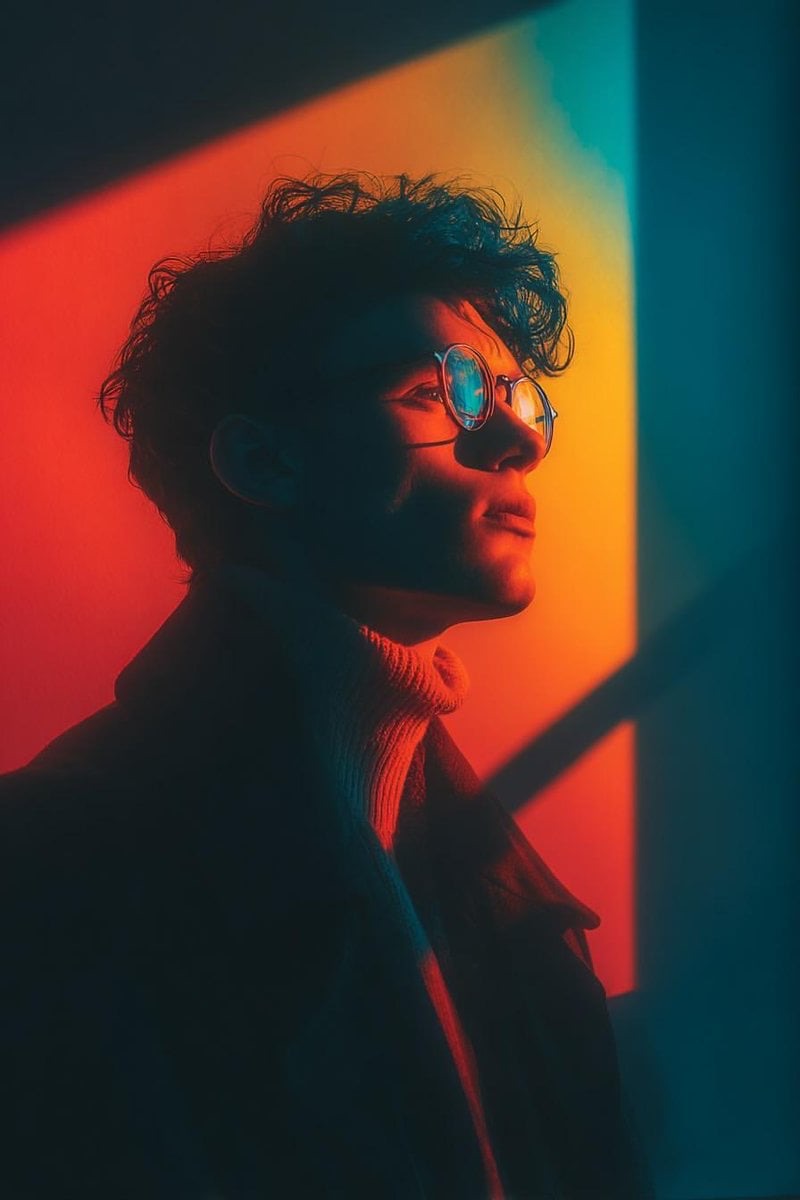
Cinematic portrait of a stylish young person wearing round glasses, standing beside a wall illuminated by bold geometric window light. Strong red, orange, and teal color contrast casting dramatic shadows across the face. Side profile pose, soft contemplative expression, sharp focus on facial features. High contrast lighting with hard-edged rectangular light shapes in the background. Moody atmosphere, artistic color blocking, modern editorial photography style. Shot on 85mm lens, f/1.8, ultra-detailed skin texture, shallow depth of field, dramatic rim lighting, 8K resolution.
Tweak: swap the triad, keep the structure: blue, magenta, and cyan reads colder, amber and green reads vintage. The phrase hard-edged rectangular light shapes is the signature — keep it even when you change everything else.
Studio looks with a pulse
The teal-and-gold studio portrait
Two colors, one face: warm orange-gold key light on the skin against a deep teal-blue backdrop, bun, black dress, red lipstick. Proof that a studio portrait only needs one deliberate contrast to stop looking like a headshot.
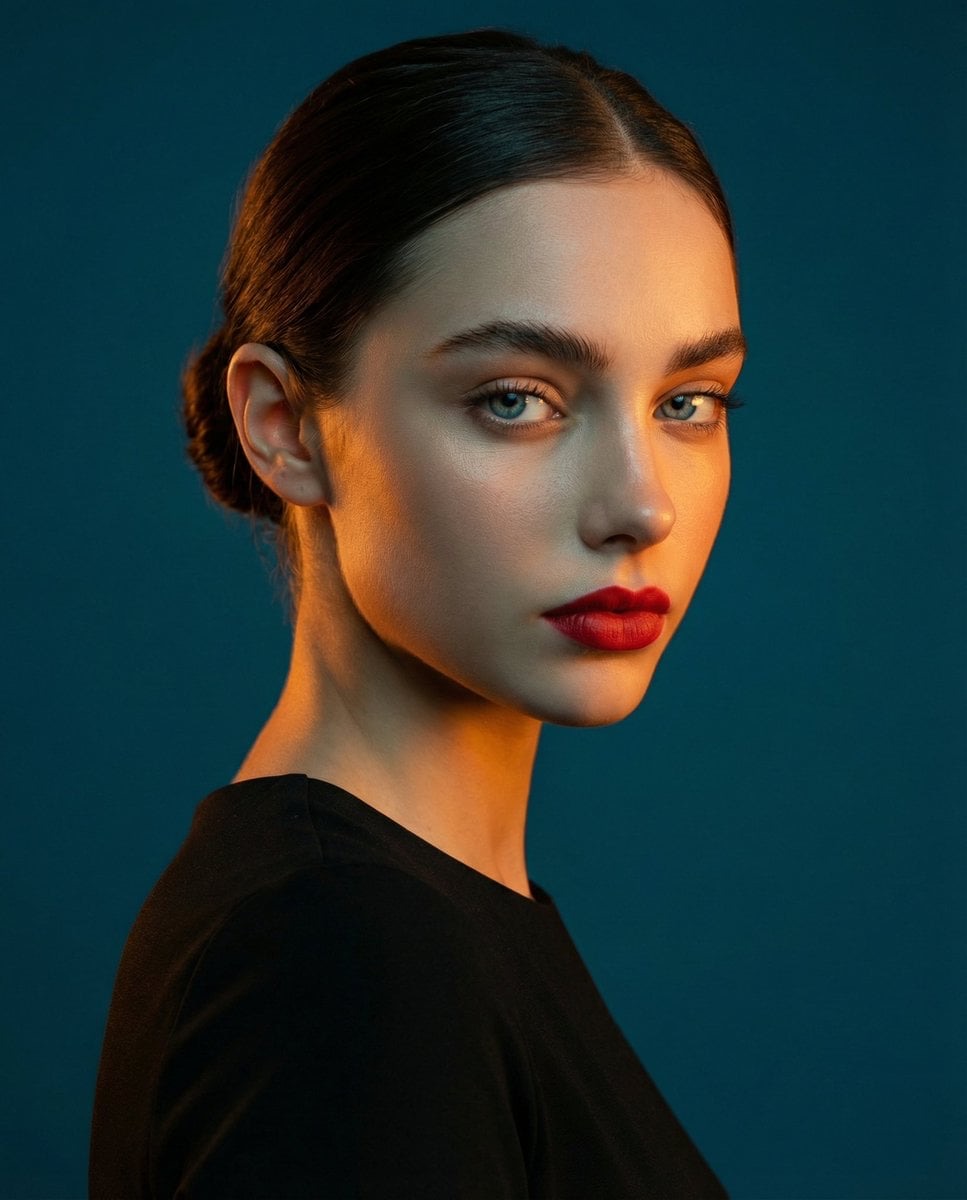
A studio portrait, medium shot of a
woman. High-contrast lighting: warm orange-golden light on her face and shoulder, contrasted with a deep teal-blue background. She has dark hair tied in a bun, wearing a black dress full cover. Red lipstick, sharp focus on the eyes, skin texture 8k.
Tweak: the entire look is the two-color pair, so swap the pair, not the structure — warm pink key against a deep green background works the same way. Add the identity-lock line at the front and attach your photo to star in it.
The neon streetwear frame
A full camera spec — Canon EOS R3, 50mm f/1.2, ISO 1600 — plus two LED strip lights at floor level and holographic fabric. The image model reads those numbers as depth and grain, which is why this looks like a lookbook page instead of a render.
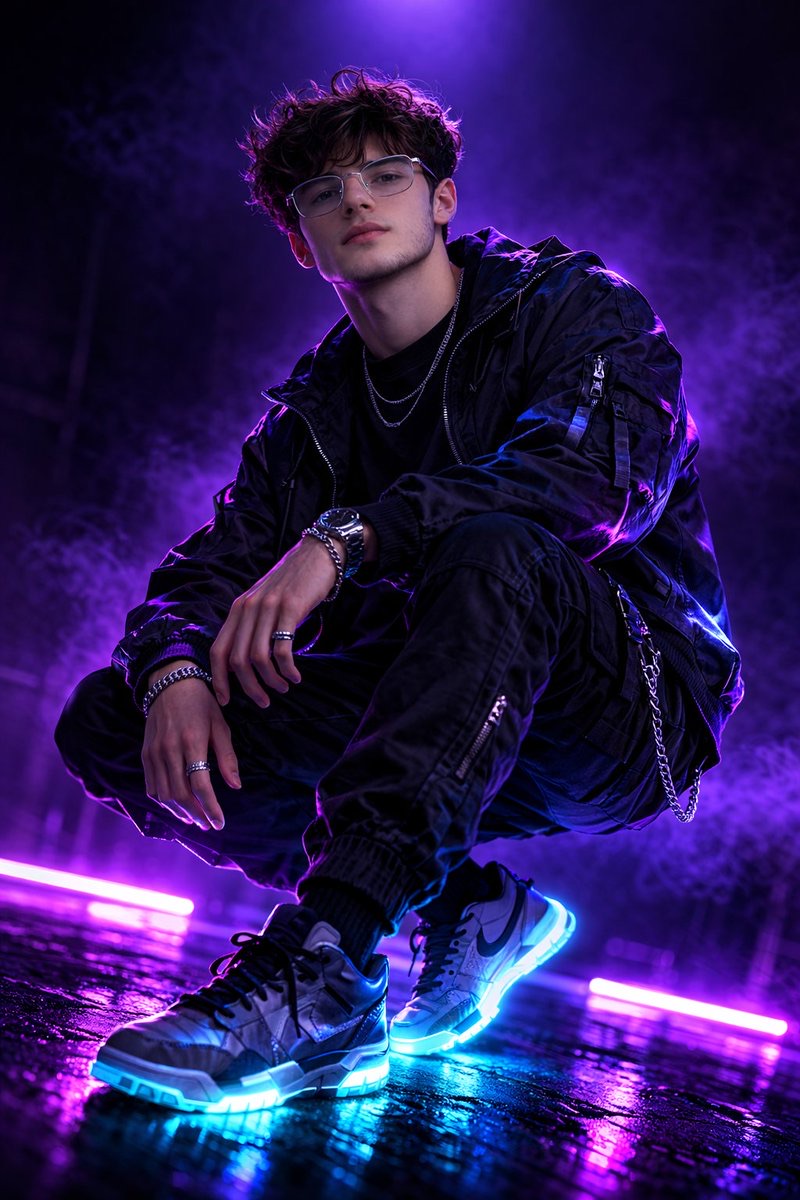
Fashion photography, professional man model, shot with Canon eos r3, 50mm f/1.2 rf lens, f/2.8 settings, 1/160s, iso 1600, gradient neon violet, streetwear style, holographic effect on wear, luminescent sneaker soles, dark backdrop with deep purple atmospheric lighting, professional studio setup with two led strip lights at floor level and one overhead softbox, cyberpunk aesthetic, side profile active pose with silhouette, dramatic contrast, ultra sharp details, photorealistic quality, rich detailing
Tweak: keep the camera block and the LED-strip setup, change one word: gradient neon violet becomes gradient neon green or electric blue and the whole mood moves. The holographic-effect phrase is what catches highlights on the fabric.
After dark, behind glass
The rainy café window
Shot from outside the glass: raindrops, condensation, a warm mug against cool teal city light, 35mm grain. It is the single most reposted "cozy night" portrait format there is, and it is almost entirely a lighting brief.
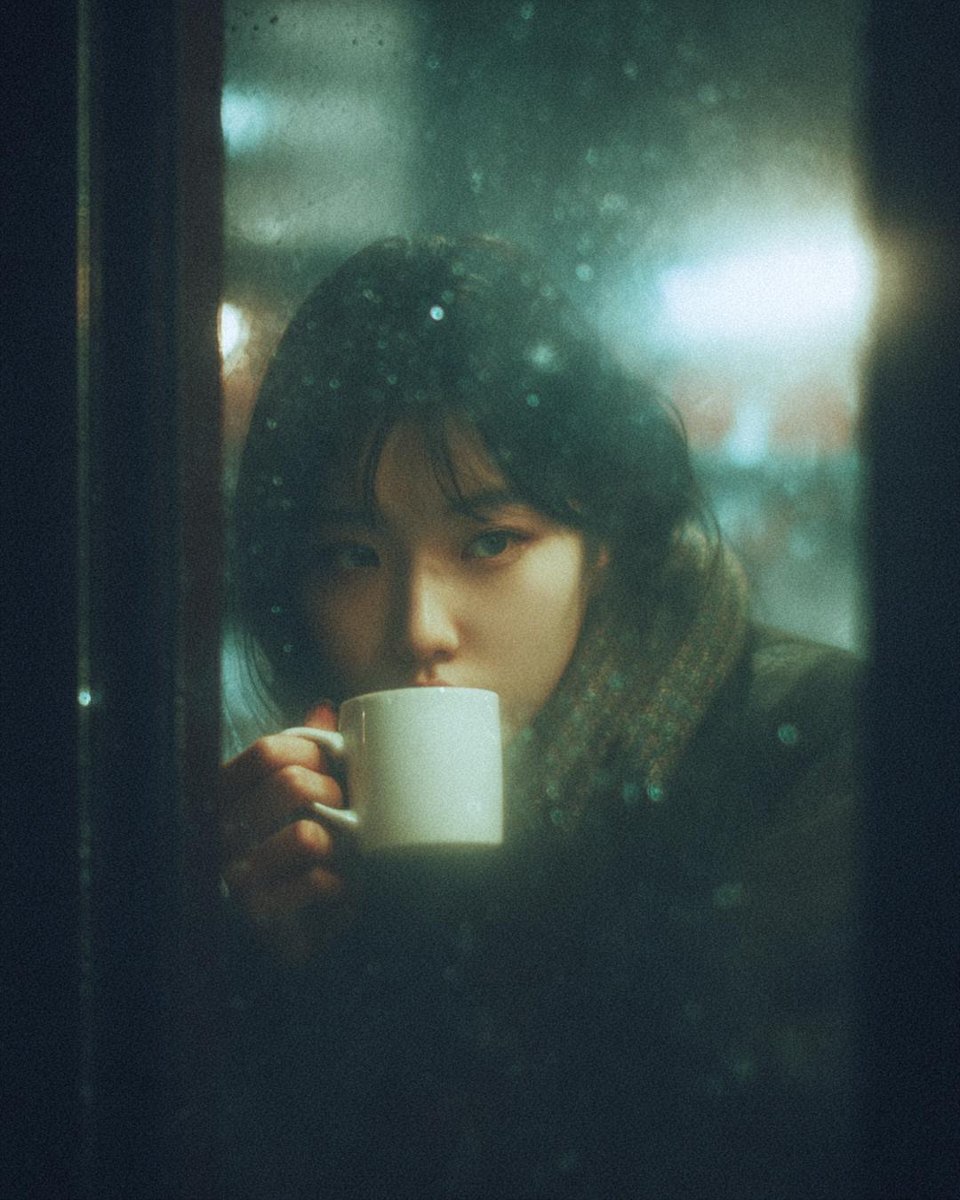
A cinematic, moody photograph of a young woman sitting inside a café at night, seen through a rain-covered window. Raindrops and condensation blur the glass, creating a dreamy, nostalgic atmosphere. She has soft features, dark hair with bangs, and is holding a small white ceramic mug close to her face, sipping a warm drink. Warm interior light contrasts with cool teal and blue city lights outside. Shallow depth of field, soft focus, film grain, muted colors, melancholic mood, intimate composition, reflective glass, bokeh lights in the background, realistic photography, 35mm film look, low light, cinematic color grading.
Tweak: written as a scene with a generated subject — to cast yourself, prepend the lock line and attach your photo. The city's temperature lives in one phrase: cool teal and blue city lights becomes warm amber streetlights for a completely different night.
The backseat neon night
A face floating in a car window with the city smeared into neon bokeh across the glass. This one expects your photo — "the face from the uploaded image" — and the reflections do all the storytelling.
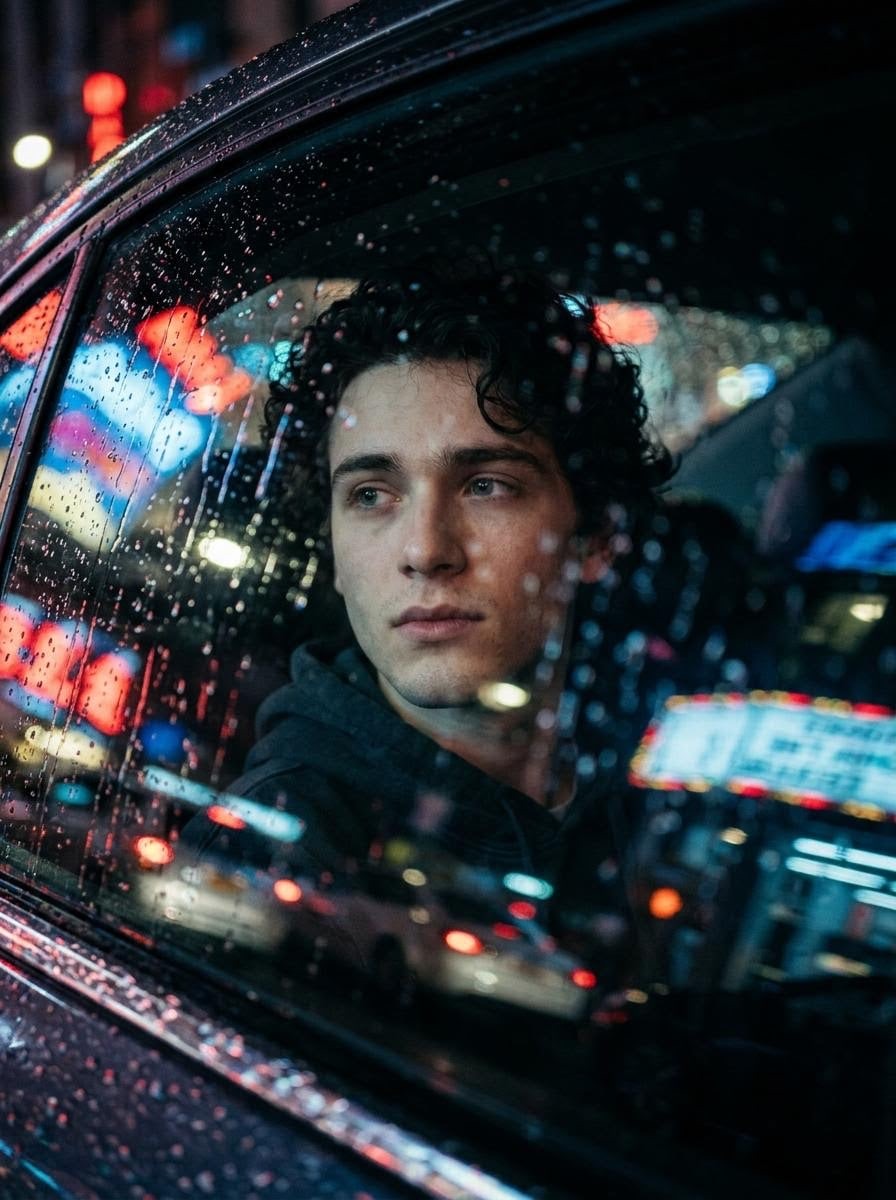
Create a highly cinematic and realistic photo of a person using the face from the uploaded image. The person is sitting inside a car at night, looking out through a rain-covered window. The camera is positioned outside the car, capturing the person through the wet glass. Raindrops and streaks of water are clearly visible on the window, with reflections of city lights, neon signs, and passing cars blending into the glass. The person’s face is softly lit by ambient street lights and subtle interior car lighting, creating a moody and emotional expression. The background outside is blurred with colorful bokeh lights (red, blue, yellow), giving a deep cinematic feel. The person is wearing a modern outfit like a hoodie or jacket. The mood feels introspective and film-like. Ultra realistic photography, shallow depth of field, dramatic lighting, reflections, rain texture, Hollywood movie scene composition, high detail.
Tweak: if likeness drifts through the reflections, move the identity-lock line to the very front and add neon reflections on the glass only, not on my face — separation between subject and environment is usually the fix.
Film grain and monochrome
The Rembrandt monochrome
Fine-art black and white with a narrow directional light, museum-grade tonal range, and two built-in variations — underwater, and a hooded figure in a single beam. This is a system prompt: a base portrait plus two edit slots.
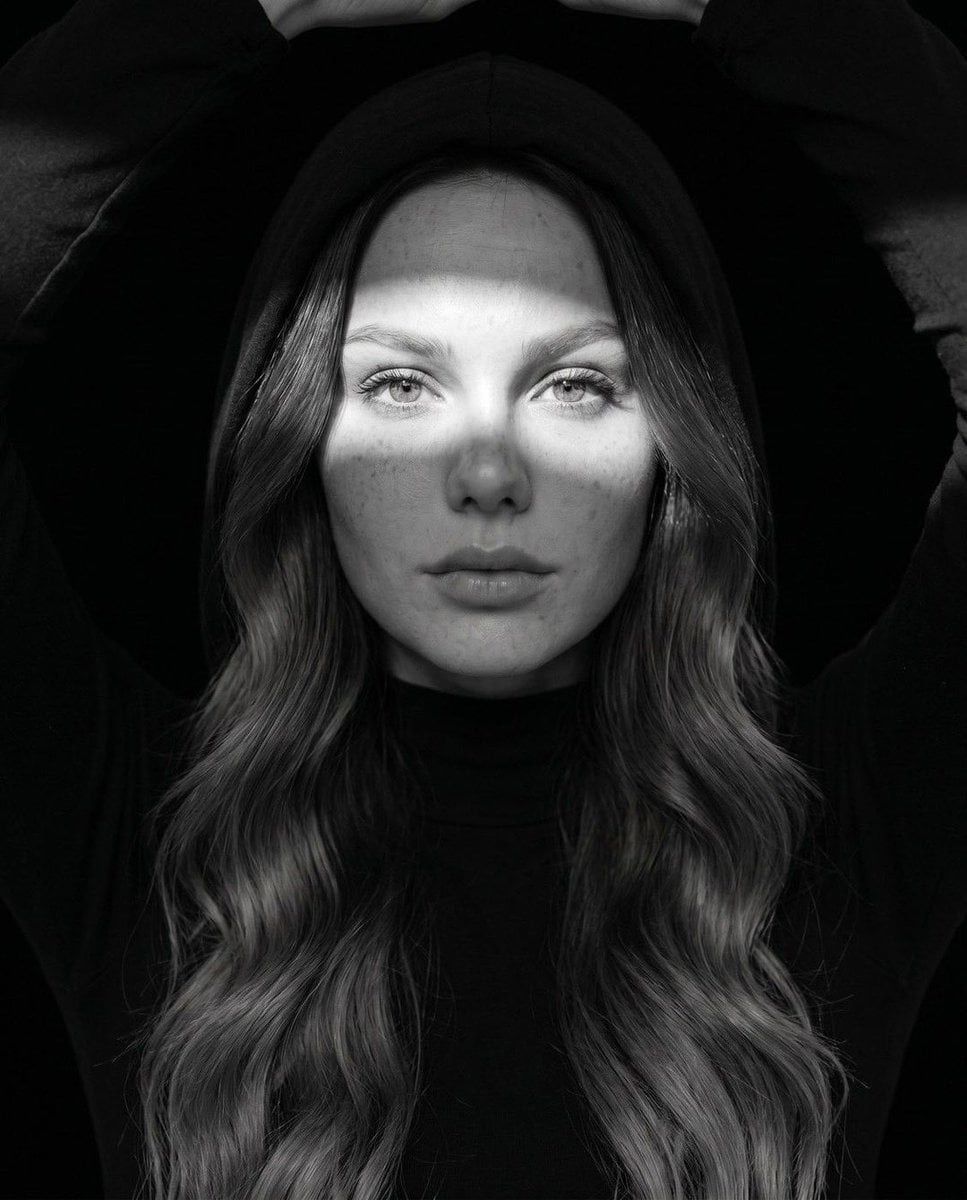
Ultra-realistic fine art black-and-white portrait, editorial fashion photography, close-up centered composition, direct eye contact, calm yet emotionally powerful expression, flawless natural skin texture with subtle freckles and pores, cinematic high-contrast monochrome grading, dramatic Rembrandt lighting with soft directional light, deep blacks and luminous highlights, razor-sharp eyes with catchlights, premium medium-format camera quality, 85mm portrait lens, f/1.8, shallow depth of field, museum-quality fine art photography, minimalist composition, timeless elegance, luxury Vogue-style editorial, rich tonal range, ultra-detailed facial features, photorealistic, HDR, 8K resolution, award-winning portrait photography.

Variation 1 (Underwater): Half-submerged underwater portrait, crystal-clear water surface crossing the forehead, natural water caustic light patterns dancing across the face and shoulders, floating hair, tiny air bubbles, soft underwater haze, blurred fish in the distant background, tranquil atmosphere, surreal yet realistic, monochrome fine-art aesthetic.

Variation 2 (Studio Hood): Black hooded outfit against a pure black background, narrow beam of light illuminating only the eyes and upper face, soft shadow falloff, symmetrical composition, dramatic chiaroscuro, elegant fashion editorial styling, mysterious cinematic mood, luxury magazine cover aesthetic.

Negative Prompt: low resolution, blurry, overprocessed skin, waxy face, plastic texture, extra limbs, deformed eyes, asymmetrical face, duplicated features, noisy image, oversharpened, artifacts, watermark, logo, text, cropped head, bad anatomy, unrealistic lighting, cartoon, CGI, low quality, distorted proportions.
Tweak: delete both Variation blocks for the base portrait; keep one when you want the underwater or hooded look. Do not simplify Rembrandt lighting to dramatic lighting — the named scheme is what places the shadow on one cheek.
The 90s disposable flash
Harsh direct flash, a halo glow around the hair, halation bloom, faded blacks — every awkward-school-photo texture, weaponized on purpose. This is an edit prompt: attach your photo and it restyles without changing pose or background.
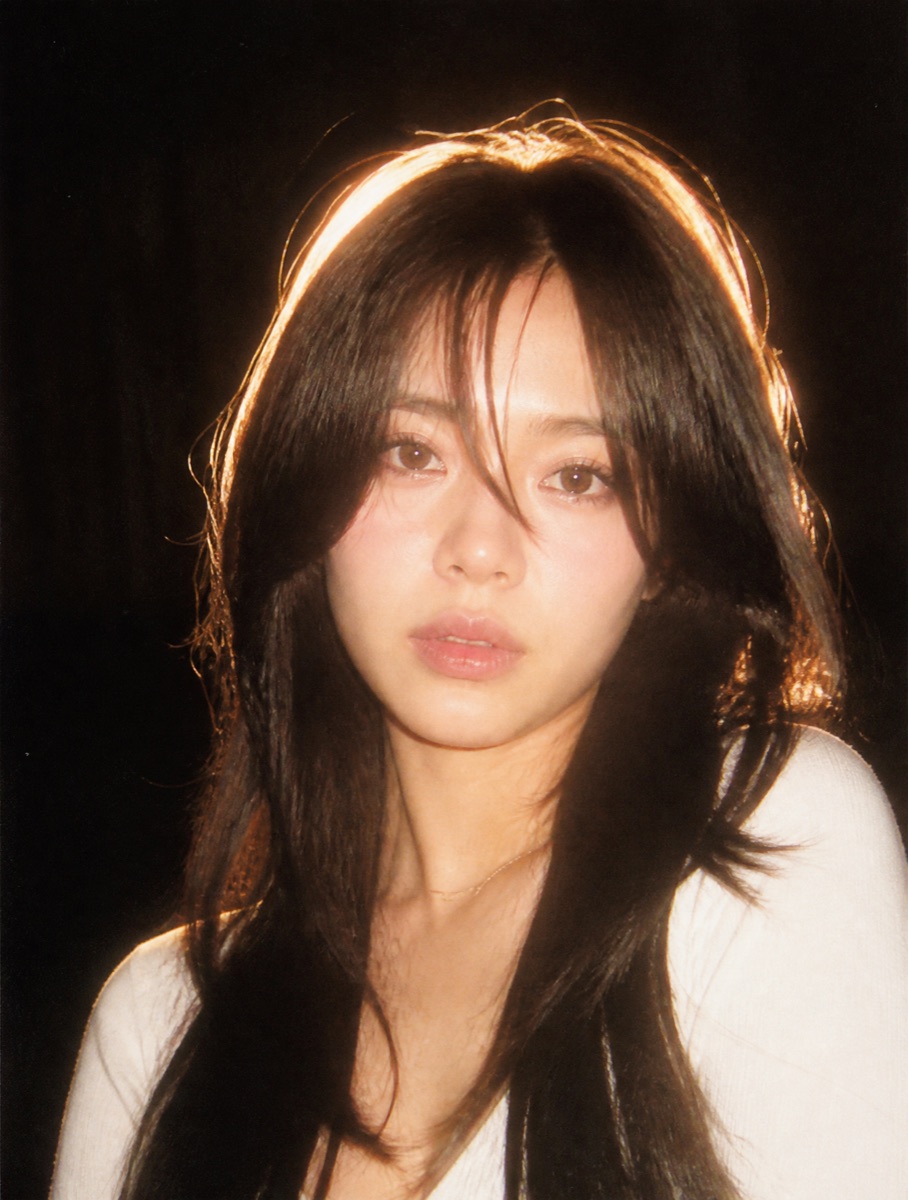
A nostalgic 90s film photography style portrait. Harsh direct camera flash lighting, strong contrast, subtle film grain texture. Backlit halo glow effect illuminating the edges of the hair, creating a soft bloom and dreamlike halation. Warm color grading, slightly faded blacks, candid point-and-shoot camera aesthetic, shot on 35mm film, vintage polaroid feel. Darken the bg, the image was capture in night, darken the bg, so that camera focus on the person. No new background.Maintain the same background. Maintain the face details as the reference. No pose change.
Tweak: if the flash blows out your face, add flash exposure on the face balanced, background stays dark. The backlit halo glow line is what keeps the hair from merging into the dark — keep it.
Motion and paint
The still face in a moving crowd
The subject stands perfectly still while a long exposure smears everyone else into streaks. It is the "main character" portrait in its purest form — one sharp face in a world that will not hold still.
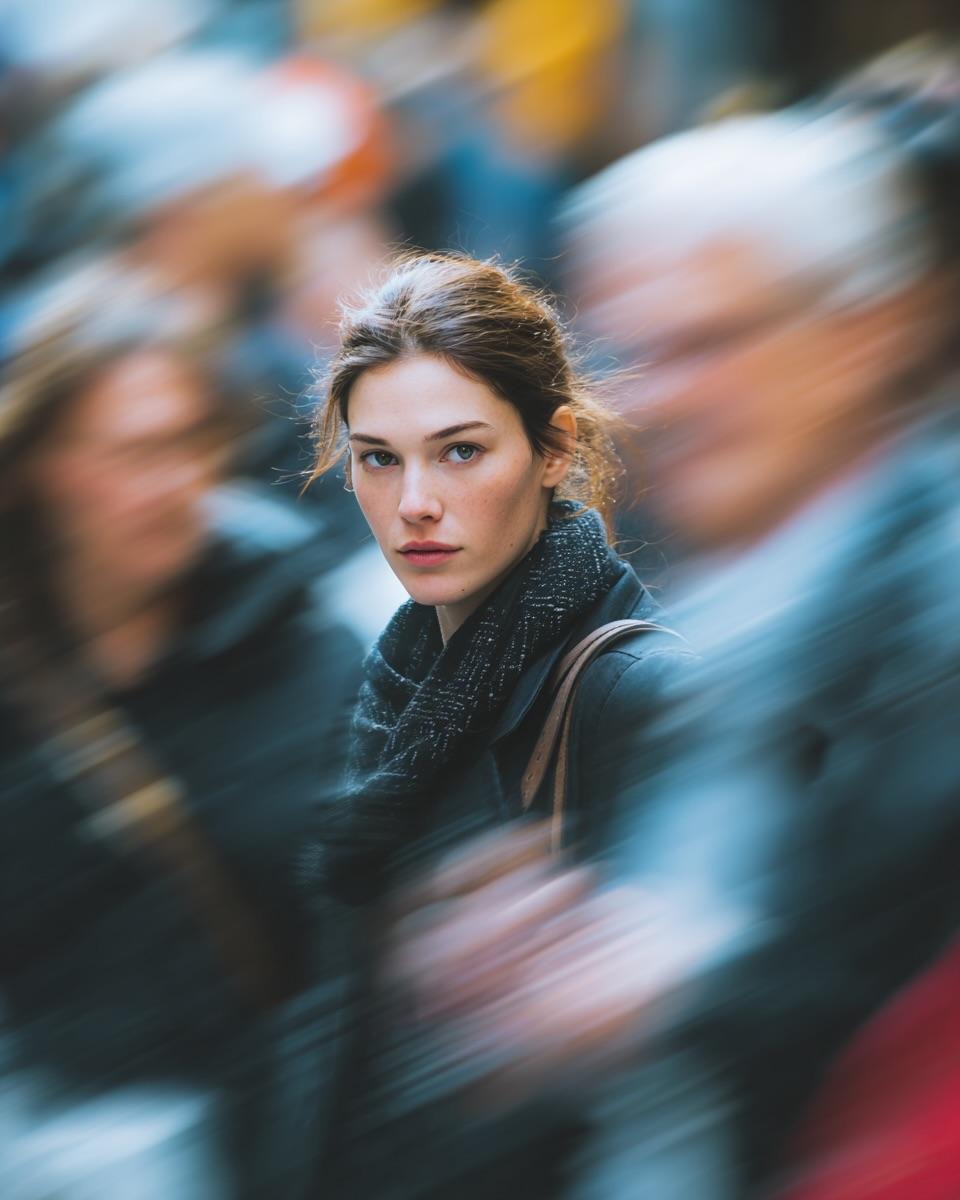
Ultra-realistic cinematic street portrait of a young woman standing still in a crowded city street, sharp focus on her face with calm, intense expression. Long-exposure effect with people moving around her creating strong directional motion blur, streaked crowd movement while the subject remains perfectly still. Natural soft daylight, shallow depth of field, creamy bokeh, realistic skin texture, subtle freckles, neutral makeup, dark winter coat and scarf. Emotional, introspective mood, urban storytelling photography, DSLR quality, 85mm lens look, f/1.8, high dynamic range, 8K, professional color grading.
Tweak: swap the season by replacing dark winter coat and scarf — light linen shirt turns it summer. The pair of lines remains perfectly still plus strong directional motion blur is the effect; keep them together.
The museum oil painting
Wide-brim hat, loose braid, impressionist brushwork on a muted blue ground — a portrait that reads as inherited rather than generated. It is also the style furthest from a photograph, which makes it the hardest on likeness and the most forgiving on everything else.
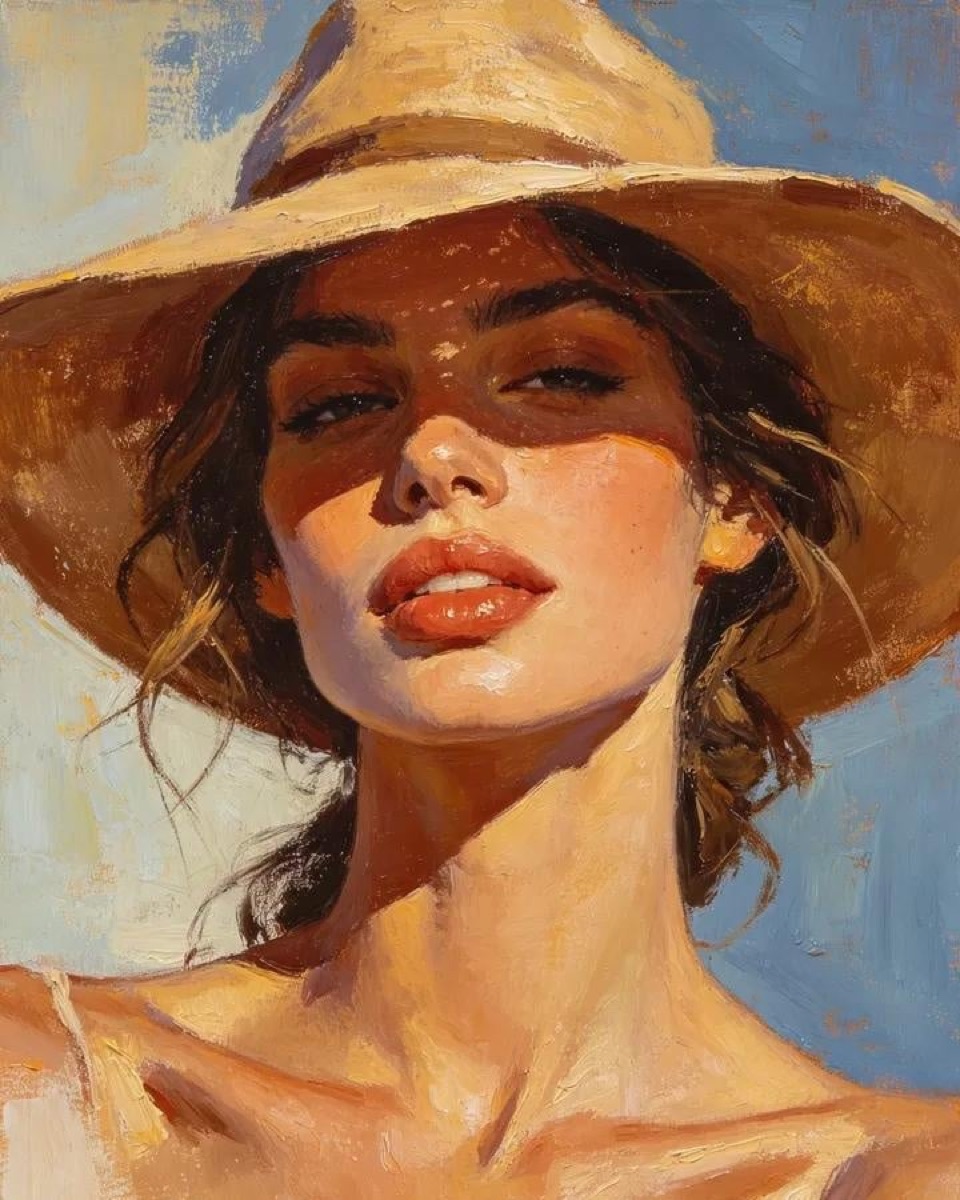
Masterpiece oil painting portrait of a beautiful young woman wearing a wide-brim tan hat, dark wavy hair loosely braided over one shoulder, soft glowing skin, full natural lips, elegant facial features, confident gaze, warm golden sunlight casting dramatic shadows across her face, earthy brown clothing, subtle gold earrings, painterly texture, expressive brush strokes, impressionist realism, fine art portrait, rich warm color palette, muted blue textured background, museum-quality oil painting, highly detailed skin highlights, cinematic lighting, depth and atmosphere, classic European portrait style, artistic canvas texture, sophisticated feminine beauty,
Tweak: classic European portrait style is your era dial — try Dutch Golden Age or pre-Raphaelite. Painterly styles drift from your likeness the most, so the identity-lock line goes first and stays there.
Why most AI portraits look AI — and the lines that fix it
Almost every "obviously generated" portrait fails in one of four ways, and each failure has a one-line fix worth stealing for any prompt you write yourself:
- Waxy, poreless skin. The default AI face. The fix is asking for texture explicitly: visible pores, fine lines, natural skin texture — half the prompts on this page carry that phrase for exactly this reason.
- Light with no direction. "Beautiful lighting" produces a lit subject in a lit world, which is how nothing in real life looks. Name the source and its position instead: golden hour sunlight from camera left, Rembrandt lighting, a narrow beam from the side — direction creates the shadows that read as photography.
- The dead background. A flawless face in front of a flawless void screams generated. The strongest prompts on this page spend as many words on one imperfect background detail — an airplane contrail, a blurred railing, bokeh city lights — as on the face.
- Identity drift in styled looks. Painterly and heavy-grade styles wash out likeness the fastest. When you restyle your own photo, the identity-lock line goes at the very front — models weight what they read first — and you fix likeness with one variable at a time, never a full re-roll.
FAQ
What makes a good AI portrait prompt?
Photography language. A weak prompt names a vibe ("aesthetic portrait of me"); a strong one names a light source and its position, a lens, a film response, and one imperfect background detail. Look at any prompt on this page and you can sort its sentences into exactly those buckets — direction, optics, texture, environment. If your prompt has no light direction and no lens, no amount of "8K ultra detailed" will save it.
Will an AI portrait actually look like me?
When you attach a photo and the prompt locks identity, yes — close enough that people who know you will recognize you. Likeness fails for three predictable reasons: a bad source photo (angled selfie, hard shadow, face too small), a prompt that never mentions the reference at all, or a styled look — heavy film grade, painting — that lets the model reimagine too much. Use the lock line keep the exact same face, skin tone, hairstyle, and features. Do not change my identity. at the very front, and change one variable at a time when correcting.
Which AI portrait generator should I use?
All of the major tools run every prompt on this page: ChatGPT is the most obedient with long structured briefs, Gemini's Nano Banana is the best at keeping your face faithful through a restyle, and Midjourney gives the most photographic grain. If you would rather not pick, Oimi AI Studio Canvas puts all three — Midjourney included — alongside Nano Banana 2 and GPT-Image-2.5 in one workspace, so you can run the same prompt on several models and keep the winner, free to start. That try-several-models habit matters more than the choice itself, because the generator that keeps your face best is rarely the one that flatters everyone else.
Can I make AI family portraits or pet portraits the same way?
Yes — the scaffolding transfers. An AI family portrait needs one reference photo per person plus a line about who is who (the uploaded photo is the woman; the second photo is the man), and the same light-and-lens language around them. Self portraits work the same way as every prompt on this page. Pets are the easiest subjects of all: no identity lock needed, just the fur description and a named light source, and even the rain-window prompt on this page works with a dog behind the glass.
Is it OK to use an AI portrait of yourself?
It is your face and your likeness — restyling a photo of yourself is the same category as a flattering lens. The lines worth respecting: upload only your own photo, never generate a portrait in a real identifiable person's likeness (celebrity, colleague, or stranger), keep minors out of it entirely, and skip the styles that misrepresent you where it counts — a portrait used for work or dating should still look like you on your best day, not like a different person.
Keep reading
- AI Portrait Poster Prompts: 10 Copy-Paste Designs That Look Art-Directed (2026) — push any portrait into print-quality poster art, from ink minimalism to glitch
- Prompt Seen Girl: 10 Copy-Paste Gemini Prompts (2026) — the trending portrait-prompt look, tuned for girls' portraits
- 100+ Awesome Nano Banana Prompts: Copy & Generate Instantly — a living library across posters, 3D miniatures, and character design
- Oimi Prompt Library — Find a look you love, copy the prompt, and make it your own
About the author
Chris Morgan writes about AI image tools and the prompt workflows behind the portraits filling Instagram and LinkedIn — what works, what quietly stops working, and why. This page is part of a running archive of portrait looks still worth copying, refreshed as older styles start to date.