
ChatGPT Image Prompt: 20 GPT Image 2 Examples to Copy (2026)
Looking for a ChatGPT image prompt you can copy and use right away?
This guide collects 20 GPT Image 2 prompts across 20 practical image generation categories, including portraits, lifestyle photos, UI mockups, posters, product ads, infographics, 3D miniatures, and so on.
Each example is designed around a different use case, so you can quickly find the right AI image prompt for a social post, ad concept, poster design, app preview, product visual, or creative test. Copy a prompt as-is, replace the placeholders, or use the pro tip below each example to adapt it for your own project.
This article focuses on broad ChatGPT image prompts for generation and design. Looking specifically for uploaded selfies or portrait transformations? Read our focused guide to ChatGPT photo prompts for portrait editing.
Quick Navigation
20 ChatGPT Image Prompt Examples by Category
These examples were selected for category diversity, practical reuse, visual quality, prompt structure. The multilingual examples are kept in their original wording to show how GPT Image 2 handles non-English prompt instructions.
1. Lifestyle Photo: Cinematic Summer Lifestyle Portrait
Source: (Community)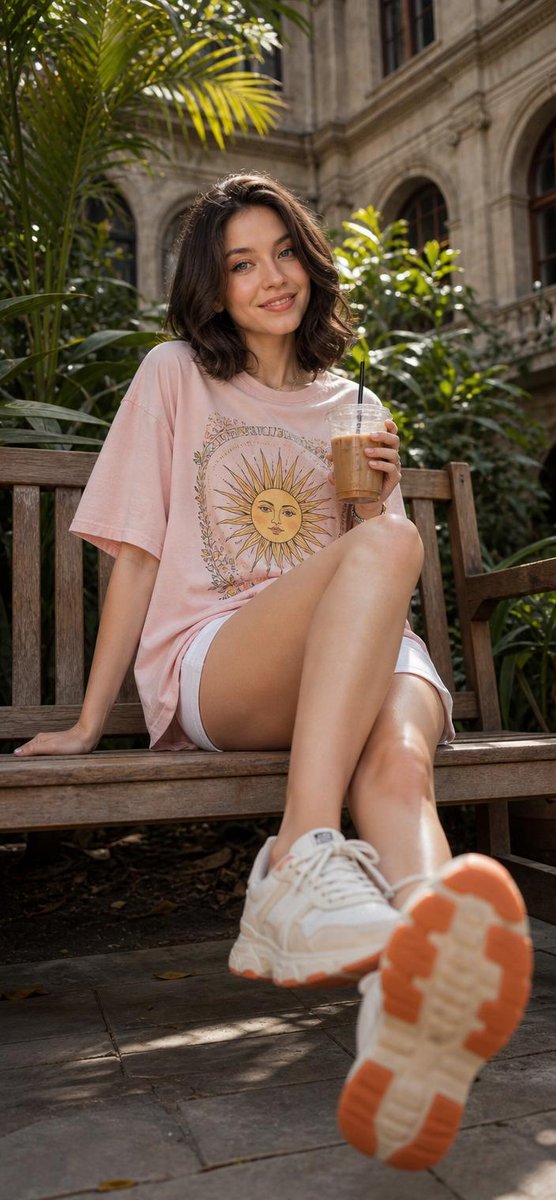
Cinematic lifestyle portrait of a cheerful young woman sitting on a rustic wooden bench in a lush botanical courtyard, holding an iced coffee in a clear plastic cup with straw, smiling naturally at camera, short wavy dark brown hair, soft natural makeup, oversized pastel pink graphic t-shirt with vintage sun illustration, white shorts, white chunky sneakers with orange soles, one leg extended toward camera creating dramatic perspective, relaxed summer aesthetic, golden hour sunlight filtering through tropical leaves, luxury university campus or historic garden background with stone architecture and large windows, shallow depth of field, warm tones, candid street photography style, ultra realistic skin texture, cozy youthful vibe, DSLR quality, high detail, photorealistic, dynamic low-angle composition, soft shadows, fashion editorial look, 8k.
Pro tip: Lifestyle portraits feel more natural when the pose, setting, prop, light, and camera angle all support the same mood. The low-angle bench composition makes the image feel candid but polished.
2. Travel Poster: Vintage Amalfi Coast Travel Poster
Source: (@WolfRiccardo)
Modern pencil illustration of Vintage travel poster illustration of the Amalfi Coast, Italy, panoramic coastal cliff road scene, classic 1960s white car driving along a curved seaside road, deep blue Mediterranean sea with small sailboats, colorful pastel hillside village, bright blue sky with soft clouds, lemon tree branches with vibrant yellow lemons framing the foreground, warm summer sunlight, bold vibrant colors, retro 1950s travel poster style, cinematic composition, high detail, screen print texture, graphic illustration. Hand-drawn style, illustration with loose strokes and defined contours. High-contrast color palette, maintaining chromatic harmony between background and elements. Contemporary and decorative aesthetic.
Pro tip: Travel poster prompts work best when they combine place, era, vehicle, color palette, and print texture. Swap the destination and landmark details to create another regional poster.
3. Food Ad: Deconstructed Gourmet Burger Ad
Source: (Community)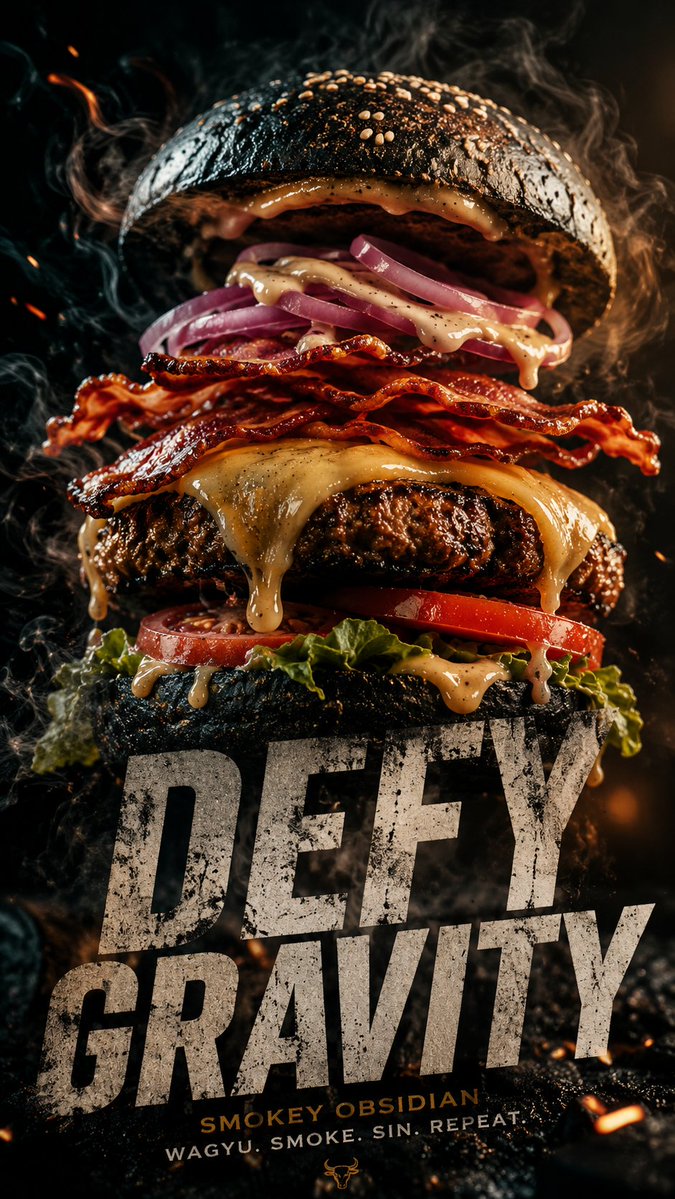
A cinematic 9:16 vertical composition featuring a gourmet "Smokey Obsidian" burger. WHAT: A towering burger with a charcoal brioche bun, thick Wagyu beef patty with visible sear marks, melting aged gruyère dripping like lava, and crispy maple-glazed bacon. FEEL: An atmosphere of "Urban Indulgence." Dark, moody lighting with a single warm amber spotlight. Wisps of real hickory smoke curl around the bun. The texture is hyper-realistic you can see the salt crystals on the crust and the moisture on the heirloom tomato. SHOW: The burger is captured in a "deconstructed gravity" moment the top bun is slightly hovering, revealing the internal layers of house-made aioli and pickled red onions. TYPOGRAPHY: Integration of ultra-bold, distressed sans-serif typeface overlapping the bottom third of the frame. The text reads "DEFY GRAVITY" in a raw, concrete-texture finish. TECHNICAL: 4k resolution, macro photography style, shallow depth of field, neon-noir color grading (deep blacks, warm ambers, and subtle teal highlights).
Pro tip: Food ad prompts work well with a WHAT / FEEL / SHOW / TECHNICAL structure. The floating bun and macro texture cues make the dish dramatic without losing appetite appeal.
4. Portrait: Cinematic Minimal Portrait Prompt
Source: (@iam_miharbi)
Generate a cinematic minimal portrait of a solitary man standing in an intense orange to red gradient environment, strong silhouette lighting, deep shadow contrast, reflective glossy floor, symmetrical composition, minimal
Pro tip: A minimal portrait prompt can be powerful when it gives one subject, one color environment, and one lighting idea. For uploaded selfies and headshots, use the focused portrait editing guide linked in this article.
5. UI Mockup: Pastel Mobile App UI Design Sheet
Source: (Community)
Create a clean, pastel mobile app design sheet for a [WHAT THE APP DOES] app called "[APP NAME]". Style: soft pastel colors, warm modern UI, rounded cards, soft shadows, minimal but playful, iOS-style, consistent illustrations. Layout: title plus mascot top left, 3-4 big iPhone mockups centered, realistic device proportions, screens for home/dashboard, main action, results/details, and progress/insights. Output: high-resolution app store or landing page ready design.
Pro tip: UI prompt quality improves when you specify screen count, device proportions, layout hierarchy, visual system, and product tone. This turns a vague app idea into a usable design sheet.
6. Brand Poster: Surreal Brand Campaign Poster
Source: (Community)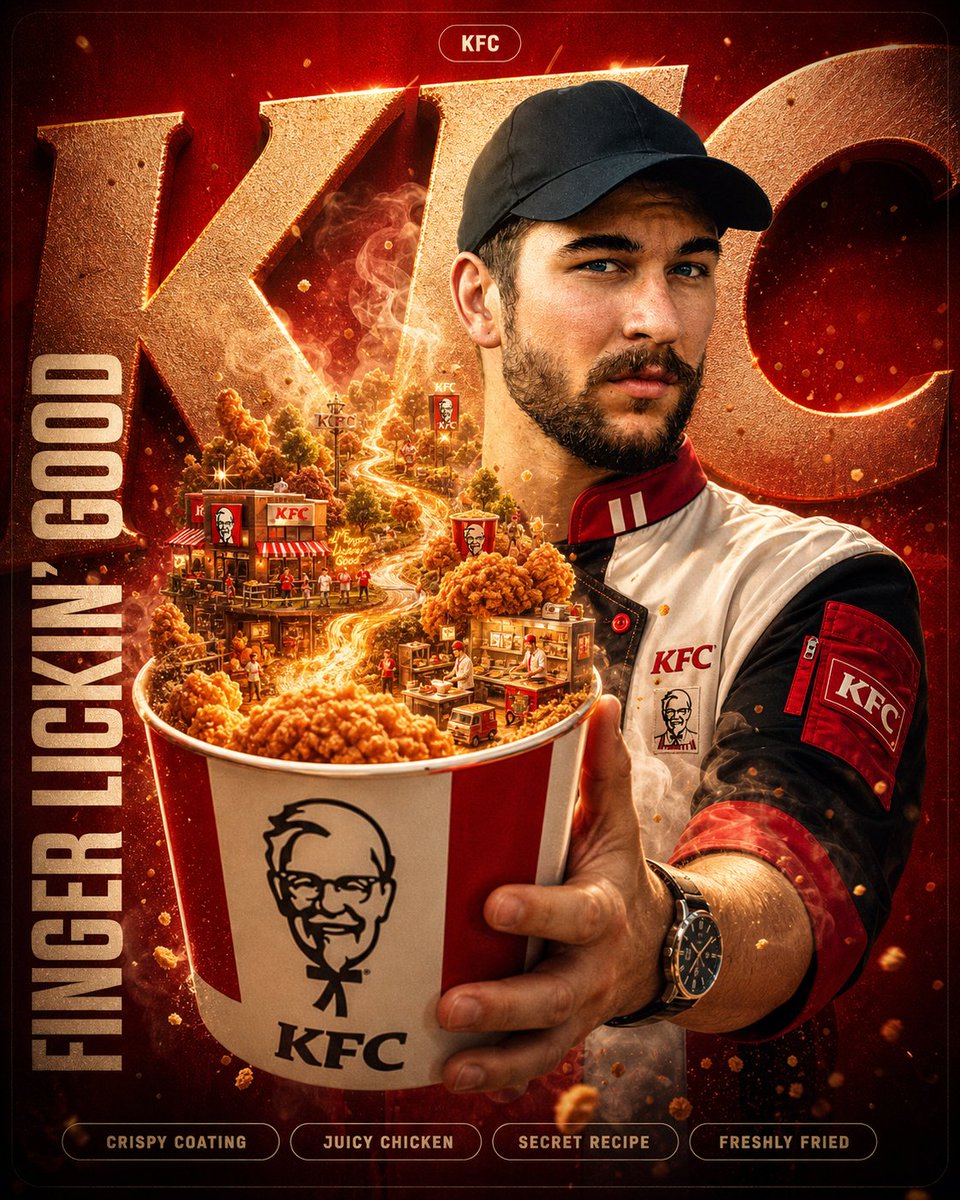
A hyper-detailed surreal advertising poster for [BRAND NAME]. BACKGROUND: A large deep-toned rounded rectangle in [BRAND NAME]'s signature brand color fills 90% of the frame. Behind the subject, massive cropped brand typography bleeds off-frame, letters constructed from the brand's core material texture, embossed and lit with sharp directional rim lighting. Subtle noise grain texture overlays the background. SUBJECT: Use the uploaded reference image. Preserve the subject's exact face and skin tone from the reference. The person faces camera in a three-quarter foreground stance, holding the brand's most iconic product directly toward the lens. EXPRESSION: Restyle the subject's facial expression to match [BRAND NAME]'s brand personality and emotional tone. OUTFIT: Completely restyle the subject's clothing into a character that naturally belongs to [BRAND NAME]'s universe. Use [BRAND NAME]'s exact brand palette and add small branded details. SURREAL PRODUCT MOMENT: The product held by the subject opens, spills, or expands into a self-contained miniature world tied to [BRAND NAME]'s identity and values. GRAPHIC LAYER: Scattered sparkle glyphs, floating micro-elements, layered soft fog, and subtle chromatic aberration at frame edges. TEXT SYSTEM: - TOP: Rounded pill badge, "[BRAND NAME]" - CENTER-LEFT: Brand tagline in bold condensed uppercase - BOTTOM STRIP: Four feature tags in a row QUALITY: Unreal Engine render quality, octane lighting, macro lens bokeh on background elements, 8K sharp foreground.
Pro tip: This modular brand prompt separates background, subject, outfit, product moment, graphics, and text. Replace the brand placeholders and upload a person photo for a controlled campaign poster.
7. Diorama Ad: Miniature Diorama Skincare Ad
Source: (Community)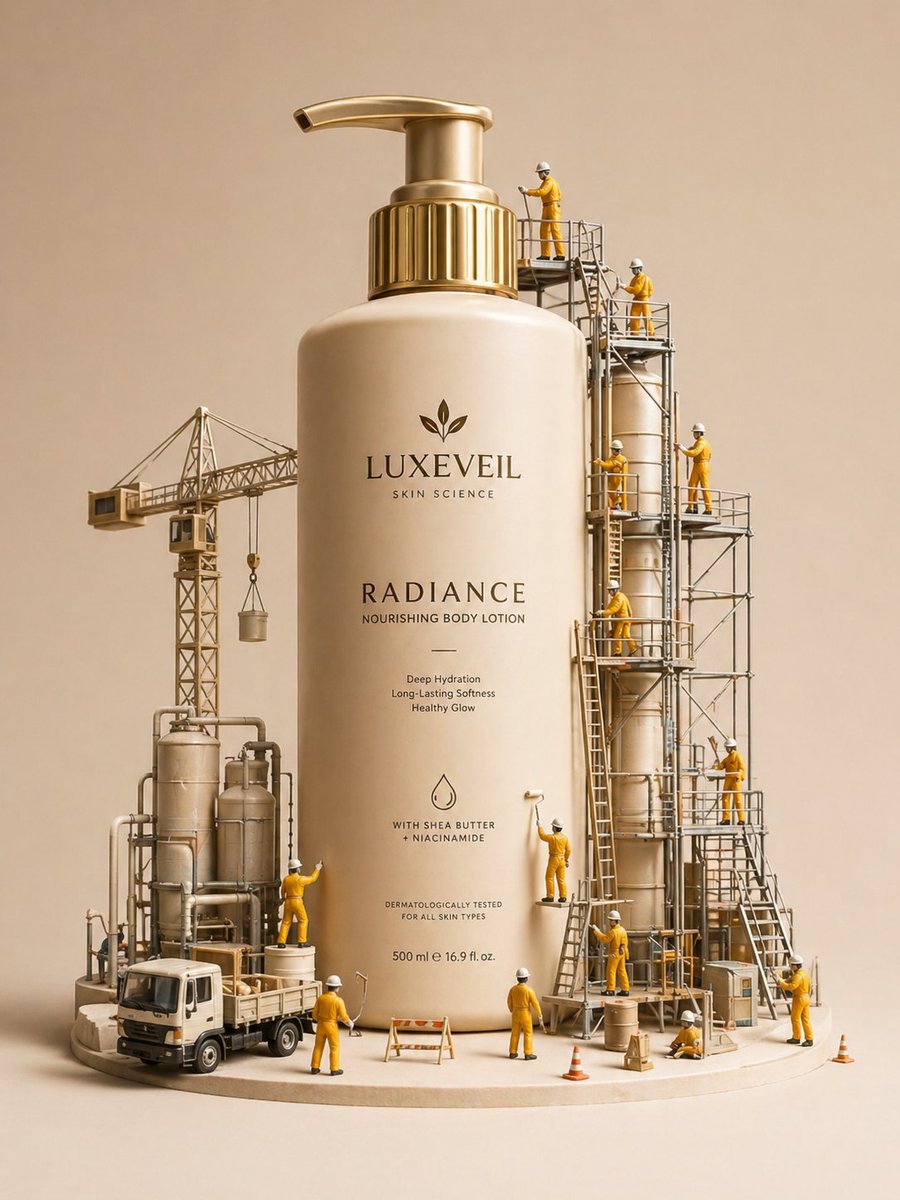
A hyper-realistic miniature diorama product advertisement featuring an oversized luxury skincare pump bottle labeled "LUXEVEIL Skin Science - Radiance Nourishing Body Lotion" in cream/beige with a polished gold pump top, placed on a circular platform. Tiny figurine construction workers dressed in yellow coveralls and white hard hats swarm around the bottle climbing scaffolding, painting the bottle with rollers, operating a tower crane, working near industrial tanks and pipework, and unloading a miniature flatbed truck. The scene includes metal scaffolding structures, industrial silos, orange traffic cones, wooden barricades, and storage barrels. The overall color palette is warm beige, cream, gold, and mustard yellow. Studio photography style with soft diffused lighting, no shadows, clean beige background. The concept metaphorically shows workers "crafting" or "building" the perfect lotion. Tilt-shift miniature aesthetic, ultra-detailed, commercial product photography, 8K resolution, photorealistic CGI render.
Pro tip: The miniature diorama format turns a product into a story. Tiny workers, scaffolding, and industrial props make the product feel crafted, premium, and shareable.
8. Infographic Poster: Cinematic Wildlife Infographic Poster
Source: (Community)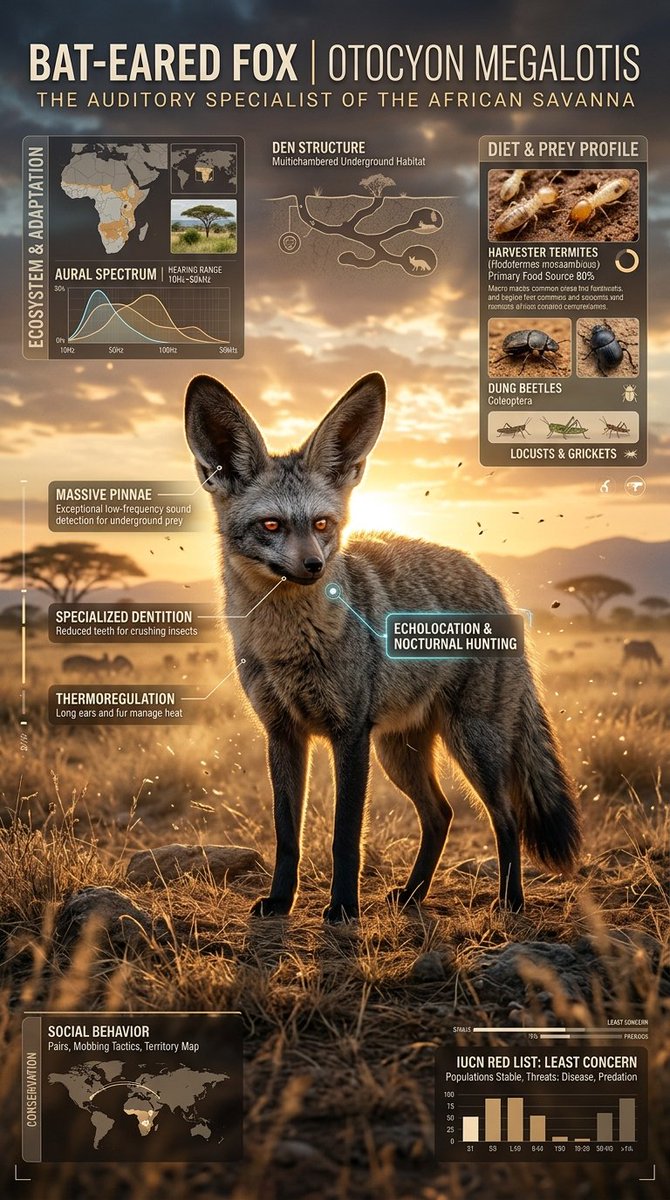
Create a premium cinematic wildlife infographic poster centered around a rare or visually unique animal species such as (animal). The entire artwork must feel like a futuristic luxury wildlife dossier rather than a normal educational infographic. The animal should dominate the composition with intense photorealistic detail: ultra-detailed fur/scales, realistic eyes, moisture textures, cinematic shadows, environmental interaction, dramatic posture, visible muscle definition, floating particles, and powerful eye contact. The environment must fully match the chosen species: (environment). Build dense layered infographic storytelling around the animal using: • anatomy callouts • adaptation systems • prey and diet visuals • ecosystem overlays • conservation status indicators • geographic range maps • hunting behavior graphics • climate danger visuals • detail inserts • tactical icon systems • scientific labels and compact data snippets The layout should feel highly artistic and cinematic instead of educational. Use: • asymmetric editorial composition • layered transparent info panels • premium typography • subtle paper grain textures • contour-line overlays • holographic UI elements • cinematic infographic markers • museum-grade visual hierarchy Blend: (luxury editorial aesthetic) + (cinematic documentary realism) + (futuristic infographic design) + (collectible field-guide energy). Color Theme: (color theme) Mood: (mood) Lighting: dramatic cinematic lighting, volumetric fog, glowing rim light, atmospheric haze, realistic environmental reflections, high contrast shadows, ultra-premium editorial lighting. The final artwork must look like a viral collectible wildlife poster people would instantly save, repost, print, and frame. Ultra-realistic, 8K, cinematic infographic masterpiece, insanely detailed, premium art direction, tactile textures, layered storytelling, emotional visual impact, museum-quality composition, viral social-media-worthy aesthetic.
Pro tip: Infographic art prompts need both visual drama and information structure. Use placeholders for animal, environment, color theme, and mood to reuse this as a high-end field-guide template.
9. Narrative Poster: Silhouette Universe Narrative Poster
Source: (Community)Automatically generate a high-aesthetic "Silhouette Universe / Collector's Edition Narrative Poster" based on [theme: xxx]. Do not default to common containers such as bottles, hourglasses, glass domes, or pocket watches. Instead, let the AI choose the most symbolic, visually strong, and narratively suitable outer silhouette for the theme. The silhouette can be an artifact, building, gate, tower, archway, dome, stairwell, corridor, statue, profile, eye, hand, skull, wing, mask, mirror, throne, ring, crack, light curtain, shadow, geometric form, spatial cross-section, stage frame, abstract symbol, or any more creative contour that best represents the theme. The goal is not to simply place a world inside an object, but to make the entire themed universe grow naturally within, around, and through the silhouette itself. The silhouette should be elegant, recognizable, and compositionally dominant. Inside or along its boundary, generate a rich and layered narrative world strongly tied to the theme, including iconic scenes, key architecture or spaces, symbols and metaphors, traces of characters or civilizations, foreground-midground-background depth, and atmosphere with emotional tension. Elements such as doors, staircases, bridges, water, smoke, paths, light sources, ruins, mechanical structures, landscapes, abstract forms, creatures, or props should all feel unified and organically integrated rather than pasted together. The final composition should feel like a premium collector's poster with strong design value. The large shapes should feel stable, the main silhouette should be unmistakable, and the inner world should have depth, structure, and breathing room. Details should be rich but not crowded. You may add small human silhouettes, distant buildings, beams of light, doorways, bridges, steps, corridors, reflections, skylight, or far-background structures to enhance scale, story, and epic atmosphere. The overall mood should be quiet, grand, refined, and lingering rather than noisy or overloaded. Blend the feeling of a collector's edition film poster, high-end narrative visual design, dreamy watercolor texture, and fine printed paper. Emphasize paper grain, feathered edges, watercolor brush marks, gentle diffusion, atmospheric perspective, soft haze, selective volumetric light, light passing through mist, generous negative space, and restrained layout. The image should feel premium, poetic, majestic, sacred, nostalgic, quiet, and mythic. Let the AI choose an elevated color palette based on the theme, but keep it unified, restrained, tasteful, low-saturation, and premium. Avoid chaotic high saturation, cheap neon effects, or plastic digital color. Suitable palette families may include black-gold-gray, cool blue-gray, mist white-gray, brown-red with off-white, dark copper, aged paper tones, deep sea blue, twilight purple, or silver-gray, as long as they serve the theme. Final requirement: the first glance should give strong theme recognition and a memorable silhouette, the second glance should reveal a complete narrative world, and the third glance should still reward close inspection with depth and aftertaste. Avoid generic backgrounds, hard cut-and-paste compositions, templated fantasy assets, video-game promo art vibes, excessive cartooning, or realism that kills the artistic mood. If appropriate, subtle titles, numbering, signatures, or marks can be added as part of the poster design, but they must never overpower the image.
Pro tip: The three-glance structure is the key: first a strong silhouette, then a complete world inside it, then small details that reward close inspection. Replace the theme to reuse the system.
10. 3D Miniature: 3D Chibi Miniature Concept Store
Source: (Community)
3D chibi-style miniature concept store of {Brand Name}, creatively designed with an exterior inspired by the brand's most iconic product or packaging. The store features two floors with large glass windows, cozy interior details, tiny figures, benches, street lamps, and potted plants. Rendered in a miniature cityscape style using Cinema 4D, blind-box toy aesthetic, rich details, soft afternoon lighting. Brand name: Starbucks.
Pro tip: For 3D miniature concepts, connect the building shape to the brand product, then add scale cues like tiny people, windows, street props, and soft render lighting.
11. Claymation: Cozy Claymation Style Transfer
Source: (Community)
Recreate the scene as a cozy claymation-style world made from soft modeling clay. Every object should have handmade textures, rounded shapes, fingerprints, and soft lighting like a stop-motion movie. Use warm pastel colors and a cute cinematic atmosphere.
Pro tip: Style-transfer prompts should name the material, texture, lighting, and production reference. Soft modeling clay, fingerprints, rounded shapes, and stop-motion lighting create a coherent claymation look.
12. City Poster: Boston Spring City Poster Prompt
Source: (@BubbleBrain)
A striking Spring 2026 city poster for Boston with an elegant celebratory mood and a bold contemporary design. On a clean off-white textured background with large areas of negative space, a miniature single sculler rows across the lower right corner of the image on a narrow ribbon of reflective water. The wake from the oar sweeps upward in a dynamic calligraphic curve, gradually transforming into the Charles River and then into a dreamlike hand-painted panorama of Boston. Inside this flowing river-shaped composition are iconic Boston elements: the Back Bay skyline, Beacon Hill brownstones, Acorn Street, Boston Public Garden, Swan Boats, Zakim Bridge, Fenway-inspired details, historic brick architecture, harbor ferries, and the city's waterfront atmosphere. Soft morning fog, golden spring light, subtle festive accents in crimson and gold, rich detail, layered depth, sophisticated city-poster aesthetics, fresh and refined, visually powerful but not overcrowded. Elegant typography in the lower left reads "SPRING 2026" with a vertical slogan "BOSTON, A CITY OF RIVER, MEMORY, AND INVENTION", text clear and beautifully composed, premium graphic design, 9:16
Pro tip: Use a city landmark, season, and one strong visual metaphor as the backbone of the composition. Here, the river becomes the narrative line that connects local icons into a premium poster design.
13. Sports Poster: Dynamic NBA Legend Sports Poster
Source: (Community)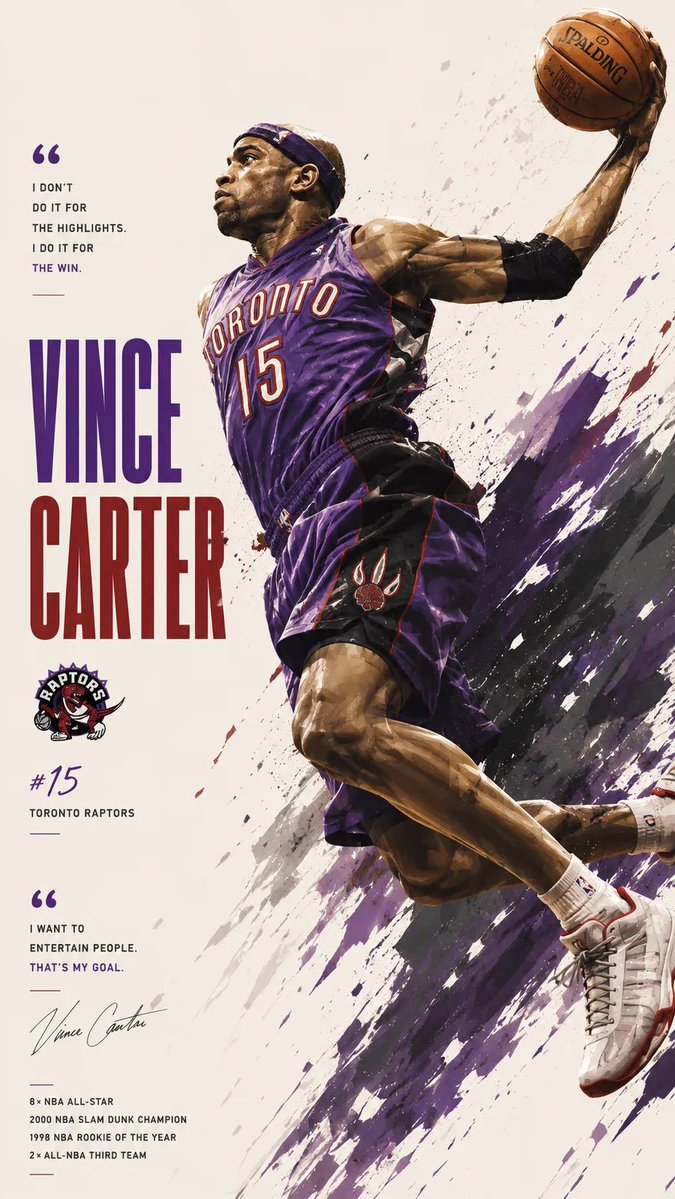
Dynamic NBA legend poster design, iconic basketball superstar in mid-air action pose performing dunk, jumpshot, or intense celebration, cinematic sports illustration style, highly detailed muscular anatomy, dramatic motion, realistic face with painterly polygon brush texture, explosive paint splashes behind character matching team colors, bold typography with player name in huge vertical letters, motivational quote text layout, sports stats and achievements infographic, clean minimal cream background, modern editorial composition.
Pro tip: Sports posters need motion, player identity, team colors, typography, and achievement details. Paint splashes and editorial composition add energy beyond a normal action photo.
14. Comic Page: 1970s NYC Indie Comic Page
Source: (Community)
Generate a page of a comic book with dialogue in the style of modern indie comic about New York City in the 1970s.
Pro tip: Comic page prompts should include page format, dialogue, era, setting, and visual tradition. The more specific the time and place, the easier it is for the model to create a believable panel sequence.
15. Handwriting Photo: Realistic Handwritten Notebook Photo
Source: (@patrickassale)
Amateur photo of an open notebook lying flat, filled with handwritten notes in black ballpoint pen. The handwriting is casual and slightly messy, like personnal notes, natural imperfections, crossed out words, underlined headings. Shot from slightly above, natural daylight from a window, no flash. Casual desk setting, shot on iPhone
Pro tip: For realistic handwriting images, ask for imperfections: crossed-out words, uneven spacing, casual desk lighting, and a phone-shot camera angle. These details make the result feel human.
16. Product Ad: Summer Citrus Soda Product Ad
Source: (@old_pgmrs_will)
画像生成: 商品広告写真, 夏にぴったりの季節商品, 炭酸飲料, 名称="夏柑SODA", 形状=ペットボトル500ml, 2025年に飲料広告として高CTAだったデザインをリサーチしてから画像仕様をデザインして生成, アスペクト比=3:4
Pro tip: Product ad prompts benefit from a structured key-value format: product type, name, packaging shape, seasonal angle, visual research goal, and aspect ratio. This makes the output easier to control.
17. Surreal Illustration: Surreal Koi Nebula Illustration
Source: (@liyue_ai)
一幅超现实主义数字插画风格,采用低角度仰拍视角。画面描绘了一条巨型彩色锦鲤遨游在梦幻般的星云中,四周环绕着色彩鲜艳的星云与气泡。画面中央还站着一个小人,背对观众,神情平静地仰望空中这条巨大的锦鲤,锦鲤头向下看着小人。整体画面呈现出强烈的大小对比,氛围空灵又梦幻。比例9:16
Pro tip: Surreal illustration prompts need a clear scale contrast and emotional focal point. The tiny human figure and giant koi give the image story, depth, and a memorable center.
18. Worldbuilding: Futuristic Desert Civilization Kit
Source: (Community)
Create a complete visual worldbuilding set for a futuristic desert civilization powered by solar technology: multiple images including architecture, characters, clothing, vehicles, maps, symbols, and environmental details. Keep a cohesive design language, cinematic realism, warm desert light, ultra detailed.
Pro tip: Worldbuilding prompts become stronger when they request a visual system instead of one hero image: architecture, vehicles, clothing, maps, symbols, and environmental rules.
19. Precision Grid: 10x10 Alphabet Object Grid
Source: (Community)Create an image with a 10x10 grid of objects whose names all start with the letter A
Pro tip: This prompt tests counting and vocabulary constraints at the same time. It is useful for checking whether GPT Image 2 can maintain a strict grid with 100 distinct labeled objects.
20. Counting Test: Bookshelf Counting Accuracy Test
Source: (@chetaslua)
A wooden bookshelf consisting of three shelves: On the top shelf, there should be one book, on the second shelf, there should be three books, and on the bottom shelf, there should be seven books.
Pro tip: This is a compact prompt for testing instruction-following. Use exact numbers, clear object locations, and a simple scene so you can quickly judge whether the model follows spatial constraints.
How to Write Better ChatGPT Image Prompts
A good ChatGPT image prompt should tell the model what to make, what it should look like, and how the final image should be composed. Use this structure when adapting any GPT Image 2 prompt from the examples above.
- Start with the output type. Say whether you want a portrait, lifestyle photo, product ad, UI mockup, infographic poster, comic page, 3D miniature, or realistic photo.
- Define the subject and scene. Name the main subject, background, environment, props, clothing, product, brand, animal, or interface the image should include.
- Add a visual style anchor. Use concrete phrases such as "vintage travel poster," "tilt-shift miniature," "cinematic lifestyle portrait," or "pastel mobile app design sheet."
- Control composition and camera. Include framing, camera angle, depth of field, layout, typography placement, screen count, object count, or focal point when the image needs accuracy.
- Specify lighting, color, and texture. Add cinematic lighting, soft studio light, golden hour, paper grain, clay texture, glossy product reflections, or a clear color palette.
- Set the final format. Add aspect ratio, poster orientation, app-store preview, social media crop, product ad layout, or print-ready poster direction when it matters.
- Turn the prompt into a reusable template. Replace the subject, brand, product, location, theme, animal, mood, or color palette to generate a new variation without rewriting the whole prompt.
Frequently Asked Questions About ChatGPT Image Prompts
What is a ChatGPT image prompt?
A ChatGPT image prompt is a written instruction that tells ChatGPT or GPT Image 2 what image to create. A strong prompt usually defines the image type, subject, style, composition, lighting, color palette, aspect ratio, and any text or layout requirements.
What is GPT-Image-2?
GPT-Image-2 is OpenAI's state-of-the-art AI model for image generation and image editing. In this article, the GPT Image 2 prompts are written for practical visual tasks such as portraits, UI mockups, product ads, infographic posters, comic pages, and realistic photo-style images.
How do I use these GPT Image 2 prompts?
Choose the category that matches your goal, copy the prompt, replace placeholders such as subject, brand, location, product, animal, color theme, or mood, then generate the image in ChatGPT or Oimi Canvas. For best results, keep the structure of the prompt and only change the details that belong to your project.
How do I write better ChatGPT image prompts?
Use a clear structure: output type, subject, scene, style reference, composition, camera angle, lighting, color palette, texture, aspect ratio, and final use case. For example, a product ad prompt needs product details and layout rules, while a UI mockup prompt needs screen count, device format, and interface style.
What is the difference between ChatGPT image prompts and ChatGPT photo prompts?
ChatGPT image prompts are broader instructions for generating images such as posters, UI mockups, product ads, infographics, comics, illustrations, and realistic photos. ChatGPT photo prompts are usually more specific to uploaded photos, portrait editing, professional headshots, profile photos, and identity-preserving image transformations.
What are the best ChatGPT image prompt categories to try first?
For most users, the easiest categories to try first are portraits, lifestyle photos, UI mockups, brand posters, product ads, infographic posters, and 3D miniatures. These formats have clear goals, strong visual references, and practical use cases for social media, marketing, design, and creative testing.
Can GPT Image 2 understand Chinese or Japanese prompts?
Yes. GPT Image 2 can understand multilingual prompts, including Chinese and Japanese examples. English prompts are often easier for English readers to copy, edit, and compare, while multilingual prompts can still be useful for testing style, layout, and language-specific image generation.
Are these ChatGPT image prompts free to copy?
Yes. The 20 ChatGPT image prompt examples in this article are free to copy and adapt. You can paste them into ChatGPT, use them as GPT Image 2 prompt templates, or click Generate on Oimi Canvas to create a similar image workflow.
Try these ChatGPT Image Prompts now
Try all the above prompts on an infinite canvas
Free ChatGPT Image GeneratorPrompt examples and output images are curated from community-shared GPT Image 2 prompt resources. Original creators and sources are preserved where available.