
GPT Image 2 + Seedance 2 Workflow: Complete Guide from Storyboard to Video
GPT Image 2 + Seedance 2 Workflow is an AI creative process that first generates storyboards or keyframes using GPT Image 2, then transforms them into dynamic videos using Seedance 2. This combination significantly improves AI video stability and control, making it one of the most practical AI video creation methods today.
In 2026, the core of AI content creation is no longer "which model to choose," but: how to combine multiple models into a workflow.
More and more creators are using AI to produce short dramas, game cutscenes, tutorial videos, and brand advertisements. The latest releases of GPT Image 2 and Seedance 2 fully demonstrate this — AI-generated images and videos have become good enough for real creative scenarios.
You can still assemble a professional team to produce content, but AI now gives you a faster way to explore ideas and test concepts before investing significant time and budget into formal production.
One particularly practical and effective combination is: GPT Image 2 + Seedance 2.
Simply understood:
- GPT Image 2 → Responsible for generating high-quality visuals (keyframes / storyboards)
- Seedance 2 → Responsible for bringing visuals to life (video / motion / camera)
By combining both, you can go from a storyboard directly to a complete video — ads, short films, tutorials, game cutscenes, all apply.
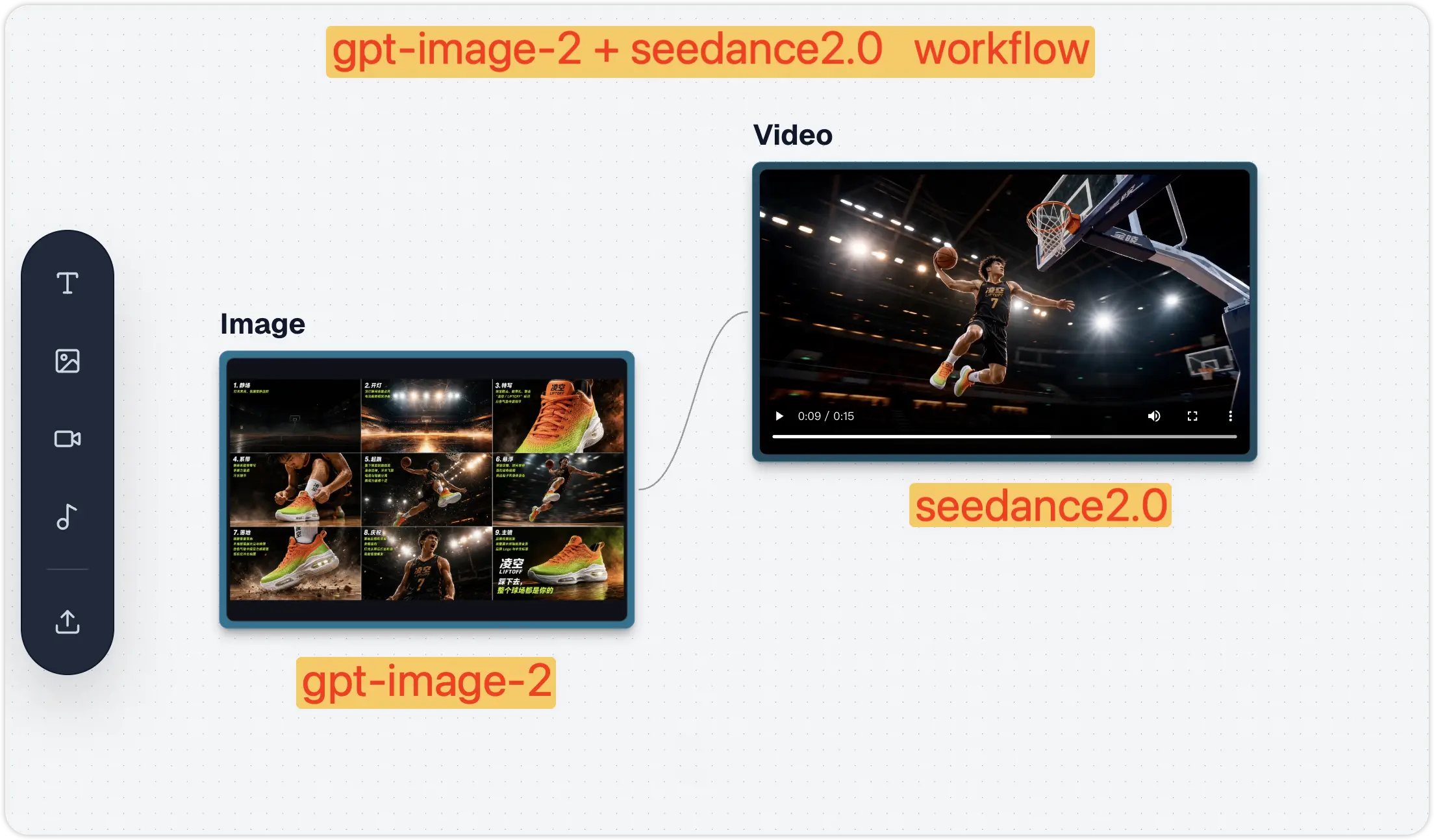
What Are GPT Image 2 and Seedance 2? New Capabilities Explained
GPT Image 2: Better Image Generation
GPT Image 2 is OpenAI's latest AI image generation model, with significant improvements over its predecessor:
- Clearer text in images — Perfect for posters, ads, thumbnails, and social media content
- More accurate prompt understanding — Better at following complex layout, style, and composition requirements
- More precise image editing — Can modify specific parts of an image without affecting the overall result
- Stronger design sense — Output suitable for brand marketing, game concept art, storyboard design, and more
- Better multilingual support — More reliable rendering of non-English text like Chinese and Japanese in images
Whether you're a marketer, indie game developer, short drama creator, or instructional designer, images generated by GPT Image 2 can be used directly as creative assets.
Seedance 2: More Powerful Video Generation
Seedance 2 is ByteDance's Doubao AI video generation model, ranked among the top globally on the Artificial Analysis Video Arena, and is currently the most creator-friendly video model:
- Better prompt following — More accurately understands detailed scene instructions
- Stronger character consistency — People, objects, and styles remain more stable between shots
- Smoother motion — Actions look more natural with less random jitter
- Better camera control — Supports pan, zoom, follow, and cinematic camera movements
- More realistic image-to-video — Reference images can be transformed into more believable motion scenes
- More realistic scenes — Lighting, physics, facial expressions, and details are cleaner
Why Is GPT Image 2 + Seedance 2 Better Than Using Either Alone?
Problems with using them separately:
| Tool | Problem |
|---|---|
| GPT Image 2 | Only generates images, cannot animate |
| Seedance 2 | Direct generation often results in "unstable visuals" and "character deformation" |
Combined Advantages
- More stable visuals — Use GPT Image 2 to define characters and style first, avoiding "face deformation" in videos
- More controllable storyboards — You can design each frame in advance, rather than letting the model generate randomly
- Higher video quality — Seedance only handles "motion," not "design" — clear division of labor yields better results
- More efficient creation — Quickly generate, test, modify, and compare different creative directions
The essence in one sentence: GPT Image 2 decides "what it looks like," Seedance 2 decides "how it moves".
GPT Image 2 + Seedance 2 vs Other AI Video Solutions
| Solution | Pros | Cons |
|---|---|---|
| Direct Seedance 2 generation | Fast, one-step process | Characters easily deform, visuals unstable |
| GPT Image 2 + Seedance 2 | Stable visuals, controllable camera, high quality | One extra storyboard generation step |
| Traditional video production | Most controllable | High cost, long cycle |
Case Study 1: Fashion Outfit Scan Video
Fashion and lifestyle videos are a natural fit for AI workflows: they need a clear character, outfit details, camera rhythm, and polished social-video pacing. With GPT Image 2 + Seedance 2, you can turn one structured fashion storyboard into a complete outfit scan video.
Scene: Luxury Outfit Scan on a London Shopping Street
Step 1: Generate Storyboard with GPT Image 2
Create a wide cinematic storyboard infographic (16:9) for a 15-second luxury fashion film titled “Scan My Outfit.” Style: ultra-realistic editorial photography with natural cinematic realism, inspired by Burberry, Dior, and Saint Laurent campaigns. STYLE Photorealistic, luxury street fashion, soft natural sunlight, shallow depth of field, subtle handheld camera feel, authentic skin and fabric detail. No cartoon or over-processed look. LAYOUT Clean white background, thin black borders, grid-based design. Include: Top reference strip (character, outfit, hair, makeup, accessories, lighting, camera style) 7 numbered storyboard panels Bottom technical production bar CHARACTER Charlotte Bennett — elegant British woman, late 20s. Fair skin, hazel eyes, chestnut low bun, gold earrings. Outfit: burgundy blazer + mini skirt, light blue silk blouse, red leather bag, metallic heels. STORYBOARD (7 PANELS) London Street Entrance — walking through luxury shopping street Phone Alert — phone lights up while walking Graceful Stop — pauses and answers call “Scan your outfit” — close-up reaction shot “I guess so” — soft reply with smile Outfit Scan — head-to-toe scan with fashion labels Final Pose — confident editorial hero shot AUDIO Male voice: “Can you scan your outfit?” Charlotte: “I guess so.” TECH STYLE iPhone cinematic look, 35mm lens, 24fps, HDR, soft stabilization, warm grading
GPT Image 2 has strong prompt understanding — you just need to clearly describe character identity, outfit details, visual style, audio cues, and shot sequence, and it can generate a complete fashion storyboard.
Generated result:
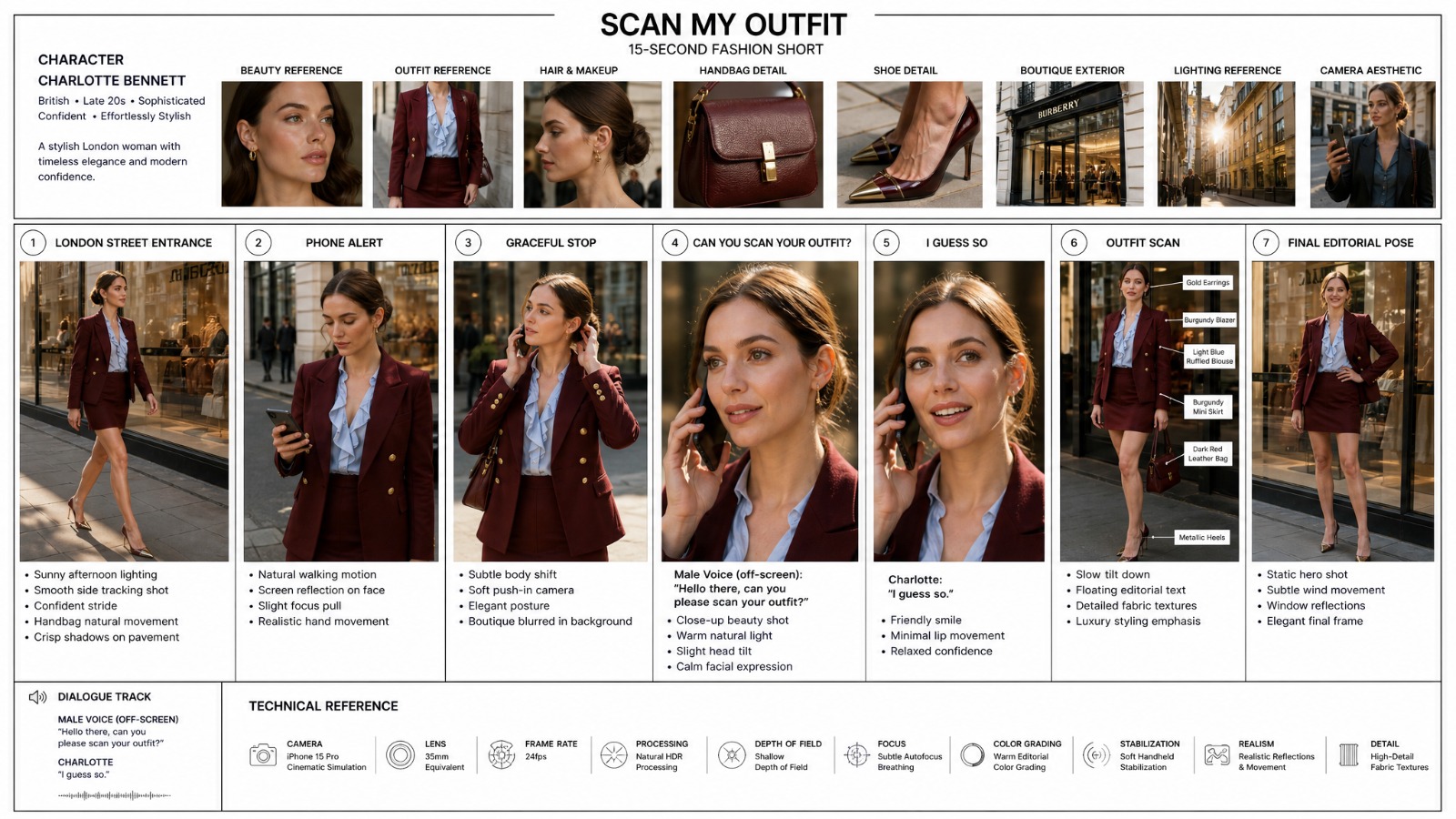
Step 2: Generate Outfit Scan Video with Seedance 2
Photorealistic cinematic fashion video set on an elegant London shopping street inspired by Bond Street. A stylish British woman in her late 20s walks confidently past a luxury boutique. She wears gold earrings, a burgundy double-breasted blazer, matching mini skirt, a light blue ruffled silk blouse, a structured dark red leather shoulder bag, and metallic pointed heels. Her chestnut hair is styled in a sleek low bun. Her phone rings. She glances at the screen, stops gracefully, and answers. A male voice asks, “Hello there, can you please scan your outfit?” She smiles and replies in a soft British accent, “I guess so.” The camera performs a smooth head-to-toe scan, displaying elegant text labels for each outfit item, then ends on a confident editorial pose in front of the boutique window. Bright natural sunlight, shallow depth of field, smooth gimbal movement, luxury editorial aesthetic, polished and sophisticated mood
Final result: From a single fashion storyboard to a polished outfit scan video — the kind of short-form fashion asset that would normally require a stylist, model, location, camera operator, and post-production pass.
Now you can accomplish it with one workflow using gpt-image-2 (storyboard) + seedance2.0 (image-to-video).
Open the AI Fashion Outfit Scan Video Case
View the gpt-image-2 & seedance2 prompts, then try the workflow
Open TemplateCase Study 2: Cinematic Short Film — Storyboard Deep Dive
This time, we analyze a viral cinematic short from the web: a medieval market at dusk, the camera moving through the crowd, finally gliding into a tavern where it lands on a silent armored knight in the corner.
In the first attempt, creator @aimikoda used the conventional approach — a single image + prompt to directly generate video with Seedance 2. After 5 attempts, each fell short: chaotic crowd movements, illogical camera transitions, lost wagon obstruction continuity, and the tavern door opening at the wrong moment.
In the second attempt, the creator changed the approach — first using GPT Image 2 to generate a storyboard with a timeline, clearly annotating all 12 shots, timing points, and camera movement motivations, then feeding it to Seedance 2. It worked on the first try.
Step 1: Generate Storyboard with GPT Image 2
Create a storyboard for a cinematic medieval market sequence in a rough graphite storyboard sketch style. The storyboard should feel like a professional film pre-visualization sheet with 12 panels, each panel containing camera direction notes, lens information, motion arrows, and cinematic staging. Use monochrome pencil shading with gritty texture, realistic medieval architecture, wet cobblestone streets, crowds, horses, carts, banners, taverns, and atmospheric lighting. The pacing should feel immersive and cinematic, beginning with slow observational shots before escalating into energetic tracking movement through the crowded marketplace. The camera should constantly redirect focus through foreground interruptions, moving objects, banners, and crowd motion to create natural cinematic transitions. The sequence should follow this structure: 1. Street-level close-up, 50mm — slow drift. A young medieval woman exchanges apples with a market vendor. Busy crowd behind them. 2. Medium close-up, 50mm — slight push-in. Hands exchanging coins and fruit while background pedestrians pass. 3. Foreground interruption, 35mm — sudden lateral catch. A horse rapidly crosses frame, briefly obscuring the scene. 4. Medium tracking shot, 35mm — camera redirects and follows a wooden cart moving through the muddy market street. 5. Low tracking shot, 28mm — slight handheld drift beside the cart wheels splashing through puddles. 6. Forward tracking, 28mm — camera continues moving through hanging banners and dense crowd traffic. 7. Partial occlusion reveal, 35mm — a cloth banner sweeps across frame, revealing chickens scattering through the street. 8. Medium shot, 35mm — focus redirects onto a running street child weaving through chickens and pedestrians. 9. Tracking shot, 28mm — weaving camera movement following the child deeper into the marketplace. 10. Tavern approach, 35mm — slight push toward a dim medieval tavern entrance as the child runs inside. 11. Transition shot, 35mm — focus handoff. Tavern door swings open revealing a rugged armored warrior inside. 12. Interior reveal, 35mm — smooth inward glide. A tired medieval knight sits alone at a wooden tavern table beside a massive sword, lit by warm candlelight and atmospheric smoke. The overall cinematic language should resemble high-end fantasy film storyboards used for production planning. Include handwritten technical annotations above every panel, motion arrows at the bottom of each frame, lens focal lengths, and subtle camera operation terminology like "tracking," "push-in," "redirect," "focus handoff," and "foreground interruption." The visual style should remain loose, expressive, and sketch-like rather than polished illustration.
Note the writing style of this prompt — it doesn't just describe the visuals, but specifies the "motivation" for transitions between each shot:
Wagon crossing → Camera follows wagon → Banner swinging → Reveals scattering chickens → Boy chasing chickens → Running past tavern door → Camera glides into tavern
Every transition is driven by scene action, no hard cuts.
Step 2: Generate Cinematic Video with Seedance 2
FORMAT cinematic continuous shot / motivated camera movement / 15s SCENE A crowded medieval market street inside a stone city at dusk. Narrow cobblestone road, wooden stalls, hanging banners, livestock moving through the crowd. Warm torchlight reflects on damp stones while light mist drifts between buildings. CAMERA CONCEPT A continuous motivated camera move where each new moving subject entering the frame redirects the camera's attention. Every motion naturally hands the focus to the next subject. SEQUENCE 0:00–0:03 Close street-level view of a market stall. CAMERA FOCUS: a woman bargaining with a merchant while selecting fruit from a wooden basket. She hands coins to the merchant. 0:03–0:05 A horse pulling a heavy wooden cart suddenly crosses the foreground from the opposite direction, briefly blocking the frame. CAMERA SHIFT: the camera catches the cart and begins tracking it as it moves through the market. 0:05–0:07 The cart squeezes between stalls and brushes past a hanging banner. The banner swings violently across the frame. CAMERA SHIFT: as the banner clears the view it reveals chickens scattering across the cobblestone street. 0:07–0:09 A street boy runs after the escaping chickens, chasing them through the crowd. CAMERA SHIFT: the camera begins following the boy as he runs between villagers. 0:09–0:12 The boy rushes past a tavern entrance and disappears into the crowd. CAMERA SHIFT: the tavern door suddenly swings open as someone exits. 0:12–0:15 The camera glides through the open doorway into the dim tavern interior. Lantern light flickers across wooden tables and drifting smoke. CAMERA FINAL FOCUS: a lone armored knight sitting quietly at a corner table, a massive sword leaning beside the bench as the knight slowly lifts his gaze. STYLE Layered medieval street life, natural crowd choreography, continuous motivated camera movement. LIGHTING Warm torchlight outside, dim lantern glow inside the tavern, smoke and dust catching the light. QUALITY Photorealistic, cinematic lighting, grounded camera motion, rich medieval atmosphere, highly detailed.
The same creative concept, dramatically different results:
| Comparison | Single Image Generation | Storyboard Generation |
|---|---|---|
| Attempts needed | 5+ attempts | 1 success |
| Shot transitions | Random jump cuts | Every transition has natural motivation |
| Narrative completeness | Scene elements lost | All 12 shots reproduced |
| Camera continuity | Camera moves randomly | Every camera move has motivation |
Why Is the Storyboard the Key to Seedance 2 Success?
Why such a huge difference between single image and storyboard? Because a single image doesn't contain enough information for the video model to understand your complete intent — you have the camera sequence, angles, and narrative rhythm in your head, but a single image can't express all of this. The storyboard encodes everything into one image, and Seedance 2 understands it immediately.
Core Technique: "Motivated Continuous Camera Movement"
This technique comes from film director Spielberg's camera philosophy — every camera movement must have "motivation" (Motivated Camera Move). The camera doesn't move randomly; it naturally shifts attention following scene actions: camera follows the wagon when it crosses, banner reveals scattering chickens, camera naturally glides into the tavern as boy runs past the door.
Annotating each camera direction and motivation in the storyboard allows Seedance 2 to precisely execute your desired camera language.
Final result: A 15-second cinematic short with complete narrative rhythm — from a lively market to a quiet tavern, every camera transition has natural scene motivation, delivering a viewing experience far beyond randomly generated camera movements. This is the power of storyboards — transforming video generation from "rolling the dice" to "precise control."
GPT Image 2 + Seedance 2 Standard Workflow (4 Steps)
Looking back at the cases above, you'll notice both follow the same workflow, only differing in storyboard detail level:
| Step | Case 1: Fashion Outfit Scan | Case 2: Medieval Short |
|---|---|---|
| ① Define visuals | Character, outfit, fashion style, 7-shot sequence | Scene, camera concept, 6 shots + timeline |
| ② Generate storyboard | GPT Image 2 generates a luxury fashion storyboard | GPT Image 2 generates storyboard with timeline |
| ③ Generate video | Seedance 2 outfit scan video | Seedance 2 motivated continuous camera movement |
| ④ Iterate and refine | Check outfit labels, character consistency | Check transition motivation, shot continuity |
Prompt Writing Key Points
Key prompt writing differences summarized from the cases:
- Image prompts (GPT Image 2) → The more detailed the better. Case 1 described character identity, outfit details, audio cues, and 7 storyboard panels; Case 2 described timeline, camera concept, transition motivation for each shot. GPT Image 2 has strong understanding, don't worry about over-describing
- Video prompts (Seedance 2) → Keep action and camera clear. No need to repeat visual details (storyboard already contains them), focus on how to move: camera direction, motion rhythm, transition logic
What Other Scenarios Does This Workflow Suit?
Case 1 was a fashion outfit scan video, Case 2 was a cinematic short. After reviewing many real examples online, we found this workflow can support a much wider range of creative scenarios:
- Game CG / Cutscenes — The strongest tool for indie games and studios: Use GPT Image 2 to generate multi-angle character sheets, scene concept art, and cutscene storyboards, Seedance 2 directly generates CG cutscenes. Boss appearances, skill releases, plot twists — no need for outsourced animation teams, one person can handle it
- Sports Brand Ads — Create a high-impact product storyboard first, then use Seedance 2 to turn it into a fast-cut brand video. This works especially well for sneakers, sportswear, hydration products, fitness gear, and campaign launches where product details and motion energy both matterSports Brand Ad Template
Open the AI Basketball Shoe Ad Video Case
View the gpt-image-2 & seedance2 prompts, then try the workflow
Open Template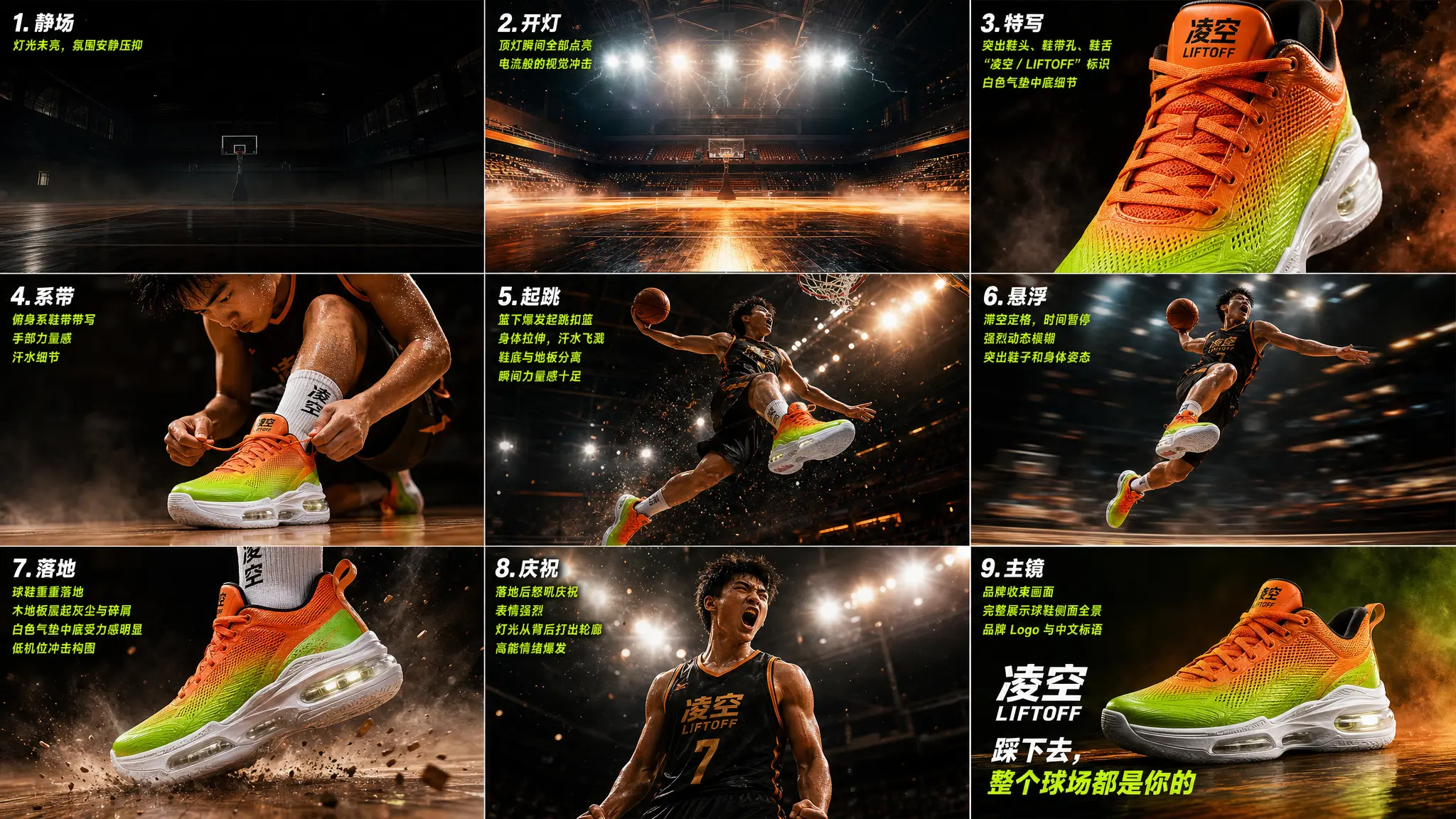
- AI Short Drama / Webtoon Video — Use Case 2's motivated camera movement technique for continuous storytelling: Have GPT Image 2 generate storyboards for each episode (character confrontations, chases, plot twists), character appearance locked at storyboard stage, Seedance 2 handles each shot. 30-60 seconds per episode, low cost batch productionAnime Storyboard Video Template
Open the AI Anime Storyboard Video Generator Case
View the gpt-image-2 and seedance 2 prompts in Oimi Canvas, then try the workflow.
Open Template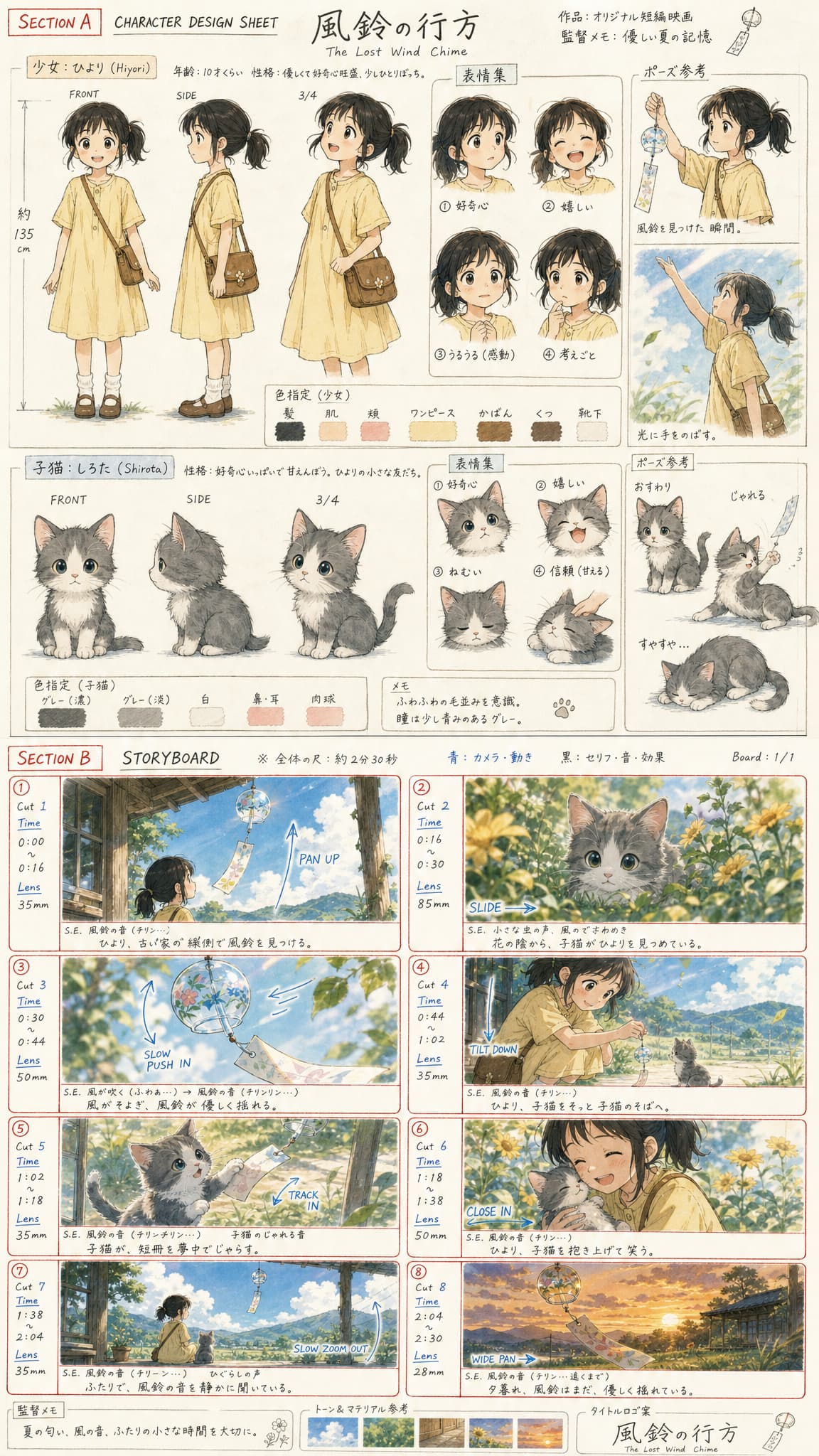
- Sports Training Videos — Tennis serve breakdown, basketball three-step layup, yoga pose transitions... Use GPT Image 2 to generate standard action storyboards (front + side multi-angle), Seedance 2 generates slow-motion demo videos. 100x faster than hand-drawn storyboards, coaches can directly use for teaching materialsAnime Sports Video Template
Open the AI Anime Tennis Video Case
View the gpt-image-2 and seedance 2 prompts in Oimi Canvas, then try the workflow.
Open Template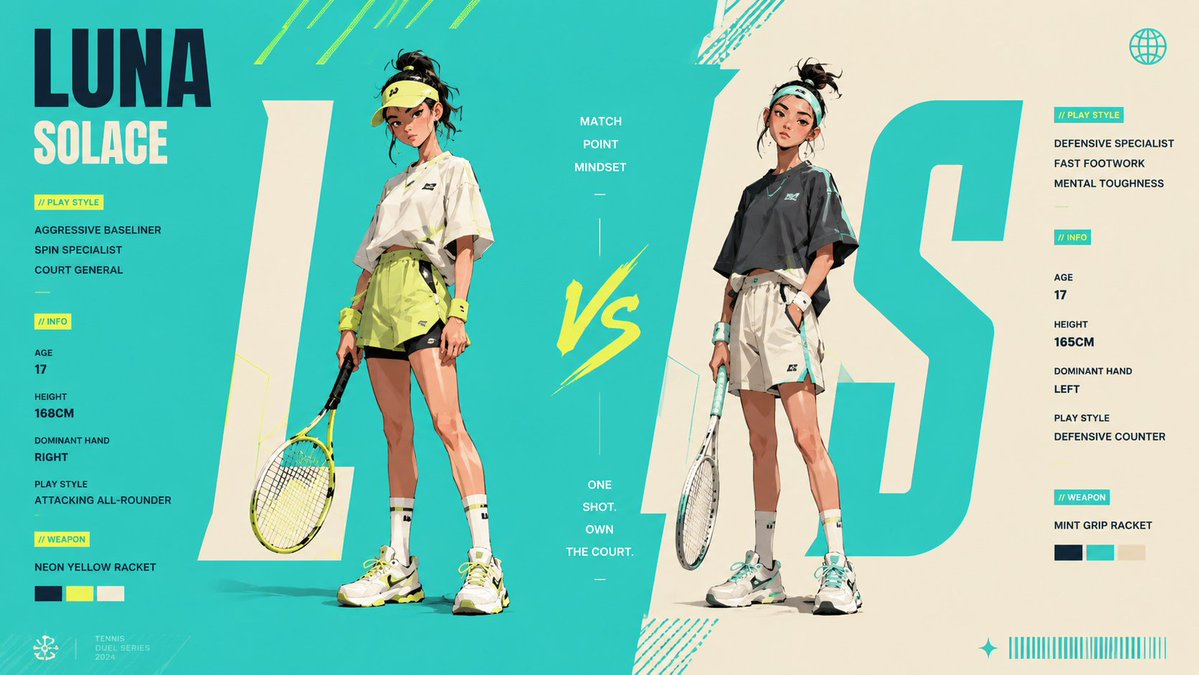
- UGC Affiliate Videos — Use Case 1's approach with handheld feel, natural lighting, conversational scenes, and product or outfit labels
- Brand Logo Animation — Upload logo, have GPT Image 2 generate animation storyboard (annotating motion arrows, glow effects, transition directions), then use Seedance 2 to generate animation
- Food / Travel Vlogs — GPT Image 2 generates "plate close-up → knife cutting → steam rising → first bite" food storyboard, Seedance 2 brings static food to life with documentary qualityAnime Cooking Video Template
Open the AI Anime Cooking Storyboard Video Case
View the gpt-image-2 and seedance 2 prompts in Oimi Canvas, then try the workflow.
Open Template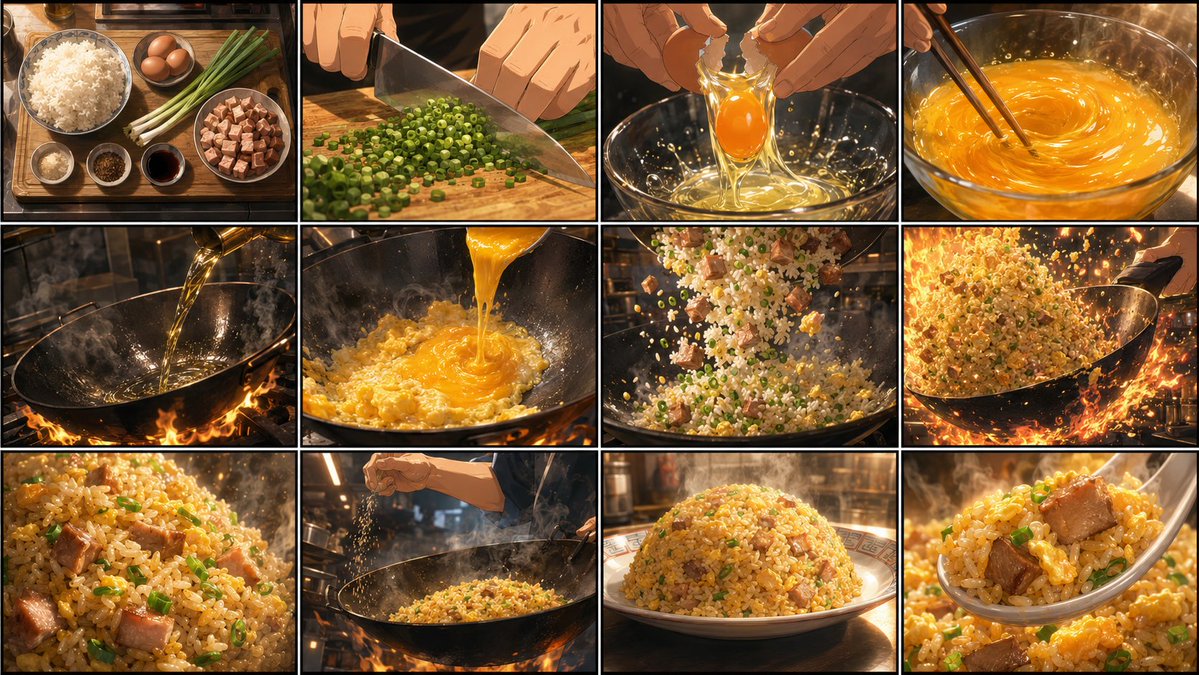
- Real Estate / Interior Design Walkthroughs — GPT Image 2 generates different angle interior renderings, Seedance 2 generates continuous walkthrough videos from living room to balcony, far more persuasive than static renderings
- Creative A/B Testing — For the same product, generate multiple different style storyboards, quickly compare which direction has better results
GPT Image 2 + Seedance 2 Advanced Tips
- Storyboards are more powerful than keyframes — Case 2 proved that storyboards with timeline and camera motivation work far better than single keyframes. Don't just use one image, create at least a 3-panel storyboard
- Specify "motivation" for transitions — Don't say "pan camera," say "wagon crosses frame, camera follows wagon" (see Case 2). Scene-action-driven camera movement looks much more natural than random movement
- Static first, then motion — Perfect the storyboard first, then add animation. Visual quality determines video quality ceiling (Case 1's fashion storyboard spent time locking down the character, outfit, and shot sequence first)
- Iterate multiple times — Both Case 1 and Case 2 were results after iteration. Generate first, check results, modify prompts, generate again — AI's advantage is rapid iteration, don't expect perfection on the first try
- Keep improving your prompts — If you want to go deeper, read the Seedance 2 Prompt Guide and ChatGPT Images 2 Hot Prompts. The first helps with video action, camera, and rhythm control; the second helps with GPT Image 2 visual design, composition, and style direction
Is GPT Image 2 + Seedance 2 the Strongest AI Video Workflow Currently?
Yes. GPT Image 2 + Seedance 2 is currently the strongest and most practical AI video workflow. Its strength is not just the models themselves, but the way it separates "visual design" and "video motion" into the two steps each model handles best: GPT Image 2 locks down characters, composition, style, and storyboards first, then Seedance 2 handles action, camera movement, and continuity.
In this combination:
- GPT Image 2 → Handles visuals (keyframes / storyboards / concept art)
- Seedance 2 → Handles motion (video / action / camera)
This workflow is more stable, more controllable, and closer to a real creative production process than using either model alone: first build the storyboard and visual assets, then move into video generation. Combined, you can quickly produce product ads, cinematic shorts, game CG cutscenes, AI short dramas, sports training videos, and more. You don't need to lock into one creative direction from the start — you can quickly generate, test, modify, and compare different creative directions, much faster than traditional production workflows.
This is the true value of AI for creation: not just helping you produce content faster, but helping you explore more creative possibilities before investing significant time and budget.
GPT Image 2 + Seedance 2 FAQ
What is the GPT Image 2 + Seedance 2 workflow?
It is a two-step AI creation workflow: use GPT Image 2 to generate high-quality keyframes or storyboards, then use Seedance 2 to animate them into video. GPT Image 2 defines the look, and Seedance 2 defines the motion.
Why combine GPT Image 2 with Seedance 2 instead of using Seedance alone?
Direct video generation can produce unstable faces and inconsistent characters. A GPT Image 2 storyboard or keyframe locks the appearance and style before Seedance 2 generates motion, which improves control and output quality.
What if Seedance generation is unstable?
Use storyboards instead of single images, annotate camera movement motivation, specify motion direction and speed, and iterate prompts. More visual context usually gives Seedance 2 a clearer generation target.
Should I use English or Chinese prompts first?
GPT Image 2 and Seedance 2 usually understand English prompts more accurately. For best results, write the first prompt in English, then adapt it to Chinese if needed.