
ChatGPT Photo Prompt: 10 Viral Portrait Editing Prompts to Copy (2026)
A ChatGPT photo prompt is a short instruction that helps you upload a portrait, selfie, or profile photo and transform it into a new AI photo.
This collection brings together 10 portrait editing prompts — each tested with real outputs — for professional headshots, profile pictures, Polaroid-style edits, travel posters, scrapbook collages, fashion portraits, and more.
No login required. Copy and paste any prompt below into ChatGPT to edit your uploaded photo, or try these prompts on Oimi Canvas — a free online AI portrait generator.
10 ChatGPT Photo Prompt Examples for Portraits
1. Professional Travel Posters#
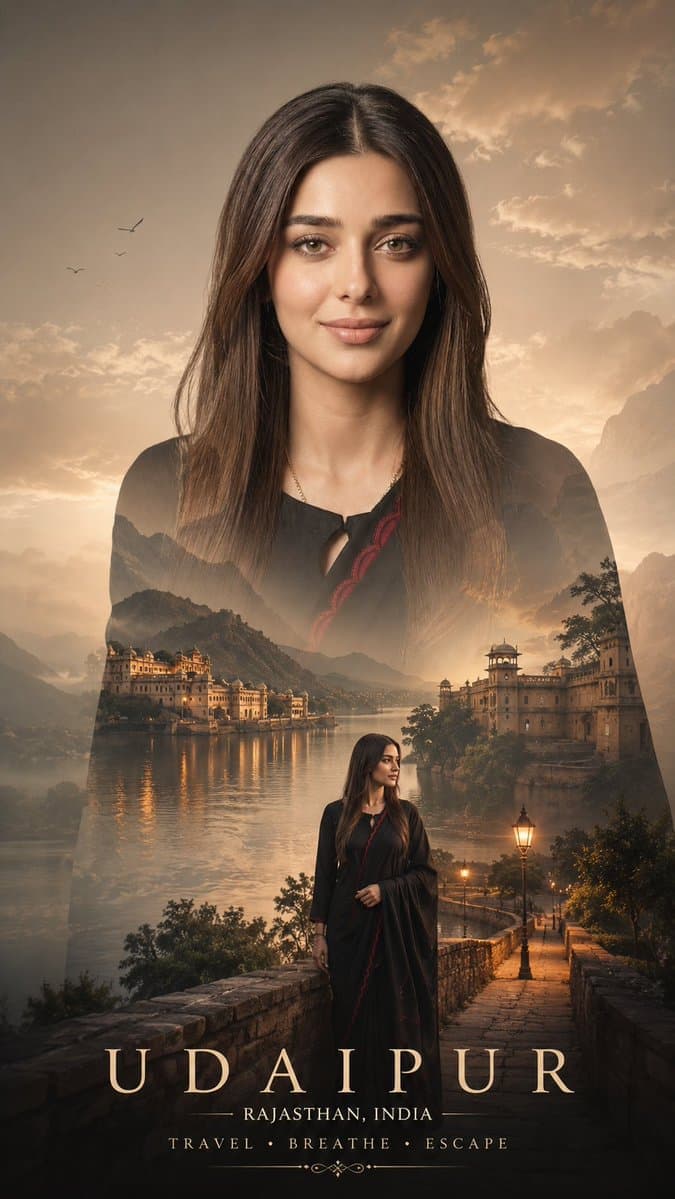
Upload a portrait or selfie and turn it into a professional travel poster while keeping the person's face recognizable. This ChatGPT photo prompt works for Instagram Reels covers, Facebook vacation albums, LinkedIn travel-industry posts, and YouTube travel vlog thumbnails.
Analyze the uploaded image first and intelligently adapt the composition, scenery, colors, lighting, subject placement, camera angle, clothing mood, and environmental elements according to the original photo. Create a cinematic DOUBLE EXPOSURE travel poster using the uploaded image while preserving the real identity, face structure, hairstyle, body pose, skin tone, and clothing details of the person. The AI should automatically detect: subject pose viewing direction outfit style mood of image lighting direction travel vibe camera framing environment suitability Then dynamically generate matching travel elements and compositions that naturally fit the image. STYLE: Ultra realistic cinematic double exposure, emotional travel storytelling, luxury tourism campaign aesthetic, realistic photo compositing, dreamy atmosphere, premium poster design, high-end editorial photography, soft fog, cinematic depth, layered landscapes, realistic blending. SMART COMPOSITION RULES: If subject is looking sideways → add mountains/roads/horizon in viewing direction. If subject is standing → create full scenic landscape body blend. If subject is sitting → create calm reflective storytelling composition. If outfit looks winter/travel oriented → add snowy mountains, fog, pine forests. If outfit looks casual/summer → add valleys, rivers, tropical roads, sunsets. If image lighting is warm → use golden cinematic grading. If image lighting is cool → use misty blue atmospheric grading. If background is simple → create clean white luxury poster background. If pose is dramatic → enhance cinematic depth and scale. SCENERY GENERATION: Automatically generate and blend suitable: mountains rivers winding roads forests clouds fog lakes valleys waterfalls temples/cabins/villages birds travel vehicles (bike/car/jeep if composition suits) DOUBLE EXPOSURE EFFECT: Blend landscapes seamlessly inside the body silhouette with realistic transparency, atmospheric fog crossing through body edges, depth layering, natural shadows, and smooth compositing. SECONDARY SUBJECT: Add a smaller realistic version of the same person near bottom area interacting with the landscape naturally: standing near road beside bike overlooking valley walking through scenery TYPOGRAPHY: Automatically place elegant cinematic text based on composition: "[Detected or Custom Location Name]" "[Region/Country]" "TRAVEL • BREATHE • ESCAPE" Typography should look minimal, luxury, cinematic, and professionally designed. COLOR GRADING: Adaptive cinematic grading based on original image tones: earthy greens foggy whites mountain blues warm sunset tones moody shadows soft atmospheric contrast QUALITY: Hyper realistic, ultra detailed, seamless blending, realistic textures, volumetric lighting, premium travel advertisement quality, 8K cinematic poster. NEGATIVE PROMPT: cartoon, low quality, distorted face, extra limbs, unrealistic blending, bad anatomy, oversaturated colors, messy composition, artificial AI artifacts, blurry face, duplicate subject, flat lighting. OUTPUT: Vertical cinematic travel poster, 9:16 aspect ratio.
2. Retro Cartoon Photos#
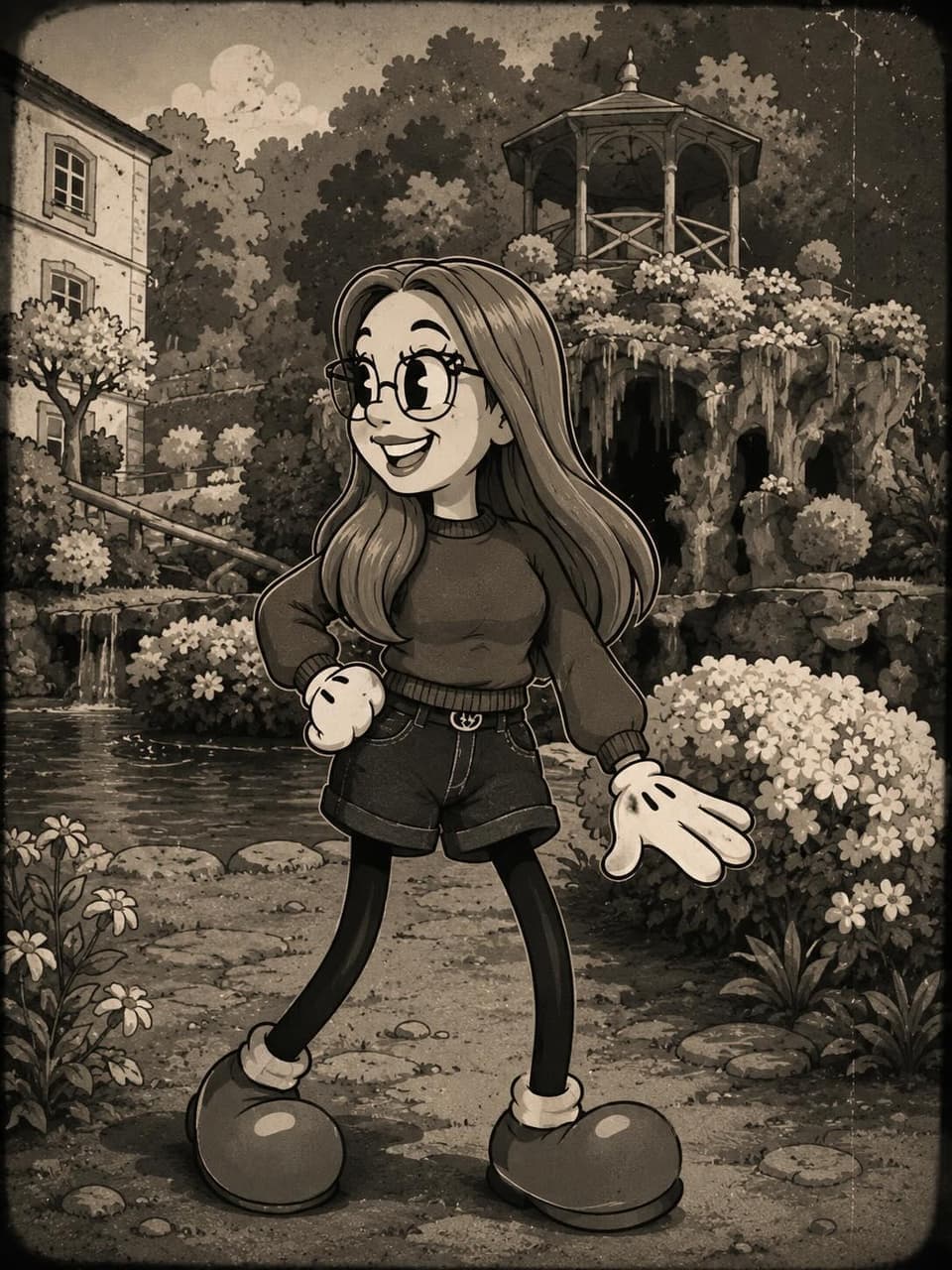
Perfect for Instagram profile pictures, TikTok avatars, and fun "compare the original vs. cartoon" posts. Upload a selfie, portrait, group shot, or pet photo, then use this ChatGPT photo editing prompt to create a recognizable retro cartoon profile image.
Transform the person in the photo into a vintage 1930s–1940s cartoon character inspired by classic "rubber hose animation" styles such as Betty Boop, Cuphead, Steamboat Willie, and old Fleischer Studios cartoons. IMPORTANT: Clearly preserve the identity of the person in the photo (recognizable hair, beard, glasses, face, and facial expression). Exaggerated, elastic cartoon-style body. Large black vintage pie-cut eyes. Big expressive smile. Classic white cartoon gloves. Oversized 1930s-style cartoon shoes. Thin rubber hose-style arms and legs. Thick black outlines and authentic vintage animation look. Visual Style: Black and white or vintage sepia tones. Aged old-film texture. Small grain, scratches, and imperfections like old film reels. Simple cel-animation style shading. Caricatured but natural proportions. Background inspired by the original environment of the photo. Art Style: 1930s / 1940s cartoon animation. Rubber hose cartoon aesthetic. Vintage animation poster style. Fleischer Studios aesthetic. Cuphead-inspired vintage cartoon style. Ink outlines and exaggerated expressions. Quality: Ultra-detailed vintage cartoon. Cinematic composition. High facial likeness detail. Soft vintage lighting. Authentic retro animation feeling. Full-body character.
3. Scrapbook Doodle Collage#
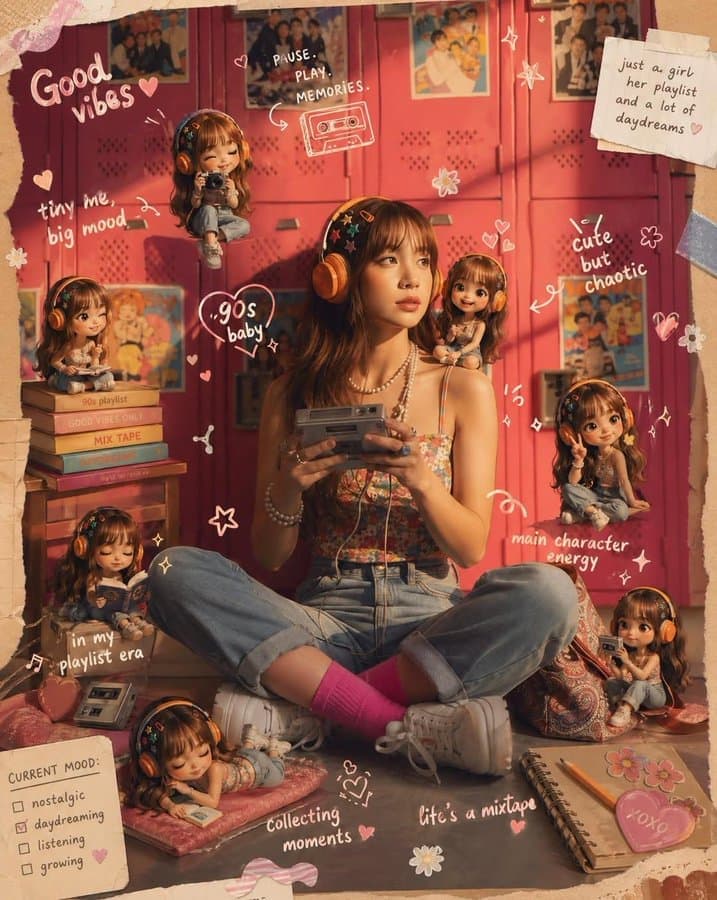
Great for aesthetic Instagram posts, lifestyle bloggers, and Pinterest mood boards. Upload a portrait or couple photo and turn it into a profile-ready scrapbook collage with doodles, mini figures, and social media details.
Transform the provided reference image into a cozy aesthetic scrapbook-style composition while strictly preserving the original subject, identity, pose, lighting, and background. Add multiple small "mini version" characters of the same person (chibi / doll-like style), placed naturally around the scene (on objects, table, shoulder, etc.). These mini figures must match the subject's face, hairstyle, outfit, and vibe consistently, styled as cute 3D collectible figurines. Show them doing different activities (reading, posing, taking photos, relaxing). Overlay handwritten-style doodles and annotations across the image: arrows, hearts, stars, sparkles, icons, and playful captions connected to elements in the scene. Use a soft pastel color palette (white base with pink, peach, blue accents). Keep the frame visually rich and filled but balanced and clean. Style: warm, cozy lighting, dreamy Instagram scrapbook aesthetic, soft depth of field, highly detailed, polished but playful. The final result must look like the SAME original image enhanced with mini alter-egos and aesthetic annotations — not a recreated or different scene.
4. A Disney Park "Follow Me" Portrait#
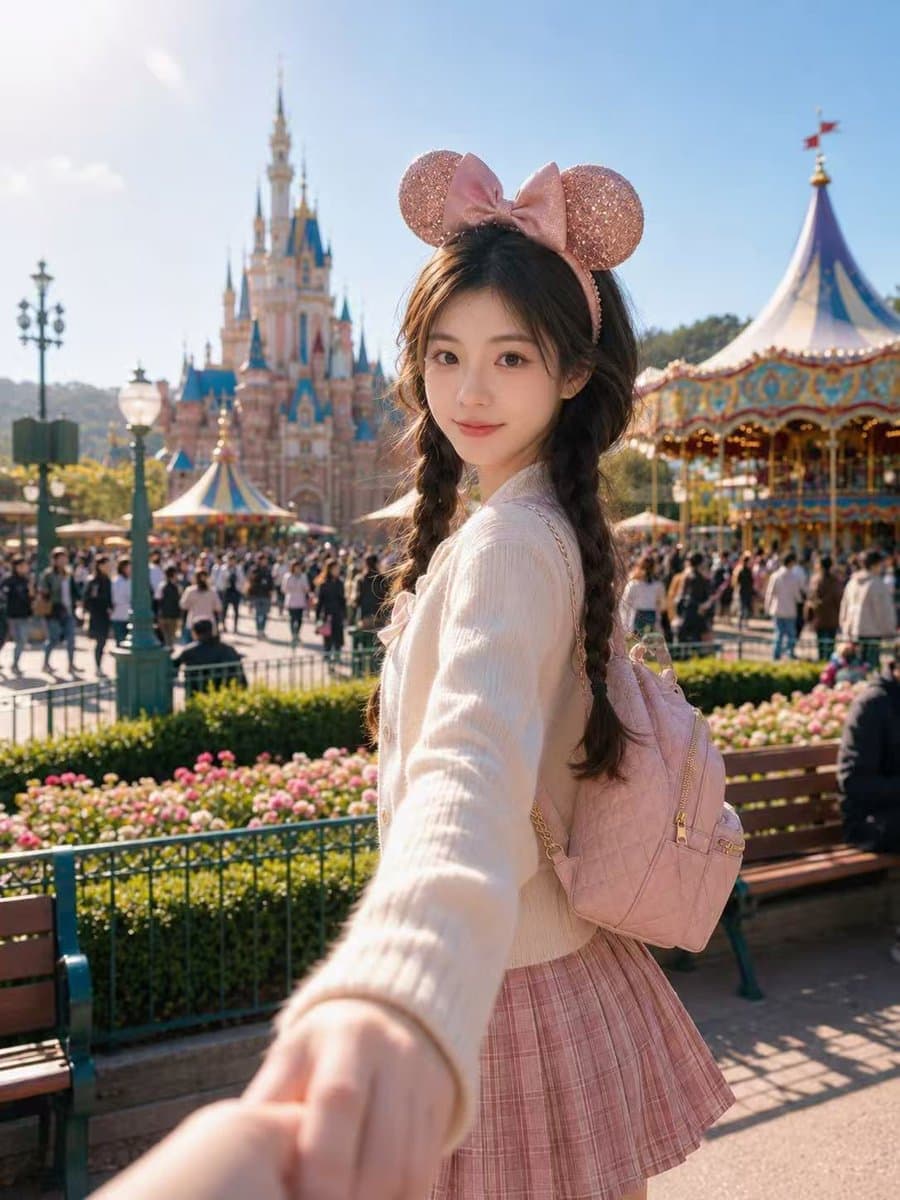
Perfect for Disney trip announcements, family vacation posts, and Instagram "follow me" portrait series. Upload a face photo or family portrait and use this prompt to create a bright AI travel portrait for birthday cards, profile updates, and Facebook memories.
Use the uploaded portrait only as the identity reference. Preserve the person's real facial features, face shape, skin tone, eye shape, and recognizable hairstyle. Do not copy the original clothes, background, lighting, pose, or image quality from the uploaded portrait. Create a realistic vertical outdoor theme-park portrait photo of the same person in a bright fairytale amusement park during a sunny afternoon. The person is standing in the foreground, captured from a slightly low front angle with a close half-body composition, gently turning back toward the camera with a natural soft smile. One arm extends slightly forward toward the camera, creating a "follow me" travel-photo perspective. Keep the face highly recognizable and natural. In the background, show a dreamy fairytale castle, a colorful carousel, garden flowers, benches, visitors, and warm lively park atmosphere. Use bright blue sky, clean sunlight, soft backlight on the hair, realistic shadows, natural skin texture, and a cheerful cinematic vacation mood. The background should be slightly blurred with realistic depth of field, while the person remains sharp and detailed. Choose a flattering outfit that best matches the person's face, hairstyle, body proportions, and overall vibe. Do not copy any specific outfit from another image. The styling should feel cute, youthful, fashionable, and suitable for a theme-park travel portrait, with coordinated colors and natural fabric texture. Add suitable accessories only if they fit the person naturally. Ultra-realistic photography, authentic smartphone camera feeling, natural body proportions, realistic hair strands, detailed skin texture, bright clean color grading, high-end social media portrait, no artificial plastic skin, no AI look, no text, no logo, no watermark. Negative Prompt: watermark, logo, text, signature, brand name, cartoon, anime, doll face, plastic skin, over-smoothed skin, distorted face, changed identity, unrecognizable face, wrong hairstyle, bad anatomy, unnatural body proportions, extra fingers, missing fingers, deformed hands, twisted arms, blurry face, blurry eyes, low resolution, overexposed face, harsh fake lighting, messy background, duplicated people, distorted castle, fake theme park, copied outfit, copied pose exactly, AI artifacts.
5. Fashion Illustration#
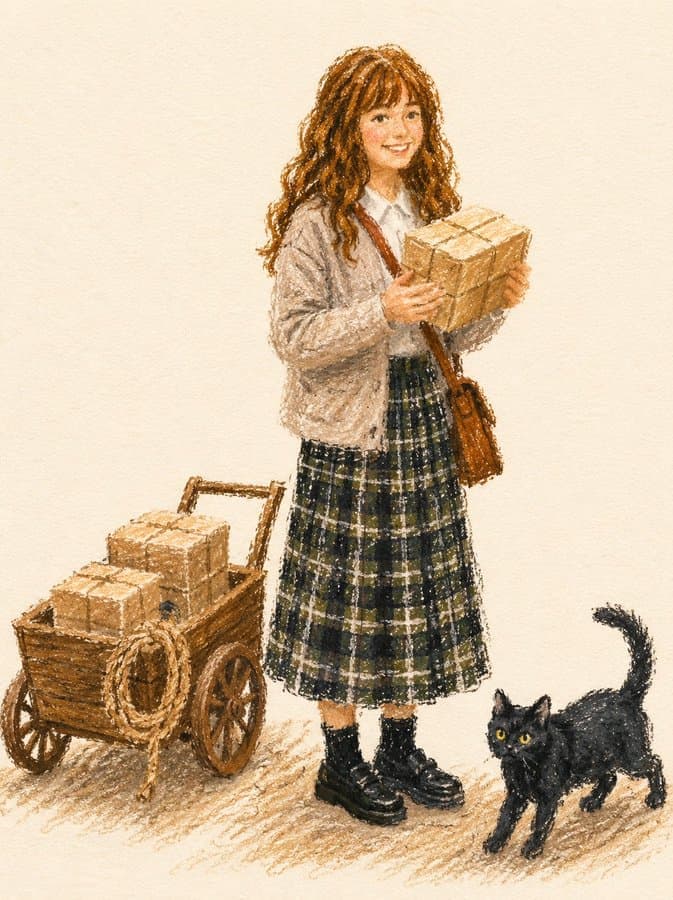
Ideal for fashion blog headers, OOTD Instagram posts, and Pinterest style illustrations. Upload a portrait or outfit photo and transform it into a professional fashion illustration for profile branding, merchandise design, or print-on-demand posters.
Transform the subject from the uploaded photo into a fashion illustration created with thick oil pastels or wax crayons on textured paper. Fashion Illustration Style: Editorial and stylish, focusing on the subject's outfit and overall look rather than background elements. Reminiscent of fashion magazine sketches. Medium & Tools: Rendered with bold, chunky pastel strokes. Marks are grainy, textured, and uneven, leaving visible gaps and overlaps. No digital smoothness. Linework: No black outlines or contour lines. Shapes are defined by overlapping pastel blocks of color. Coloring: Flat matte fills in vibrant but muted tones. Slightly imperfect coverage, with paper texture peeking through. Minimal shading using broad pastel hatching, not gradients. Details: Preserve the subject's hairstyle, clothing, accessories, pose, and expression exactly, but simplify them into bold pastel forms. Logos or numbers should appear as painterly pastel marks, not sharp text. Background: Solid, off-white sketchbook paper. Only a light scribbled ground shadow to anchor the figure. Overall Tone: Chic, modern fashion sketch aesthetic — stylish, minimal, and editorial. Negative Prompt: No outlines, no contour ink. No gradients, no digital airbrush, no vector-smooth shapes.
6. Greenhouse Portrait#
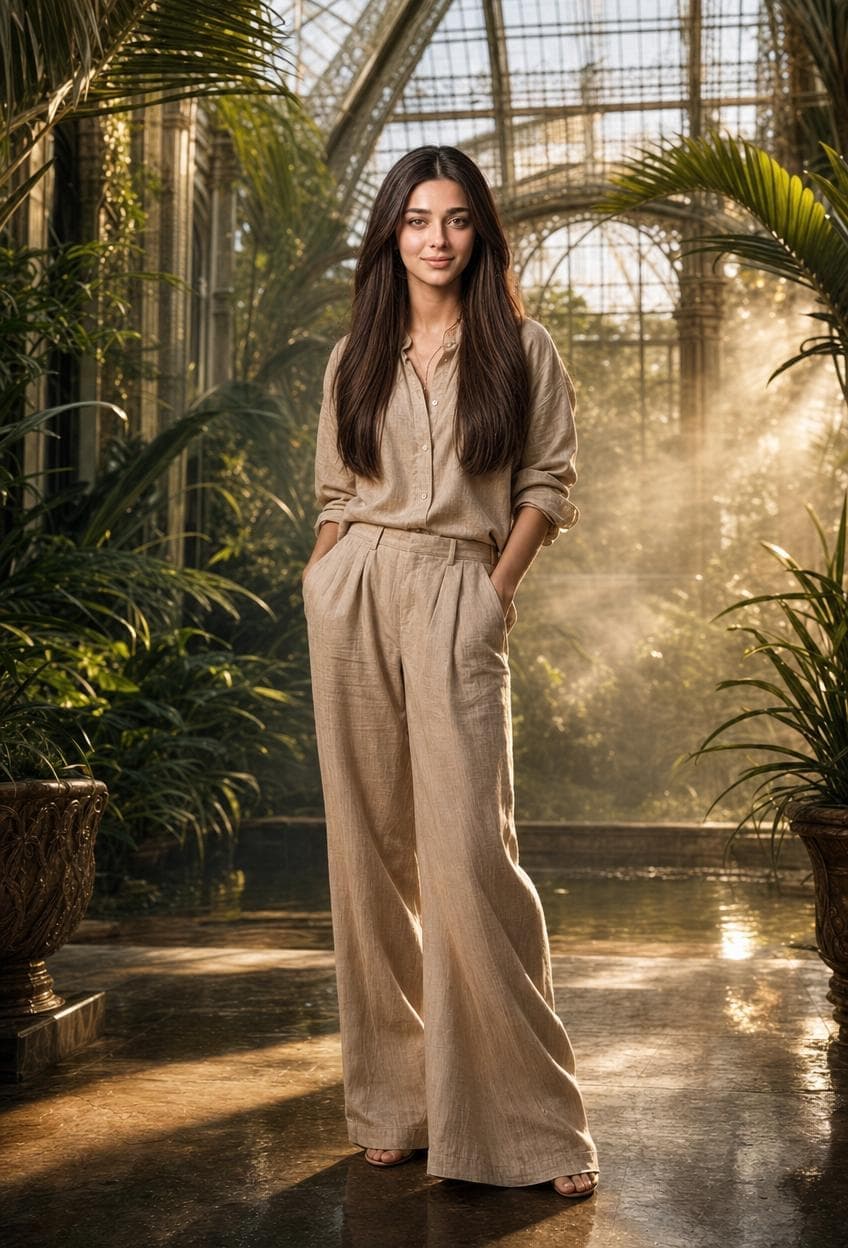
A strong fit for fashion Instagram, editorial portfolio shots, and LinkedIn creative-industry headshots. Upload a portrait or selfie and use this professional photo prompt to create a polished greenhouse portrait for brand shoots and profile photos.
Use my reference photo as the subject (same face/likeness). Full-body editorial fashion portrait inside a luxurious tropical greenhouse with tall exotic plants and glass walls. Subject standing naturally with hands in pockets, wearing an elegant neutral beige linen outfit with relaxed wide-leg pants and soft rolled sleeves. Warm golden sunlight streaming through the greenhouse glass, visible soft mist in the background, cinematic atmospheric haze, refined green-gold color grading. Ultra-realistic photography, Vogue-style editorial composition, soft shadows, detailed skin texture, natural long hair, shallow depth of field, luxury botanical aesthetic, centered framing, no extra people.
7. 3x3 Grid Portrait Collage#
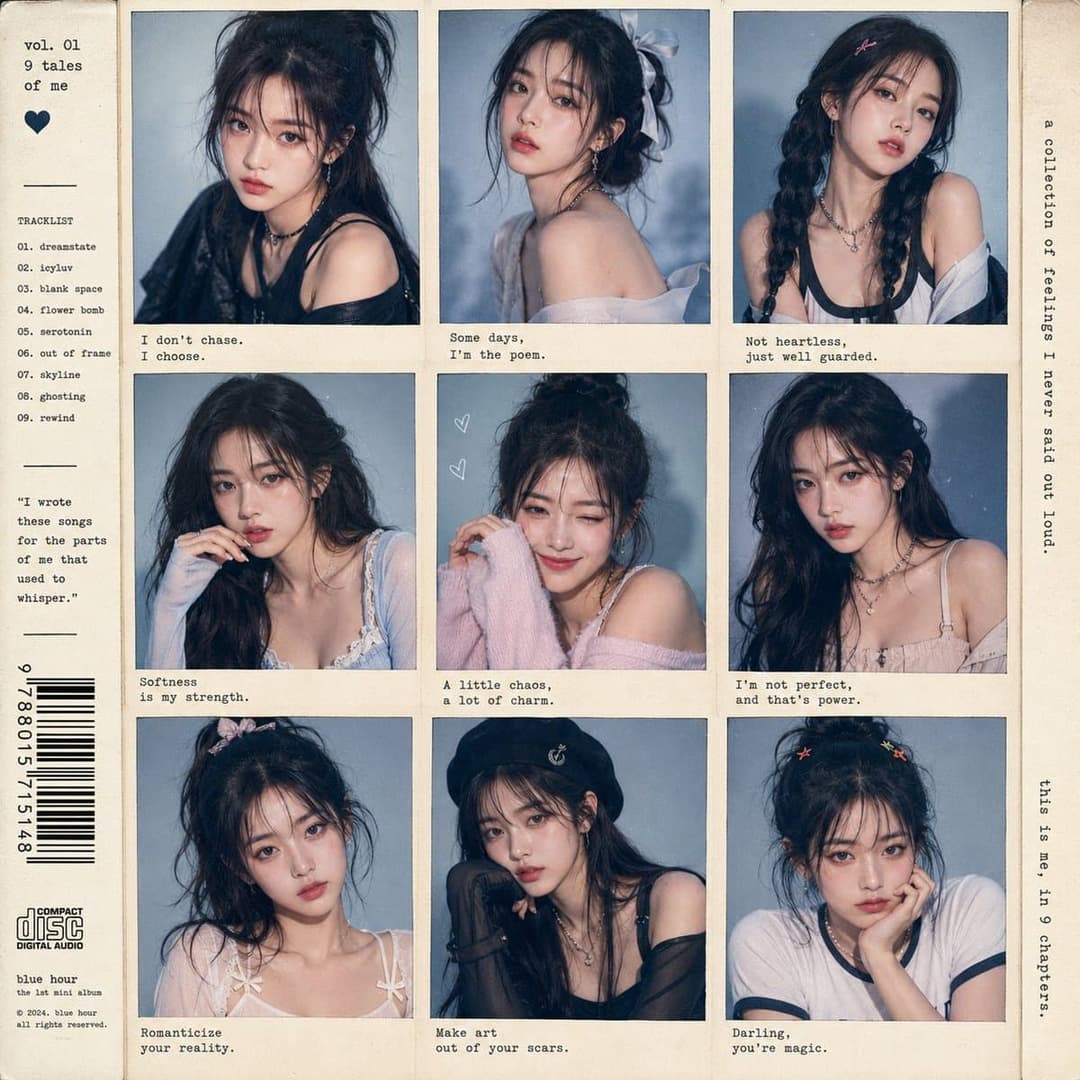
A go-to for Instagram grid posts, K-pop fan accounts, and artist portfolio showcases. Upload one portrait and generate a 3x3 Polaroid-style profile photo collage with multiple hairstyles, outfits, and expressions.
Semi-realistic anime style young Korean woman in the uploaded image, K-pop idol concept album cover, 3x3 grid portrait collage, nine unique individual portraits with different hairstyles and outfits, soft blue-grey studio background, varied expressions from fierce to playful, pastel and neutral fashion styling, vintage polaroid-style grid layout, retro typewriter text overlay with poetic phrases, barcode detail on left edge, soft cinematic studio lighting, ultra-detailed, 8K.
8. A Clumsy and Hasty 'Soulful Artist' Style#
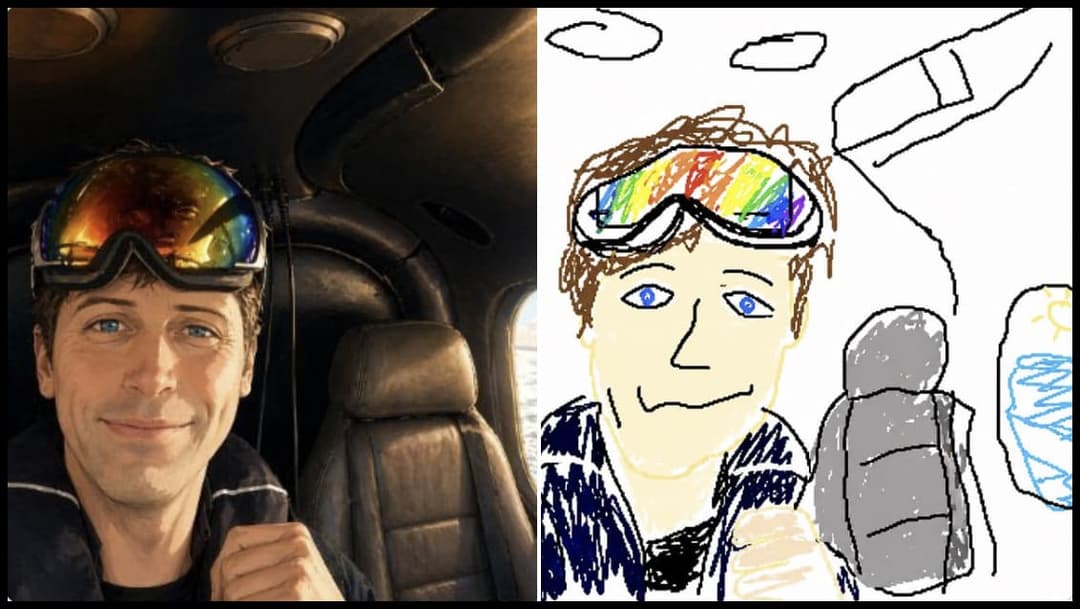
Ideal for meme pages, Reddit humor posts, and "expectation vs. reality" Instagram stories. Upload a portrait or profile photo, then use this funny ChatGPT image prompt to create a deliberately bad redraw while keeping the original person loosely recognizable.
Redraw the attached image in the most clumsy, scribbly, and utterly pathetic way possible. Use a white background, and make it look like it was drawn in MS Paint with a mouse. It should be vaguely similar but also not really, kind of matching but also off in a confusing, awkward way, with that low-quality pixel-by-pixel feel that really emphasizes how ridiculously bad it is. Actually, you know what, whatever, just draw it however you want.
9. Trash Polka Artwork#
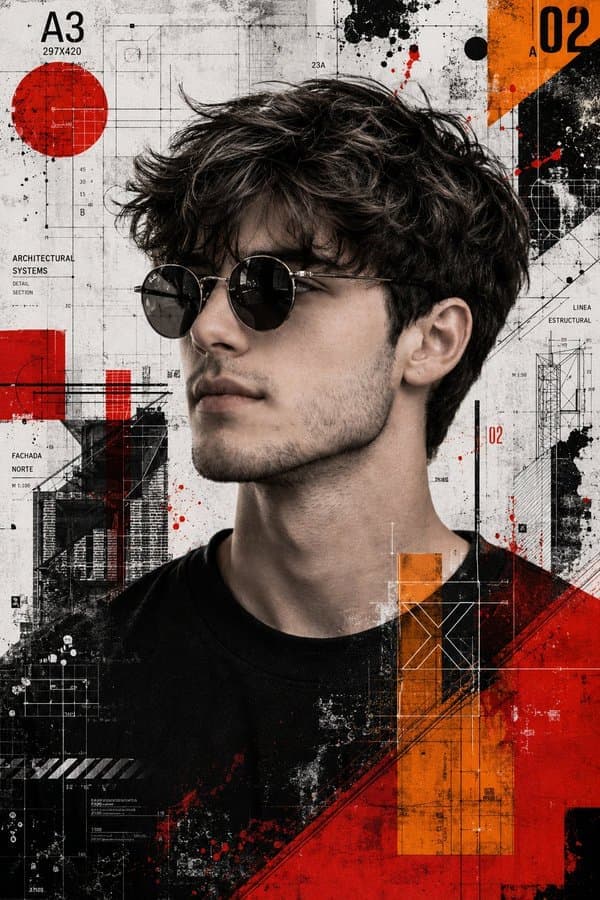
A bold choice for album art, professional portrait posters, tattoo studio Instagram, and edgy editorial posts. Upload a face photo and turn it into a dramatic AI portrait while preserving facial structure, hairstyle, and identity.
Create a high resolution mixed media Trash Polka artwork using the provided reference image strictly for identity preservation. The face, hairstyle, and beard must remain exactly the same as the reference with no alteration or beautifying. Keep sharp focus, strong detail, and strict style consistency. The subject should be shown in a side profile view wearing round sunglasses. Glasses are allowed but must not change the facial structure in any way. Style the artwork in Trash Polka with a realistic black and white photographic base layered with abstract graphic elements. Add grunge and collage textures with high contrast. Include vivid orange and vivid red geometric shapes, architectural blueprint lines, and schematic drawing elements. The background should look like an abstract technical collage made of blueprint style line work and schematic diagrams. Keep the overall palette mostly monochrome with strong orange and red accents. Use cinematic lighting that enhances depth and contrast. The overall aesthetic should feel sharp, cinematic, editorial, and like an art collage. Restrictions: do not change facial structure, hairstyle, or beard. Do not beautify or stylize the face beyond the reference. Avoid smooth digital painting and keep a realistic photographic base.
10. Adorable Character Design Sheet#
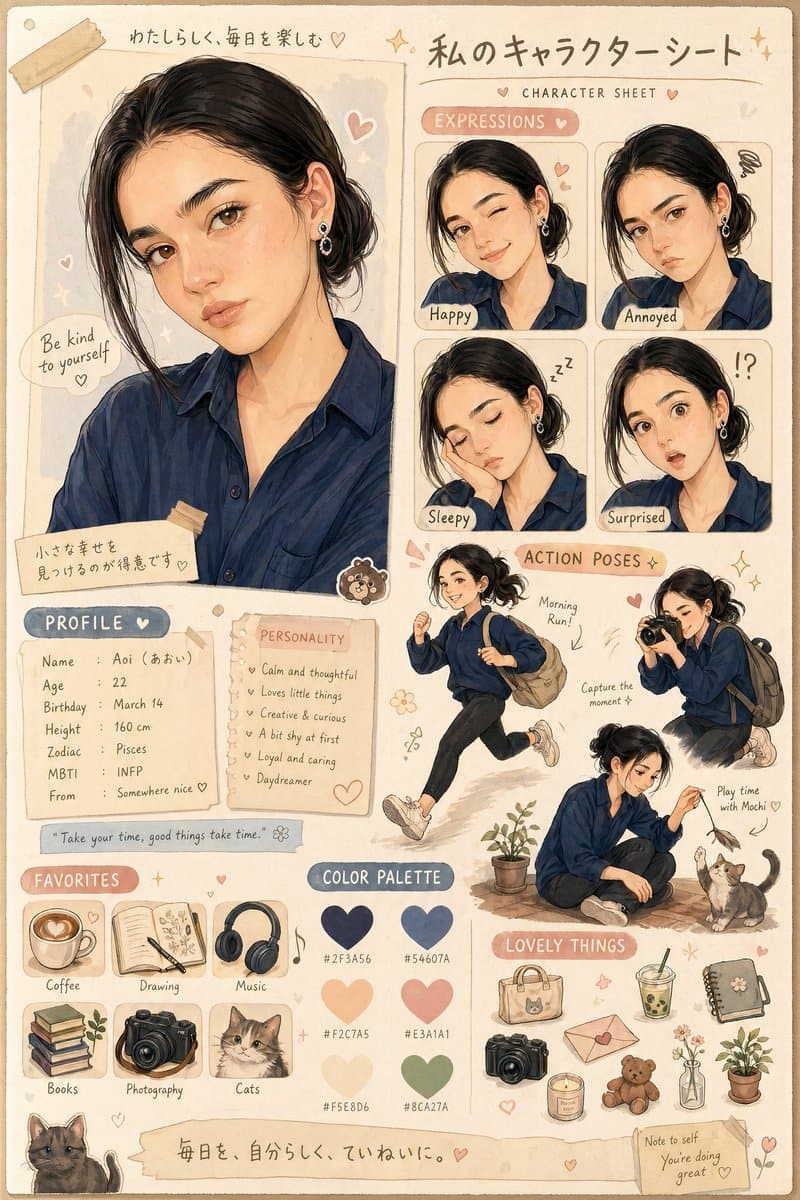
Perfect for YouTube channel mascots, Twitch emotes, Instagram story stickers, and personal brand building. Upload a portrait or profile photo and turn it into a character design sheet for VTuber profiles, avatars, and custom commissions.
Create an adorable character design sheet based on the uploaded image. Style: Warm, soft, and semi-realistic cartoon illustration with a cozy Japanese/kawaii style. Design: Character profile poster including: Large main portrait Various facial expressions (happy, annoyed, sleepy, surprised) Action poses (running, playing) (based on personality) Small object icons Color palette section Profile section with name and personality.
Best ChatGPT Portrait Editing Prompt Template
After analyzing all 10 portrait prompts above, we found they share a common structure. Use this template as a starting point for your own ChatGPT photo edits, professional headshots, profile photos, and AI portrait styles — just fill in the brackets with your details.
[Transform / Recreate / Create] the [subject] in/from the uploaded photo into a [style description]. Identity: Preserve the subject's [facial features, hairstyle, skin tone, clothing, pose] exactly as in the reference. Style: [Art style — e.g. vintage cartoon, oil pastel illustration, cinematic photography, mixed media collage]. Visual Details: - [Specific element 1 — e.g. thick black outlines, soft pastel tones, grunge textures] - [Specific element 2 — e.g. exaggerated expressions, film grain, handwritten doodles] - [Specific element 3 — e.g. layered collage, double exposure, blueprint linework] Color & Lighting: [Color palette / grading / lighting direction / atmosphere]. Composition: [Layout / camera angle / framing / aspect ratio]. Quality: Ultra-detailed, [cinematic / editorial / photorealistic], [8K / high resolution]. Negative Prompt: [List unwanted elements to avoid — e.g. distorted face, blurry, cartoon, oversaturated].
Frequently Asked Questions
What is a ChatGPT photo prompt?
A ChatGPT photo prompt is a short instruction that tells ChatGPT how to create, edit, or transform a photo. For portrait editing, strong prompts usually mention the uploaded portrait or selfie, identity preservation, face details, setting, camera style, lighting, composition, color mood, and constraints.
How to use these ChatGPT photo editing prompts?
Upload your portrait, selfie, profile photo, or pet photo to ChatGPT first. Then copy one of these ChatGPT photo editing prompts and paste it into ChatGPT to generate a new AI portrait style. You can also click the Generate Similar button on any prompt card to try a similar result for free on Oimi Canvas, then adjust the subject, camera style, lighting, aspect ratio, and output goal.
What is the best ChatGPT photo prompt for portraits?
The best ChatGPT photo prompt for portraits clearly says to use the uploaded portrait as the identity reference, preserve the face and hairstyle, then describe the target style such as professional headshot, profile photo, Polaroid collage, travel poster, or cinematic AI portrait.
Can ChatGPT create professional photos from a portrait?
Yes. A professional ChatGPT photo prompt can turn an uploaded portrait or selfie into a LinkedIn headshot, profile picture, editorial portrait, fashion photo, or branded social media image while preserving the person's identity.
What is the best ChatGPT photo editing prompt template?
A reliable ChatGPT portrait editing prompt template covers seven parts: Subject & Identity, Style, Visual Details, Color & Lighting, Composition, Quality, and Negative Prompt. See the full template at the end of this article for a copy-paste starting point.
How to write better ChatGPT photo editing prompts?
The portrait prompts in this article share a common structure: (1) Subject & Identity — define the uploaded portrait, selfie, or profile photo and what to preserve; (2) Style — specify an art style like professional headshot, vintage cartoon, Polaroid, oil pastel, or cinematic photography; (3) Visual Details — list concrete elements such as textures, outlines, or overlays; (4) Color & Lighting — set the palette, grading, and light direction; (5) Composition — describe layout, camera angle, framing, and aspect ratio; (6) Quality — add resolution and fidelity cues like "ultra-detailed, 8K"; (7) Negative Prompt — list unwanted elements to avoid.
Can ChatGPT photo prompts edit existing photos?
Yes. ChatGPT photo editing prompts can transform existing portraits, selfies, and profile photos into professional headshots, retro cartoons, scrapbook collages, fashion illustrations, travel posters, character design sheets, and more — covering background replacement, style transfer, portrait retouching, and creative reimagining.
Are these ChatGPT photo editing prompts free to use?
Yes. All 10 photo editing prompts in this article are free to copy and use. Click Generate on any prompt card to try it instantly on Oimi AI.
What types of photos work well with ChatGPT photo editing prompts?
ChatGPT photo editing prompts work well for clear selfies, portrait photos, pet photos, profile pictures, full-body fashion shots, and family travel photos. The examples here cover professional photo prompts, Polaroid-style collages, cinematic travel posters, fashion illustrations, greenhouse portraits, and Disney-style theme-park photos.
Try these ChatGPT portrait prompts now
Upload one portrait or selfie and instantly generate professional AI photo styles on Canvas...
Free Portrait Generator