
GPT Image 2 + Seedance 2 Workflow: Complete Guide from Storyboard to Video
GPT Image 2 + Seedance 2 Workflow is an AI creative process that first generates storyboards or keyframes using GPT Image 2, then transforms them into dynamic videos using Seedance 2. This combination significantly improves AI video stability and control, making it one of the most practical AI video creation methods today.
In 2026, the core of AI content creation is no longer "which model to choose," but: how to combine multiple models into a workflow.
More and more creators are using AI to produce short dramas, game cutscenes, tutorial videos, and brand advertisements. The latest releases of GPT Image 2 and Seedance 2 fully demonstrate this — AI-generated images and videos have become good enough for real creative scenarios.
You can still assemble a professional team to produce content, but AI now gives you a faster way to explore ideas and test concepts before investing significant time and budget into formal production.
One particularly practical and effective combination is: GPT Image 2 + Seedance 2.
Simply understood:
- GPT Image 2 → Responsible for generating high-quality visuals (keyframes / storyboards)
- Seedance 2 → Responsible for bringing visuals to life (video / motion / camera)
By combining both, you can go from a storyboard directly to a complete video — ads, short films, tutorials, game cutscenes, all apply.
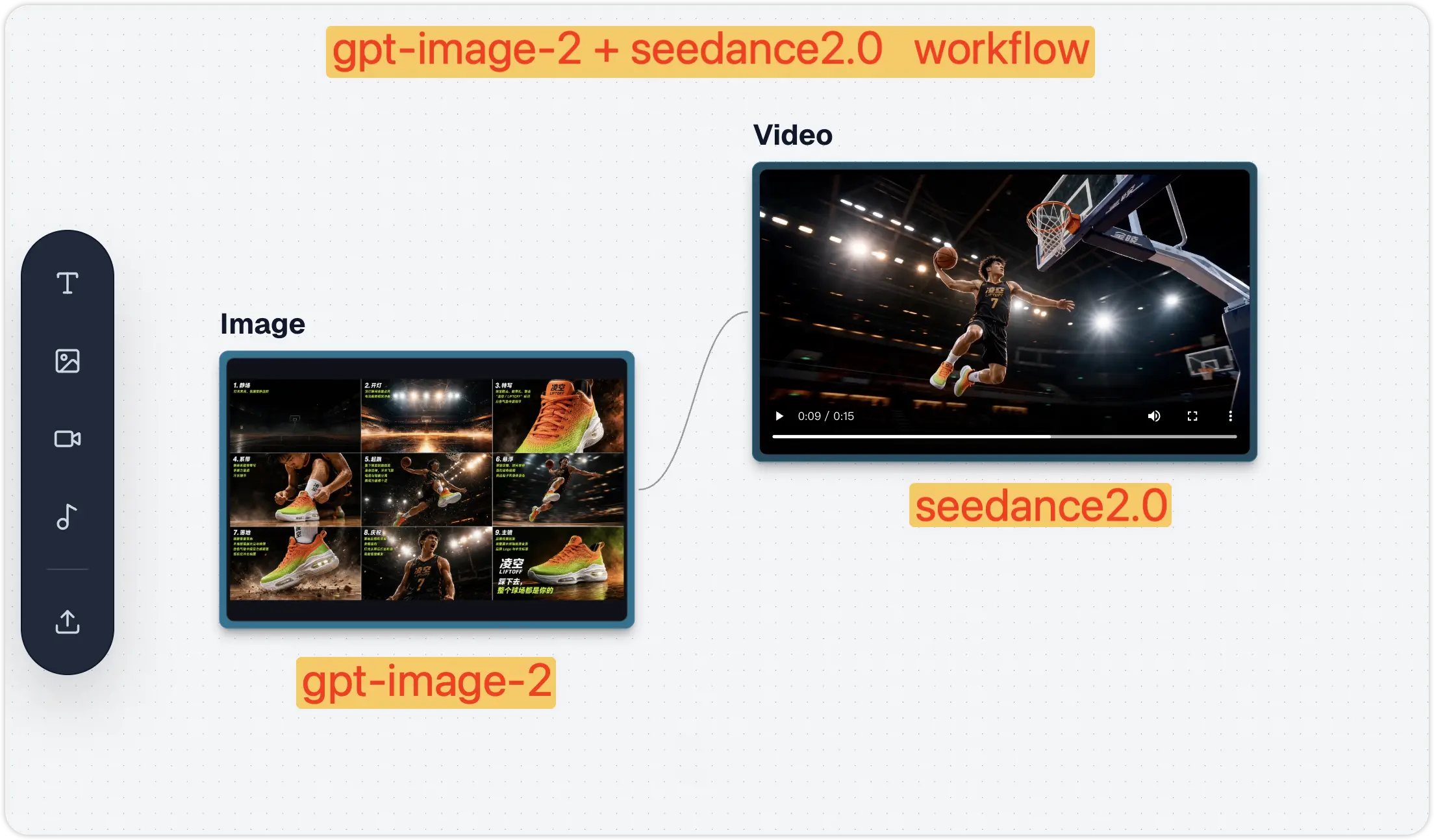
What Are GPT Image 2 and Seedance 2? New Capabilities Explained
GPT Image 2: Better Image Generation
GPT Image 2 is OpenAI's latest AI image generation model, with significant improvements over its predecessor:
- Clearer text in images — Perfect for posters, ads, thumbnails, and social media content
- More accurate prompt understanding — Better at following complex layout, style, and composition requirements
- More precise image editing — Can modify specific parts of an image without affecting the overall result
- Stronger design sense — Output suitable for brand marketing, game concept art, storyboard design, and more
- Better multilingual support — More reliable rendering of non-English text like Chinese and Japanese in images
Whether you're a marketer, indie game developer, short drama creator, or instructional designer, images generated by GPT Image 2 can be used directly as creative assets.
Seedance 2: More Powerful Video Generation
Seedance 2 is ByteDance's Doubao AI video generation model, ranked among the top globally on the Artificial Analysis Video Arena, and is currently the most creator-friendly video model:
- Better prompt following — More accurately understands detailed scene instructions
- Stronger character consistency — People, objects, and styles remain more stable between shots
- Smoother motion — Actions look more natural with less random jitter
- Better camera control — Supports pan, zoom, follow, and cinematic camera movements
- More realistic image-to-video — Reference images can be transformed into more believable motion scenes
- More realistic scenes — Lighting, physics, facial expressions, and details are cleaner
Why Is GPT Image 2 + Seedance 2 Better Than Using Either Alone?
Problems with using them separately:
| Tool | Problem |
|---|---|
| GPT Image 2 | Only generates images, cannot animate |
| Seedance 2 | Direct generation often results in "unstable visuals" and "character deformation" |
Combined Advantages
- More stable visuals — Use GPT Image 2 to define characters and style first, avoiding "face deformation" in videos
- More controllable storyboards — You can design each frame in advance, rather than letting the model generate randomly
- Higher video quality — Seedance only handles "motion," not "design" — clear division of labor yields better results
- More efficient creation — Quickly generate, test, modify, and compare different creative directions
The essence in one sentence: GPT Image 2 decides "what it looks like," Seedance 2 decides "how it moves".
GPT Image 2 + Seedance 2 vs Other AI Video Solutions
| Solution | Pros | Cons |
|---|---|---|
| Direct Seedance 2 generation | Fast, one-step process | Characters easily deform, visuals unstable |
| GPT Image 2 + Seedance 2 | Stable visuals, controllable camera, high quality | One extra storyboard generation step |
| Traditional video production | Most controllable | High cost, long cycle |
Case Study 1: Product Advertisement Video
Product advertisement short videos are the most direct marketing approach. More eye-catching than traditional ads and better suited for social media distribution, you can generate a complete advertisement video from a single storyboard.
Scene: Limited Edition Basketball Shoe Ad
Step 1: Generate Storyboard with GPT Image 2
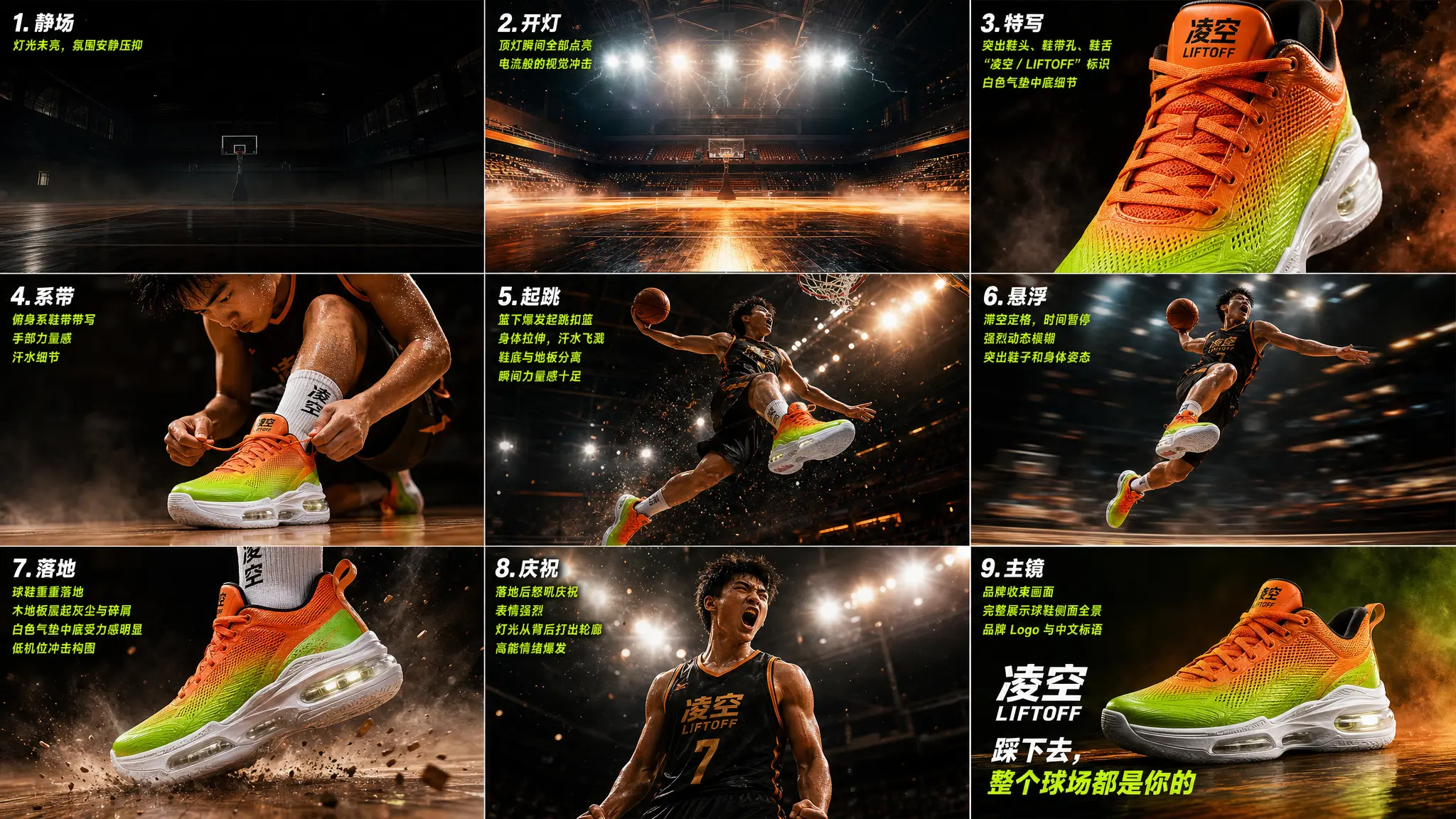
Create a limited-edition basketball shoe ad "Liftoff Edition" storyboard poster, landscape 16:9, 3 columns × 3 rows, 9 shots total. Brand name: Ling Kong English name: LIFTOFF Product: Limited colorway basketball shoe Subject: Teenage Asian athlete Tagline: "Hit the ground, the whole court is yours" Visual style: High-contrast sports feel, bright neon orange + electric green + pure white color scheme, court lighting, wooden hardwood floor texture, splashing sweat, explosive moments, motion blur, smoke atmosphere, spotlight lighting, Nike-level sports ad quality. The product is a high-top basketball shoe with fluorescent orange fading to electric green on the upper, white air-cushioned midsole, and "Ling Kong / LIFTOFF" on the tongue. 9 shots in sequence: Still (empty court, lights off) → Lights on (court lights instantly illuminate) → Close-up (shoe front close-up, air midsole details) → Lacing (athlete lacing up close-up) → Jump (athlete soaring for dunk) → Suspended (figure frozen mid-air, background motion blur) → Landing (shoe hits ground hard, dust rises from floor) → Celebration (athlete roaring after landing) → Hero (brand logo + tagline + shoe side profile panorama).
GPT Image 2 has strong prompt understanding — you just need to clearly describe brand, product, visual style, and shot sequence, and it can generate a complete storyboard poster.
Generated result:
Step 2: Generate Ad Video with Seedance 2
Transform this storyboard into a high-energy basketball shoe advertisement. Follow each storyboard shot in sequence: empty dark court with lights instantly turning on, shoe close-up showcasing air midsole details, athlete lacing up, explosive jump for dunk with frozen mid-air moment, background motion blur, shoe hitting ground hard with dust rising, athlete roaring in celebration, finally ending with brand logo + tagline + shoe side profile panorama. Fast-cut rhythm, high contrast, top-tier sports ad quality.
Final result: From a single storyboard to a complete advertisement video — this effect would traditionally require a professional team several days to produce.
Now you can accomplish it with one workflow using gpt-image-2 (storyboard) + seedance2.0 (image-to-video).
Run this workflow on Oimi Infinite Canvas now
Combine image, video, music, and text workflows seamlessly in a single creative space.
Try NowCase Study 2: Cinematic Short Film — Storyboard Deep Dive
This time, generating a 15-second cinematic short: a medieval market at dusk, camera moving through the crowd, finally gliding into a tavern where it lands on a silent armored knight in the corner.
The first attempt used the conventional approach — a single image + prompt to directly generate video with Seedance 2. After 5 attempts, each fell short: chaotic crowd movements, illogical camera transitions, wagon obstruction cuts lost, tavern door opening at the wrong moment.
The second attempt changed approach — first used GPT Image 2 to generate a storyboard with timeline, annotating all 12 shots with their timing and camera movement motivations, then fed it to Seedance 2. Success on the first try.
Step 1: Generate Storyboard with GPT Image 2
Create a storyboard for a cinematic medieval market sequence in a rough graphite storyboard sketch style. The storyboard should feel like a professional film pre-visualization sheet with 12 panels, each panel containing camera direction notes, lens information, motion arrows, and cinematic staging. Use monochrome pencil shading with gritty texture, realistic medieval architecture, wet cobblestone streets, crowds, horses, carts, banners, taverns, and atmospheric lighting. The pacing should feel immersive and cinematic, beginning with slow observational shots before escalating into energetic tracking movement through the crowded marketplace. The camera should constantly redirect focus through foreground interruptions, moving objects, banners, and crowd motion to create natural cinematic transitions. The sequence should follow this structure: 1. Street-level close-up, 50mm — slow drift. A young medieval woman exchanges apples with a market vendor. Busy crowd behind them. 2. Medium close-up, 50mm — slight push-in. Hands exchanging coins and fruit while background pedestrians pass. 3. Foreground interruption, 35mm — sudden lateral catch. A horse rapidly crosses frame, briefly obscuring the scene. 4. Medium tracking shot, 35mm — camera redirects and follows a wooden cart moving through the muddy market street. 5. Low tracking shot, 28mm — slight handheld drift beside the cart wheels splashing through puddles. 6. Forward tracking, 28mm — camera continues moving through hanging banners and dense crowd traffic. 7. Partial occlusion reveal, 35mm — a cloth banner sweeps across frame, revealing chickens scattering through the street. 8. Medium shot, 35mm — focus redirects onto a running street child weaving through chickens and pedestrians. 9. Tracking shot, 28mm — weaving camera movement following the child deeper into the marketplace. 10. Tavern approach, 35mm — slight push toward a dim medieval tavern entrance as the child runs inside. 11. Transition shot, 35mm — focus handoff. Tavern door swings open revealing a rugged armored warrior inside. 12. Interior reveal, 35mm — smooth inward glide. A tired medieval knight sits alone at a wooden tavern table beside a massive sword, lit by warm candlelight and atmospheric smoke. The overall cinematic language should resemble high-end fantasy film storyboards used for production planning. Include handwritten technical annotations above every panel, motion arrows at the bottom of each frame, lens focal lengths, and subtle camera operation terminology like "tracking," "push-in," "redirect," "focus handoff," and "foreground interruption." The visual style should remain loose, expressive, and sketch-like rather than polished illustration.
Note the writing style of this prompt — it doesn't just describe the visuals, but specifies the "motivation" for transitions between each shot:
Wagon crossing → Camera follows wagon → Banner swinging → Reveals scattering chickens → Boy chasing chickens → Running past tavern door → Camera glides into tavern
Every transition is driven by scene action, no hard cuts.
Step 2: Generate Cinematic Video with Seedance 2
FORMAT cinematic continuous shot / motivated camera movement / 15s SCENE A crowded medieval market street inside a stone city at dusk. Narrow cobblestone road, wooden stalls, hanging banners, livestock moving through the crowd. Warm torchlight reflects on damp stones while light mist drifts between buildings. CAMERA CONCEPT A continuous motivated camera move where each new moving subject entering the frame redirects the camera's attention. Every motion naturally hands the focus to the next subject. SEQUENCE 0:00–0:03 Close street-level view of a market stall. CAMERA FOCUS: a woman bargaining with a merchant while selecting fruit from a wooden basket. She hands coins to the merchant. 0:03–0:05 A horse pulling a heavy wooden cart suddenly crosses the foreground from the opposite direction, briefly blocking the frame. CAMERA SHIFT: the camera catches the cart and begins tracking it as it moves through the market. 0:05–0:07 The cart squeezes between stalls and brushes past a hanging banner. The banner swings violently across the frame. CAMERA SHIFT: as the banner clears the view it reveals chickens scattering across the cobblestone street. 0:07–0:09 A street boy runs after the escaping chickens, chasing them through the crowd. CAMERA SHIFT: the camera begins following the boy as he runs between villagers. 0:09–0:12 The boy rushes past a tavern entrance and disappears into the crowd. CAMERA SHIFT: the tavern door suddenly swings open as someone exits. 0:12–0:15 The camera glides through the open doorway into the dim tavern interior. Lantern light flickers across wooden tables and drifting smoke. CAMERA FINAL FOCUS: a lone armored knight sitting quietly at a corner table, a massive sword leaning beside the bench as the knight slowly lifts his gaze. STYLE Layered medieval street life, natural crowd choreography, continuous motivated camera movement. LIGHTING Warm torchlight outside, dim lantern glow inside the tavern, smoke and dust catching the light. QUALITY Photorealistic, cinematic lighting, grounded camera motion, rich medieval atmosphere, highly detailed.
The same creative concept, dramatically different results:
| Comparison | Single Image Generation | Storyboard Generation |
|---|---|---|
| Attempts needed | 5+ attempts | 1 success |
| Shot transitions | Random jump cuts | Every transition has natural motivation |
| Narrative completeness | Scene elements lost | All 12 shots reproduced |
| Camera continuity | Camera moves randomly | Every camera move has motivation |
Why Is the Storyboard the Key to Seedance 2 Success?
Why such a huge difference between single image and storyboard? Because a single image doesn't contain enough information for the video model to understand your complete intent — you have the camera sequence, angles, and narrative rhythm in your head, but a single image can't express all of this. The storyboard encodes everything into one image, and Seedance 2 understands it immediately.
Core Technique: "Motivated Continuous Camera Movement"
This technique comes from film director Spielberg's camera philosophy — every camera movement must have "motivation" (Motivated Camera Move). The camera doesn't move randomly; it naturally shifts attention following scene actions: camera follows the wagon when it crosses, banner reveals scattering chickens, camera naturally glides into the tavern as boy runs past the door.
Annotating each camera direction and motivation in the storyboard allows Seedance 2 to precisely execute your desired camera language.
Final result: A 15-second cinematic short with complete narrative rhythm — from a lively market to a quiet tavern, every camera transition has natural scene motivation, delivering a viewing experience far beyond randomly generated camera movements. This is the power of storyboards — transforming video generation from "rolling the dice" to "precise control."
GPT Image 2 + Seedance 2 Standard Workflow (4 Steps)
Looking back at the cases above, you'll notice both follow the same workflow, only differing in storyboard detail level:
| Step | Case 1: Basketball Shoe Ad | Case 2: Medieval Short |
|---|---|---|
| ① Define visuals | Brand, product, visual style, 9-shot sequence | Scene, camera concept, 6 shots + timeline |
| ② Generate storyboard | GPT Image 2 generates 3×3 storyboard poster | GPT Image 2 generates storyboard with timeline |
| ③ Generate video | Seedance 2 fast-cut ad | Seedance 2 motivated continuous camera movement |
| ④ Iterate and refine | Check brand text, product details | Check transition motivation, shot continuity |
Prompt Writing Key Points
Key prompt writing differences summarized from the cases:
- Image prompts (GPT Image 2) → The more detailed the better. Case 1 described brand name, colors, 9 shot descriptions; Case 2 described timeline, camera concept, transition motivation for each shot. GPT Image 2 has strong understanding, don't worry about over-describing
- Video prompts (Seedance 2) → Keep action and camera clear. No need to repeat visual details (storyboard already contains them), focus on how to move: camera direction, motion rhythm, transition logic
What Other Scenarios Does This Workflow Suit?
Case 1 was a product ad, Case 2 was a cinematic short. The same workflow also applies to:
- Game CG / Cutscenes — The strongest tool for indie games and studios: Use GPT Image 2 to generate multi-angle character sheets, scene concept art, and cutscene storyboards, Seedance 2 directly generates CG cutscenes. Boss appearances, skill releases, plot twists — no need for outsourced animation teams, one person can handle it
- AI Short Drama / Webtoon Video — Use Case 2's motivated camera movement technique for continuous storytelling: Have GPT Image 2 generate storyboards for each episode (character confrontations, chases, plot twists), character appearance locked at storyboard stage, Seedance 2 handles each shot. 30-60 seconds per episode, low cost batch production
- Sports Training Videos — Tennis serve breakdown, basketball three-step layup, yoga pose transitions... Use GPT Image 2 to generate standard action storyboards (front + side multi-angle), Seedance 2 generates slow-motion demo videos. 100x faster than hand-drawn storyboards, coaches can directly use for teaching materials
- UGC Affiliate Videos — Use Case 1's approach with handheld feel, natural lighting, conversational scenes
- Brand Logo Animation — Upload logo, have GPT Image 2 generate animation storyboard (annotating motion arrows, glow effects, transition directions), then use Seedance 2 to generate animation
- Food / Travel Vlogs — GPT Image 2 generates "plate close-up → knife cutting → steam rising → first bite" food storyboard, Seedance 2 brings static food to life with documentary quality
- Real Estate / Interior Design Walkthroughs — GPT Image 2 generates different angle interior renderings, Seedance 2 generates continuous walkthrough videos from living room to balcony, far more persuasive than static renderings
- Creative A/B Testing — For the same product, generate multiple different style storyboards, quickly compare which direction has better results
GPT Image 2 + Seedance 2 FAQ
Why do characters deform?
Reason: Direct video generation without "keyframe constraints," model lacks stable character reference. Case 1's approach was to first use GPT Image 2 to lock character appearance in the storyboard, then hand off to Seedance 2.
What if Seedance generation is unstable?
Based on Case 2's experience, the core issue is insufficient information. Recommendations:
- Use storyboards instead of single images — Case 2 proved storyboards have far higher first-try success rate than single images
- Annotate camera movement motivation — Tell the model why the camera moves, not just "camera move"
- Specify motion direction and speed in prompts (e.g.: camera slowly pushes in)
- Iterate multiple times, fine-tuning prompts each iteration
Should I use English or Chinese prompts first?
GPT Image 2 and Seedance 2 have more accurate understanding of English prompts, typically yielding better results. If you pursue the best results, write prompts in English first, then adjust as needed.
GPT Image 2 + Seedance 2 Advanced Tips
- Storyboards are more powerful than keyframes — Case 2 proved that storyboards with timeline and camera motivation work far better than single keyframes. Don't just use one image, create at least a 3-panel storyboard
- Specify "motivation" for transitions — Don't say "pan camera," say "wagon crosses frame, camera follows wagon" (see Case 2). Scene-action-driven camera movement looks much more natural than random movement
- Static first, then motion — Perfect the storyboard first, then add animation. Visual quality determines video quality ceiling (Case 1's storyboard poster spent time perfecting the visuals first)
- Iterate multiple times — Both Case 1 and Case 2 were results after iteration. Generate first, check results, modify prompts, generate again — AI's advantage is rapid iteration, don't expect perfection on the first try
Is GPT Image 2 + Seedance 2 the Strongest AI Video Workflow Currently?
The strongest AI creative approach isn't a single tool, but a workflow.
In this combination:
- GPT Image 2 → Handles visuals (keyframes / storyboards / concept art)
- Seedance 2 → Handles motion (video / action / camera)
Combined, you can quickly produce product ads, cinematic shorts, game CG cutscenes, AI short dramas, sports training videos, and more. You don't need to lock into one creative direction from the start — you can quickly generate, test, modify, and compare different creative directions, much faster than traditional production workflows.
This is the true value of AI for creation: not just helping you produce content faster, but helping you explore more creative possibilities before investing significant time and budget.
Experience GPT Image 2 + Seedance 2 Workflow Now
Combine image, video, music, and text workflows seamlessly in a single creative space.
Try Now